
12 Best Shipping Plugins for WooCommerce (2026): Free, Multi-Carrier & Advanced Rules Compared
The best shipping plugin for WooCommerce is the one that fits your store’s shipping logic and fulfillment complexity. WooCommerce’s default options work for simple setups, but they become limiting when you need flexible rates, carrier-based pricing, or scalable fulfillment.
In this article, we break down 12 best WooCommerce shipping plugins by real use cases, including:
- Flat-rate, weight-based, and conditional shipping rules
- Multi-carrier shipping and live rate calculation
- Label printing, bulk processing, and automation
- Tracking and post-purchase experience
We then show how to choose and configure the right plugins so your WooCommerce shipping setup stays reliable as order volume increases.
Why Use a Shipping Plugin for WooCommerce
WooCommerce includes basic shipping settings, but they are designed for simple stores with minimal shipping logic. Once a store needs weight-based pricing, free shipping thresholds, conditional rules, or different rates by product or region, the default setup quickly becomes limiting.
Shipping plugins also address a key operational issue: manual fulfillment does not scale. Features such as automated rate calculation, label printing, and bulk processing reduce handling time and minimize errors as order volume grows.
From the customer’s perspective, shipping plugins improve checkout clarity. Accurate and flexible shipping options help set expectations, reduce cart abandonment, and build trust, especially when multiple delivery methods are offered.
As a WooCommerce store grows, shipping complexity increases. Using a dedicated shipping plugin allows merchants to expand shipping logic and fulfillment workflows without rebuilding checkout or changing platforms, making it a core component of a scalable WooCommerce setup.
How We Evaluated WooCommerce Shipping Plugins
To compare WooCommerce shipping plugins fairly, we focused on practical performance rather than feature lists. Each plugin was evaluated based on how well it handles real shipping requirements across different store sizes and fulfillment scenarios.
Evaluation criteria:
- Shipping rate logic: Support for flat rates, weight-based pricing, cart value thresholds, and table rate rules, including how flexible and predictable those calculations are.
- Multi-carrier support: Ability to work with one or multiple carriers, provide real-time rates, and offer fallback options when a carrier is unavailable.
- Label printing and fulfillment workflow: Whether the plugin supports label creation, bulk processing, and a streamlined order-to-shipment flow.
- Checkout performance impact: How rate calculation affects checkout speed, clarity of options, and overall customer experience.
- Scalability: How well the plugin performs as order volume grows from roughly 100 to 10,000+ orders per month.
- Compatibility with modern WooCommerce setups: Stability with current WooCommerce versions, themes, checkout blocks, and common performance or caching configurations.
This framework ensures each plugin is assessed not just on features, but on how well it supports a reliable, scalable WooCommerce shipping setup. And if you’re in a hurry, here’s our quick picks of the best shipping plugin for WooCommerce:
| Plugin | Price | Best for | Key strength |
| WooCommerce Shipping & Tax | Free + pay-per-label | Small US stores | Native USPS rates & labels |
| Flexible Shipping | Free / ~$99+ | Rule-based pricing | Advanced table & condition logic |
| Shippo for WooCommerce | Free + usage | Scalable fulfillment | 40+ carriers, labels & tracking |
| WooCommerce Advanced Shipping | Free / $23 | Conditional shipping | Highly flexible rule engine |
| AfterShip | Free / ~$11+ | Post-purchase UX | Tracking, notifications, analytics |
Now, let’s get in detailed!
12 Best Shipping Plugins for WooCommerce
This list of the 12 best shipping plugins for WooCommerce covers everything from simple shipping rules to real-time carrier rates, label printing, and tracking, so you can choose the right setup without adding unnecessary plugins.
1. WooCommerce Shipping & Tax
WooCommerce Shipping & Tax is the official shipping and tax solution maintained by the WooCommerce team.
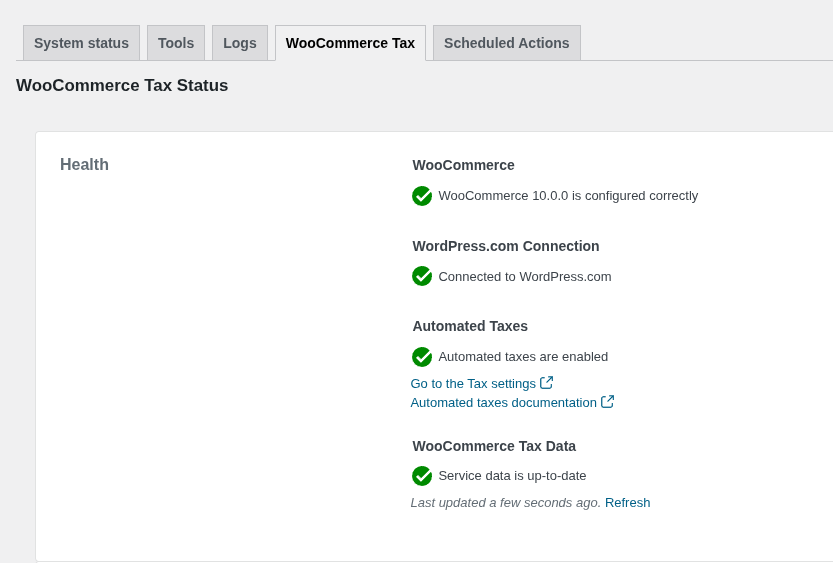
It is designed to help small stores get started quickly with basic shipping and tax requirements, especially for merchants shipping within the United States who want live USPS rates and in-dashboard label printing without relying on third-party platforms.
| Price | Core shipping features we like | Key limitations to know |
| Free plugin Pay-per-label shipping costs (USPS rates) No paid tier; functionality is capped by design | • Live USPS shipping rates displayed at checkout • Built-in shipping label printing directly from WooCommerce • Automatic tax calculation when connected to WordPress.com • Native integration maintained by the WooCommerce team | • No table rate, weight-based, or conditional shipping rules • Limited multi-carrier support compared to dedicated shipping platforms • Requires a WordPress.com account connection • Not designed for high-volume or complex shipping setups |
WooCommerce Shipping & Tax is a reliable entry-level option for simple WooCommerce stores, but it is not built to handle advanced shipping rules, multiple carriers, or high-volume fulfillment as a store grows.
2. ELEX USPS Shipping Plugin (Free Version)
ELEX WooCommerce USPS Shipping Method is a carrier-specific shipping plugin designed for WooCommerce stores that rely on USPS for both domestic and international deliveries.
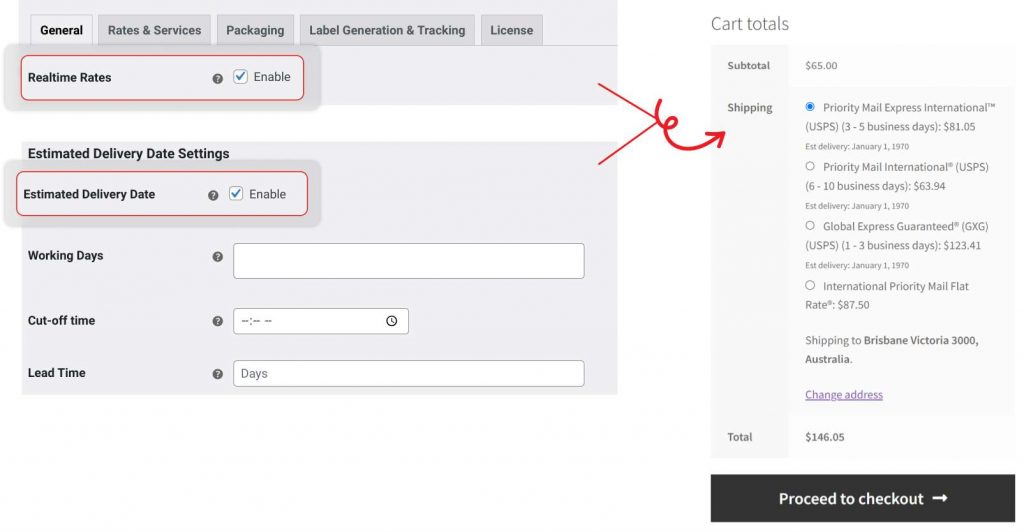
The free version focuses on displaying real-time USPS rates at checkout based on cart and destination data, making it suitable for stores that want more USPS control than WooCommerce’s default shipping options.
| Price | Core shipping features we like | Key limitations to know |
| Free plugin Premium version available (separate upgrade) | • Live USPS shipping rates at cart and checkout • Supports both domestic and international USPS services • Estimated delivery days shown with shipping rates • Rate calculation based on shipping address and cart content | • No shipping label printing in the free version • Advanced automation and tracking require paid upgrade• Limited to USPS (no multi-carrier support) • Not suitable for complex shipping rules or large catalogs |
The free ELEX USPS Shipping Plugin is a strong choice for USPS-only WooCommerce stores that need accurate real-time rates, but it quickly becomes limiting if you require label printing, automation, or multi-carrier shipping.
3. Flat Rate / Conditional Shipping for WooCommerce
Advanced Free Flat Rate Shipping for WooCommerce is a rule-based shipping plugin built for WooCommerce stores that need conditional flat-rate shipping without using carrier APIs.
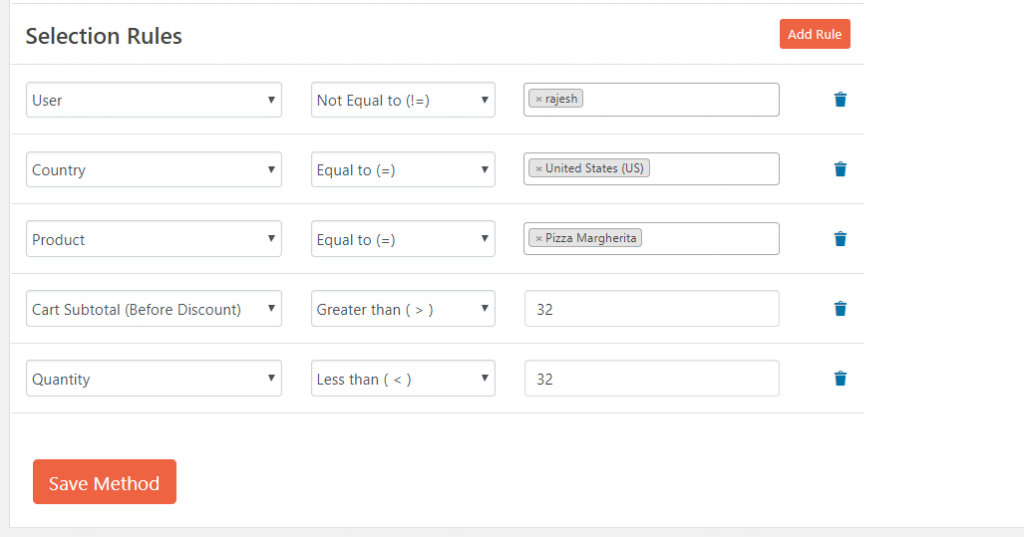
It is designed for merchants who want precise control over when shipping methods appear at checkout based on cart conditions rather than real-time carrier rates.
| Price | Core shipping features we like | Key limitations to know |
| Free plugin Pro version: $34-$79 | • Conditional flat-rate shipping rules based on cart conditions • Rules based on cart total, quantity, weight, products, and shipping classes • Ability to show or hide shipping methods dynamically at checkout • Lightweight setup with no external API dependencies | • No real-time carrier rates • No shipping label printing • Carrier-based pricing not supported • Advanced rule combinations require the Pro version |
Flat Rate / Conditional Shipping for WooCommerce is a practical solution for stores that need rule-driven flat rates, but it is not suitable for real-time carrier pricing, fulfillment automation, or multi-carrier shipping setups.
4. ShipStation for WooCommerce
ShipStation is a full-scale shipping and fulfillment platform built for WooCommerce stores that handle high order volumes, multiple carriers, and multi-channel sales.
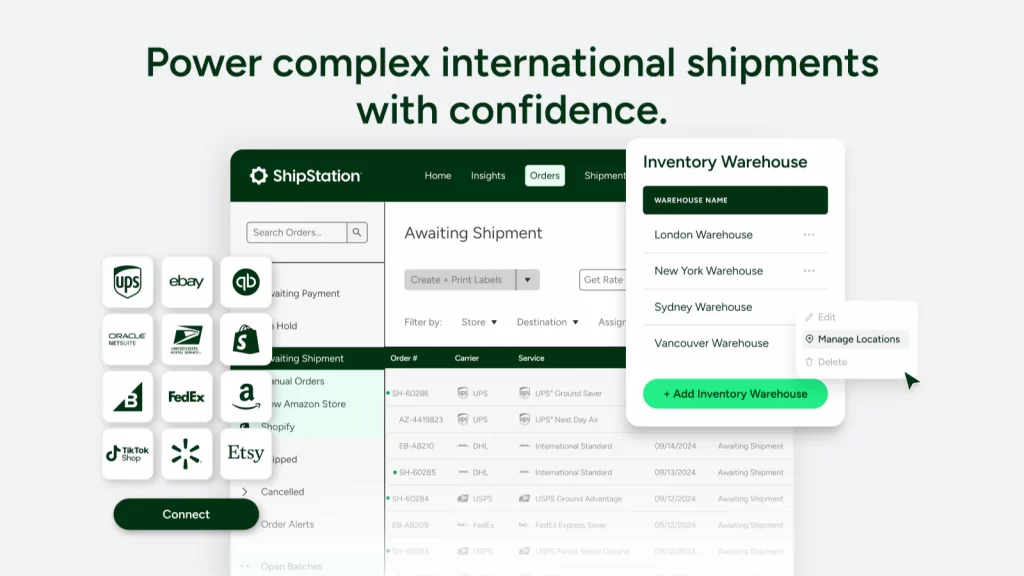
The WooCommerce extension connects your store to ShipStation’s dashboard, where orders, labels, returns, and tracking are managed centrally rather than inside WooCommerce itself.
| Price | Core shipping features we like | Key limitations to know |
| Free plan: $0/month (up to 10 shipments) Starter: $14.99/month Standard: $29.99/month Premium: $349.99/month | • Centralized order and shipment management dashboard • Discounted shipping rates from major carriers • Bulk label printing and batch fulfillment • Multi-carrier support with rate comparison • Automation rules for shipping, tagging, and routing | • Requires a paid ShipStation subscription • Not managed directly inside WooCommerce • Can be overkill for low-volume stores • Pricing increases quickly as volume scales • Setup and workflow complexity for beginners |
ShipStation for WooCommerce is best suited for growing and high-volume stores that need carrier flexibility and fulfillment automation, but it is unnecessary for small stores with simple shipping requirements.
5. Shippo
Shippo is a multi-carrier shipping platform designed for WooCommerce stores that want discounted carrier rates, fast label creation, and simple automation without managing complex fulfillment software.
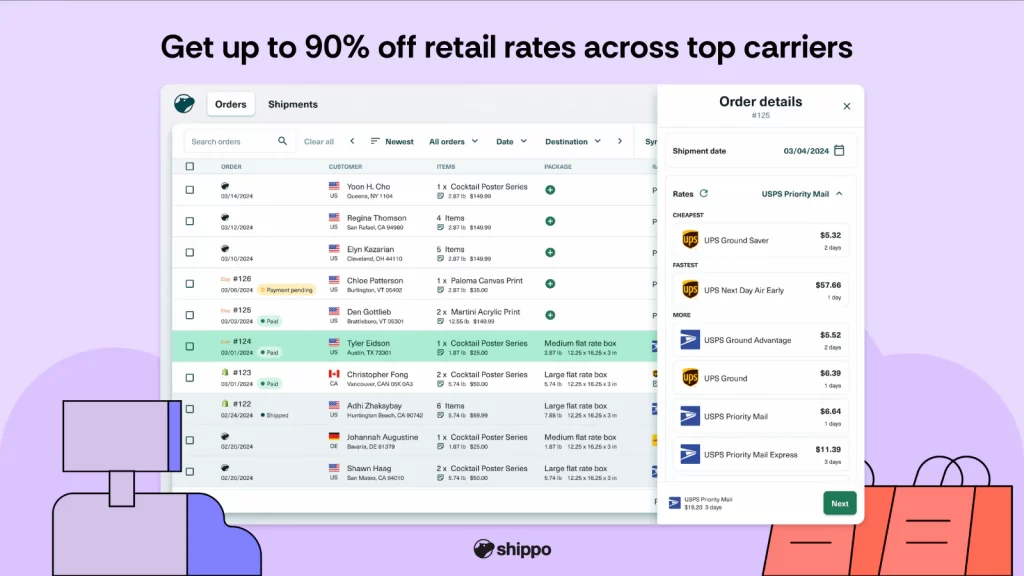
It sits between basic shipping plugins and enterprise tools, making it a popular option for small to mid-sized stores that ship regularly across multiple carriers.
| Price | Core shipping features we like | Key limitations to know |
| Starter: Free Pay-as-you-go per label Pro: $17/month Premier: Contact sales | • Multi-carrier shipping rates (USPS, UPS, FedEx, DHL, and others) • Discounted shipping rates compared to retail carrier pricing • Bulk label printing and batch processing • Automatic tracking sync back to WooCommerce | • Pay-per-label costs apply on all plans • Limited automation in the free plan • Advanced workflows are lighter than enterprise tools • Not designed for complex warehouse or multi-location fulfillment |
Shippo is a strong middle-ground solution for WooCommerce stores that want multi-carrier flexibility and discounted rates without the overhead of a full fulfillment platform, but it is not ideal for highly complex or enterprise-scale shipping operations.
6. WooCommerce Shipping Services by PluginHive
PluginHive WooCommerce Shipping Services is a multi-carrier shipping solution for WooCommerce stores that need live carrier rates, label printing, and tracking updates directly inside the WooCommerce dashboard.
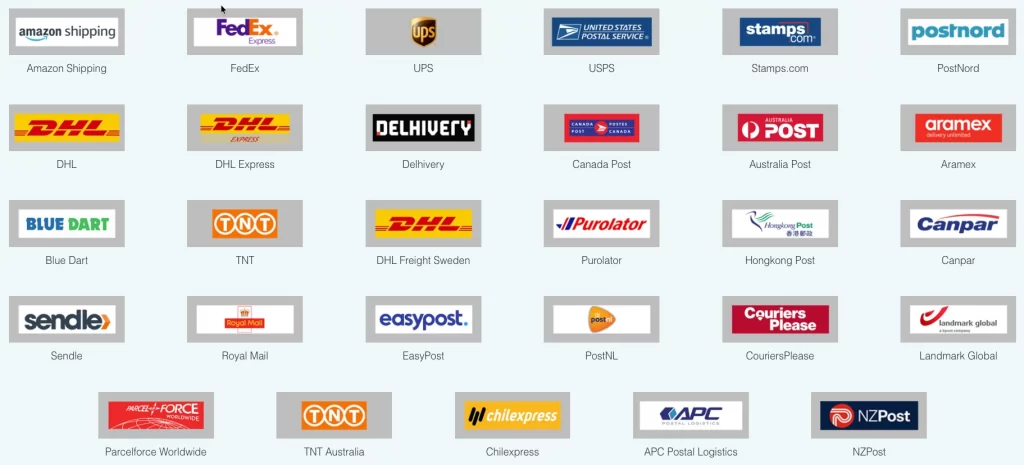
It is built for stores with recurring shipping volume that want predictable, subscription-based pricing instead of pay-per-label fees.
| Price | Core shipping features we like | Key limitations to know |
| From $9/month (100 orders/labels) Most stores: $29/month (1,000 orders/labels) High volume: $99/month (15,000 orders/labels) | • Live carrier rates and tracking updates • Supports all major carriers • Multi-vendor shipping support • Lower cost per order vs monthly | • Order/label limits apply • API request limits per plan • Requires carrier accounts • Must estimate volume in advance |
WooCommerce Shipping Services by PluginHive is a good fit for stores with steady shipping volume that want carrier-level features inside WooCommerce, but it requires choosing the right plan to avoid hitting order or API limits.
7. ELEX ShipEngine UPS & FedEx Shipping Method
ELEX ShipEngine is a carrier-based shipping plugin for WooCommerce that uses ShipEngine APIs to display real-time UPS and FedEx shipping rates at checkout.
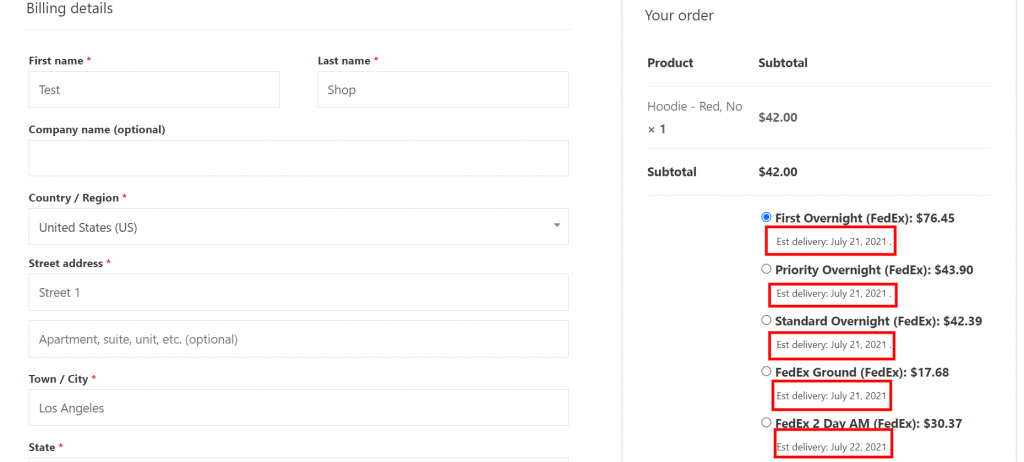
It is built for stores that ship primarily with UPS or FedEx and want accurate, address-based pricing without running a full shipping platform.
| Price | Core shipping features we like | Key limitations to know |
| Free plugin Premium add-on required Paid plans vary by feature set | • Live UPS & FedEx shipping rates at checkout • Supports residential & commercial rate calculation • Service-level selection (Ground, Express, etc.) • Lightweight carrier-specific setup | • No label printing in free version • Requires ShipEngine account • Limited to UPS & FedEx only • No multi-carrier comparison |
ELEX ShipEngine UPS & FedEx Shipping Method is best for stores that rely on UPS or FedEx exclusively and want real-time rates at checkout, but it is not suitable for multi-carrier workflows, fulfillment automation, or label management on its own.
8. PluginHive Carrier-Specific Shipping Plugins
PluginHive Carrier-Specific Shipping Plugins are designed for WooCommerce stores that want deep, carrier-level integration for a single shipping provider such as UPS, FedEx, USPS, DHL, or regional carriers.
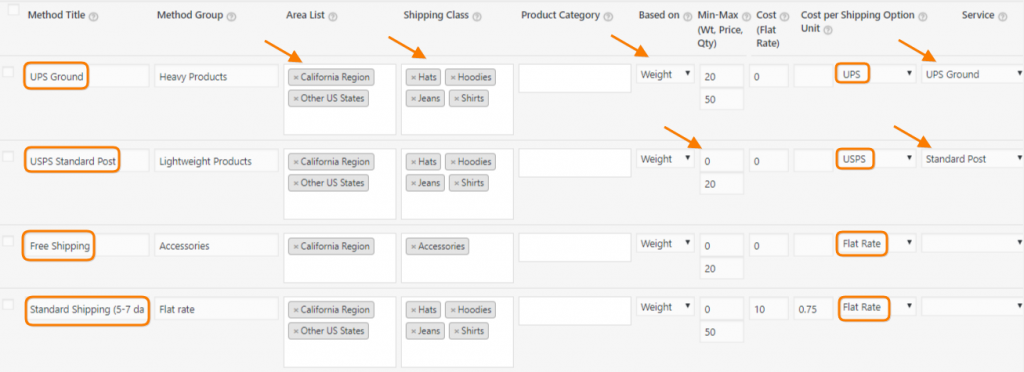
Unlike multi-carrier platforms, each plugin focuses on one carrier to provide more accurate rates, services, and shipping options.
| Price | Core shipping features we like | Key limitations to know |
| Paid plugin (varies by carrier) From ~$69/year (per carrier) Yearly licensing model | • Real-time shipping rates for a single carrier • Full service-level support (Ground, Express, International) • Shipping label printing from WooCommerce • Accurate carrier-specific rules and options | • Each carrier requires a separate plugin • No multi-carrier rate comparison • Costs add up if you use multiple carriers • More setup than platform-based tools |
PluginHive carrier-specific shipping plugins are ideal for stores that rely heavily on one carrier and need accurate, service-level shipping control, but they become expensive and harder to manage if multiple carriers are required.
9. Table Rate Shipping for WooCommerce
Table Rate Shipping for WooCommerce is a rule-based shipping plugin that lets WooCommerce stores calculate shipping costs using tables instead of carrier APIs.
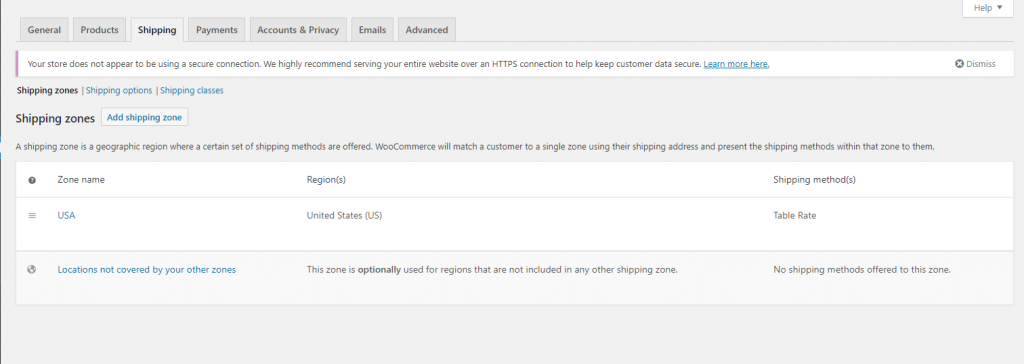
It is built for merchants who need flexible pricing based on weight, cart total, quantity, or destination, without relying on real-time carrier rates.
| Price (brief) | Core shipping features we like | Key limitations to know |
| Free plugin Pro license: from $79/year | • Table-based shipping rules by weight, price, or quantity • Supports shipping by country, state, or ZIP/postcode • Unlimited shipping rules and methods • Works natively with WooCommerce shipping zones | • No real-time carrier rates • No shipping label printing • Rule-based only (not carrier-based) • Advanced logic requires manual setup |
Table Rate Shipping for WooCommerce is ideal for stores that need precise, rule-driven shipping costs, but it is not suitable for carrier-based pricing, automatic labels, or fulfillment automation.
10. Octolize Flexible Shipping
Octolize Flexible Shipping is a rule-based WooCommerce shipping plugin focused on table rate, weight-based, and condition-driven pricing.
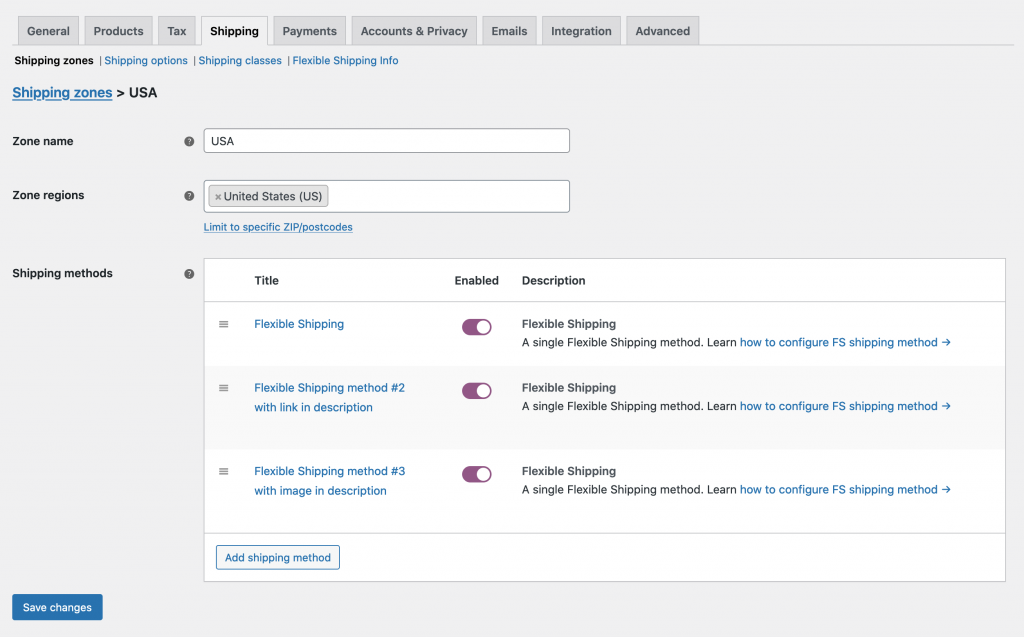
It is designed for stores that need more flexible logic than basic table rate plugins, without relying on live carrier APIs.
| Price | Core shipping features we like | Key limitations to know |
| Free plugin PRO pricing: from ~$99/year | • Weight-based and cart total–based shipping rules • Advanced conditions (products, shipping classes, zones) • Highly granular rule logic compared to basic table rate plugins • Deep integration with WooCommerce shipping zones | • No real-time carrier rates • No label printing or fulfillment tools • Rule setup can be complex for beginners • Not suitable for carrier-based pricing |
Octolize Flexible Shipping is best for stores that need advanced, rule-driven shipping logic, but it is not intended for real-time carrier rates, shipping labels, or automated fulfillment.
11. WooCommerce Advanced Shipping
WooCommerce Advanced Shipping is a condition-based WooCommerce shipping plugin that focuses on advanced free shipping rules rather than table rates or carrier pricing.
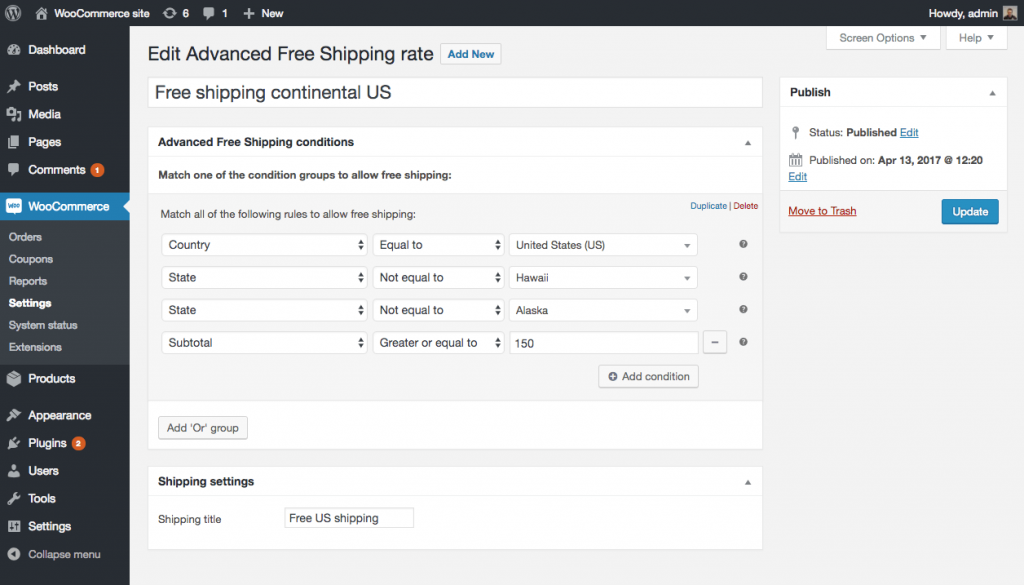
It allows store owners to control when free shipping appears using flexible logic such as cart value, weight, quantity, user role, and location.
| Price | Core shipping features we like | Key limitations to know |
| Free plugin | • Advanced free shipping conditions (subtotal, quantity, weight, country, ZIP, user role) • Supports AND / OR conditional logic • Deep integration with WooCommerce shipping zones • Lightweight and focused on rule logic | • Free shipping rules only (no paid shipping rates) • No table-rate or weight-based pricing calculations • No real-time carrier rates or label printing • Not suitable for complex multi-rate setups |
WooCommerce Advanced Shipping is best for stores that want precise control over free shipping eligibility, but it is not designed for paid shipping rules, carrier-based pricing, or fulfillment workflows.
12. AfterShip (Tracking & Post-Purchase Experience)
AfterShip is a WooCommerce tracking and post-purchase experience plugin focused on shipment tracking, customer notifications, and branded order status pages, rather than shipping rate calculation. It helps stores improve delivery visibility and customer communication after checkout.
| Price | Core shipping features we like | Key limitations to know |
| Free plan available Paid plans: from ~$11/month | • Automatic shipment tracking across 900+ carriers • Branded tracking pages and delivery notifications • Tracking updates via email, SMS, and webhooks • Analytics on shipping performance and delivery issues | • Does not calculate shipping rates • No checkout or pricing logic control • Label printing requires carrier or third-party tools • Costs increase with shipment volume |
AfterShip is best for stores that want a stronger post-purchase experience and shipment visibility, but it is not a shipping rate, table-rate, or carrier pricing solution.
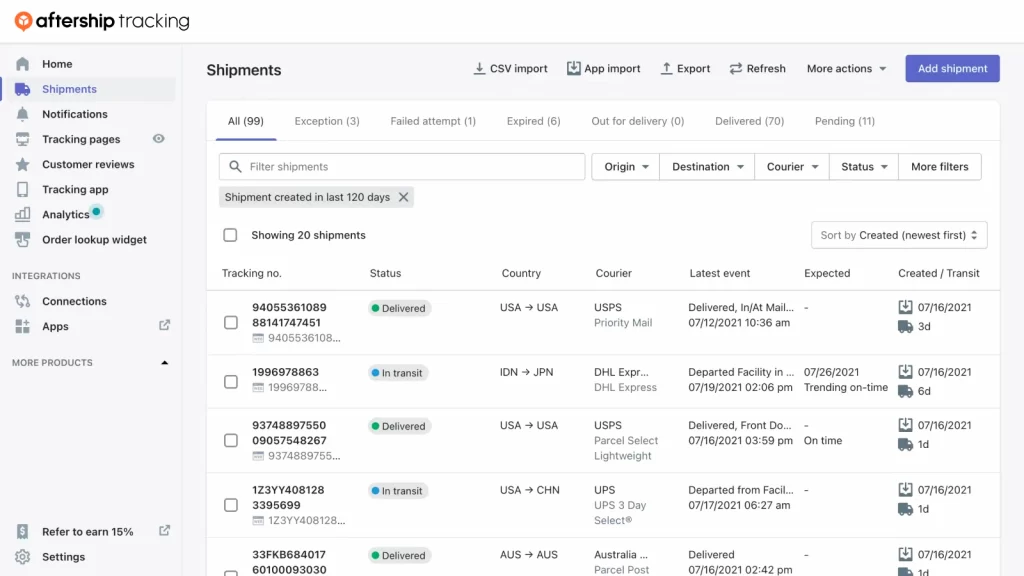
Not every store needs every type of shipping plugin. The right choice depends on whether you need flexible pricing rules, carrier-based rates, automated fulfillment, or better post-purchase tracking, and in many cases, one well-chosen plugin is enough to handle your shipping needs efficiently.
Ready to optimize your WooCommerce shipping setup?
At LitOS, we help WooCommerce brands build scalable shipping systems – from choosing the right plugins to configuring zones, rates, and fulfillment workflows that support real growth.
Contact UsCommon WooCommerce Shipping Plugin Configurations
The examples below use the US market for illustration, but the same shipping configurations can be adapted to other countries and regions.
Recommended US shipping zones
Most US WooCommerce stores use a simple three-zone structure:
- Local – ZIP codes near your warehouse or store, used for cheap local delivery or pickup
- Domestic US – All United States, used for standard nationwide shipping
- International – Canada, Europe, or a fallback “Locations not covered by other zones”
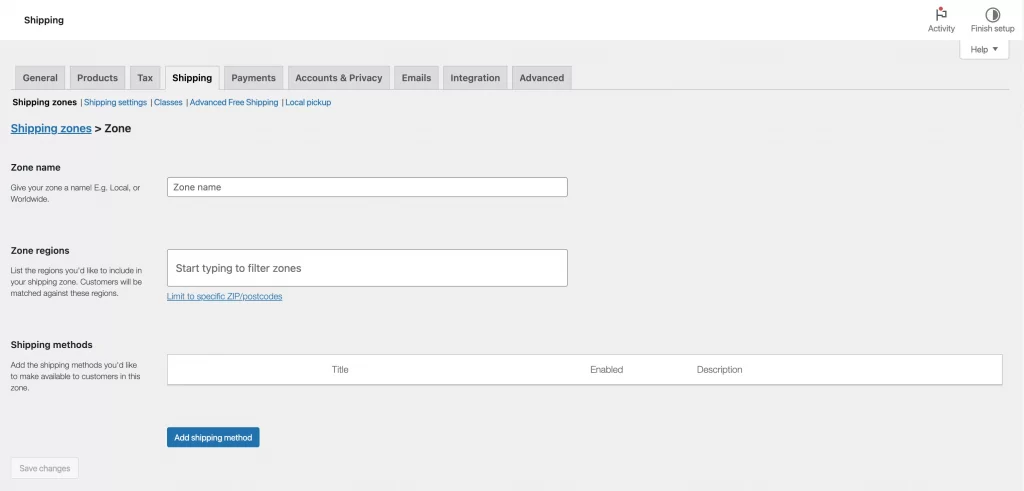
In WooCommerce, these are set under WooCommerce → Settings → Shipping → Shipping zones, using countries, states, or ZIP/postcode ranges (for example: 9410* or 90000–96199).
Free shipping thresholds (US)
Free shipping is commonly configured per zone, with lower thresholds for local orders and higher ones for nationwide shipping.
Typical US setup:
- Local zone:
- Flat rate: $4.95
- Free shipping over $50 – $75
- Domestic US:
- Flat rate: $8.95
- Free shipping over $75 – $100
- International: Usually no free shipping, or a much higher threshold (e.g. $200+)
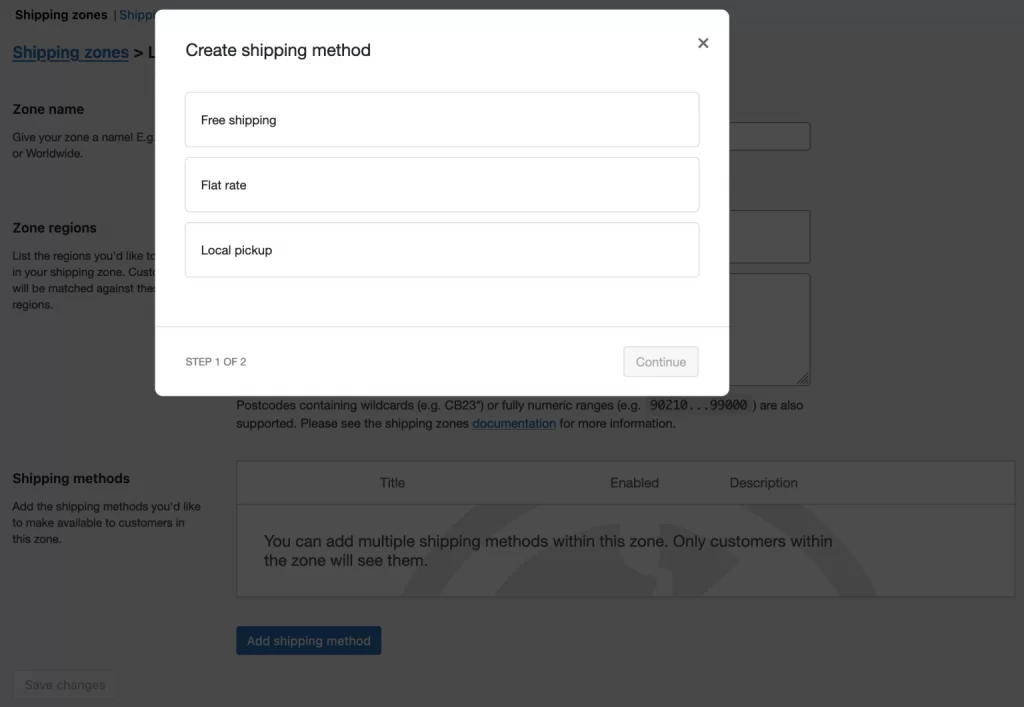
This is configured by adding both Free shipping and Flat rate methods to each zone, so customers below the threshold still see a paid option.
Weight-based US zones
Weight-based pricing is common for physical goods where shipping cost increases with distance. Here are typical patterns:
- Local zone: lower weight tiers
- 0 – 1 lb: $4.95
- 1 – 5 lb: $8.95
- Domestic US: higher tiers to cover long-distance shipping
- 0 – 1 lb: $5.95
- 1 – 5 lb: $9.95
- 5 – 20 lb: $16.95
- Oversize: flat surcharge or “freight quote only”
Many stores keep zones simple (Local + United States) and adjust pricing using weight tiers instead of creating many regional zones.
Multi-carrier checkout (USPS, UPS, FedEx)
US stores often show multiple carrier options at checkout so customers can choose between cost and speed. Here are the common setup:
- Economy: USPS Ground Advantage or Parcel Select
- Standard: UPS Ground / FedEx Ground
- Express: UPS 2nd Day Air or FedEx 2Day
At checkout, a customer shipping a 3 lb package from Colorado to New York might see:
- USPS Ground Advantage – ~$6.75
- UPS Ground – ~$9.10
- FedEx 2Day – ~$22.50
This improves transparency and reduces cart abandonment by letting customers control delivery speed.
Local delivery and pickup (US)
For stores with a physical location or local audience, local methods are often combined with nationwide shipping. Typical setup:
- Local pickup: Free pickup at store location
- Local delivery:
- Flat rate $4.95
- Free over $40 – $60
- Domestic US zone: Standard nationwide shipping methods
Some stores restrict pickup-only options to heavy or fragile products while allowing others to ship nationwide.
Best Shipping Plugin for WooCommerce: FAQs
What is the best shipping plugin for WooCommerce?
There is no single best shipping plugin for WooCommerce, but popular choices include WooCommerce Shipping & Tax for simple setups, Shippo and ShipStation for multi-carrier shipping and label printing, and Octolize Flexible Shipping for advanced rule-based shipping logic.
Can WooCommerce use multiple shipping plugins?
Yes. You can install and activate multiple shipping plugins simultaneously. For example, you might use Flexible Shipping to handle your domestic flat rates and a carrier-specific plugin (like DHL) to provide real-time quotes for international customers.
Note: Be careful to configure your "Shipping Zones" correctly so that customers aren't overwhelmed with too many (or conflicting) shipping options at checkout.
Is there a free WooCommerce shipping plugin?
Yes, WooCommerce supports free shipping plugins such as WooCommerce Shipping & Tax, WooCommerce Advanced Shipping, and the free version of Octolize Flexible Shipping, which cover basic shipping needs.
Can I print shipping labels from WooCommerce?
Yes, but not natively. You must use a plugin to bridge the gap between your store and the carrier. The WooCommerce Shipping extension allows you to buy and print labels (USPS/DHL/UPS) directly from the order page. Tools like ShipStation or Shippo sync your orders to their platform, where you can bulk-print labels for almost any carrier globally.
Which WooCommerce plugin is best for international shipping?
For international shipping, WooCommerce stores typically use Shippo for simple multi-country shipping with discounted rates, ShipStation for higher-volume and multi-channel fulfillment, and PluginHive solutions for direct carrier integrations.
Final Recommendation: Which Shipping Plugin Should You Choose?
There is no single best shipping plugin for every WooCommerce store, but the right choice becomes clear once you match plugins to your shipping needs.
- For simple domestic shipping, start with WooCommerce Shipping & Tax or a basic rule-based plugin to handle flat rates and free shipping thresholds.
- For advanced pricing logic, such as weight-based or conditional rules, Octolize Flexible Shipping and WooCommerce Advanced Shipping are better suited than carrier-based tools.
- For multi-carrier shipping and label printing, especially at higher order volumes, platforms like Shippo or ShipStation provide more automation and operational efficiency.
- For stores that already handle rates but want to improve delivery communication, AfterShip adds value through tracking, notifications, and post-purchase visibility.
In most cases, one primary shipping plugin plus, optionally, one tracking plugin is enough.

