
20+ Best WooCommerce Plugins & Extensions for eCommerce Stores (Free & Paid Picks)
WooCommerce works well on its own, but most stores need a few extra tools to run smoothly. Choosing the best WooCommerce plugins is not about adding more plugins. It is about adding the right ones.
This guide breaks down the best plugins for WooCommerce by purpose:
- SEO and marketing: All in One SEO, Yoast SEO, Omnisend, OptinMonster, AffiliateWP
- Performance and speed: LiteSpeed Cache, WP Rocket, Smush
- Product search: SearchWP, FiboSearch, WooCommerce Product Search
- Checkout and conversion: FunnelKit, CartFlows, Advanced Coupons
- Payments: WooPayments, Stripe Payments for WooCommerce, PayPal Payments for WooCommerce
- Security: Wordfence, Sucuri
After that, we explain which plugins are worth using in each category, when free plugins are enough, and how to avoid plugin bloat so your WooCommerce store stays fast, stable, and easy to manage as it grows.
How We Evaluate the Best WooCommerce Plugins
There are thousands of plugins available for WooCommerce, but not all of them are suitable for real online stores. Many plugins look useful at first, but later cause performance issues, conflicts, or unnecessary complexity.
To create this list of the best WooCommerce plugins, we focus on how plugins work in real eCommerce stores, not just on features or popularity:
- Performance impact: We choose plugins that run efficiently and do not slow down product pages, category pages, or the checkout process.
- WooCommerce compatibility: Every plugin must work smoothly with WooCommerce core features, such as products, cart, checkout, and order management.
- Clear use cases: We prioritize plugins that solve clear problems like improving SEO, speeding up the store, increasing conversions, simplifying checkout, or managing payments.
- Free and paid value: We check what the free version can realistically do and explain when a paid version becomes necessary, so store owners can make informed decisions.
And in case you’re in a hurry, here’s a quick comparison of the best WooCommerce plugins by category:
| Category | Best free plugin | Best paid plugin | Best for |
| SEO & marketing | Yoast SEO | All-in-One SEO | Product-focused SEO |
| Performance & speed | LiteSpeed Cache | WP Rocket | Faster page loading |
| Product search | FiboSearch | SearchWP | Large product catalogs |
| Checkout & conversion | CartFlows | FunnelKit | Checkout optimization |
| Payments | PayPal Payments | Stripe Payments | Global transactions |
| Security | Wordfence | Sucuri | Store protection |
If a category does not clearly have both free and paid options, we recommend the single plugin that offers the best balance of features, stability, and performance.
Best WooCommerce Plugins for SEO & Marketing
1. All-in-One SEO (AIOSEO)
Best for: WooCommerce stores that rely heavily on product pages and category pages to drive organic traffic and want strong SEO control without technical complexity.
All in One SEO is a popular SEO plugin built for WordPress and WooCommerce. It helps optimize product pages, collections, and structured data so products appear correctly in search results.
Many WooCommerce stores lack proper product schema and SEO control at scale. AIOSEO solves this with built in WooCommerce SEO features that work out of the box and are easy to manage.
| Version | Price (per year) | Key WooCommerce features | Best for |
| Free | $0 | Basic SEO titles, meta descriptions, XML sitemap | Small stores or new WooCommerce sites |
| Basic | $49.50 | WooCommerce SEO, product schema, advanced SEO tools | Growing stores |
| Plus | $99.50 | Local SEO, image SEO, extended schema | Businesses scaling SEO |
| Pro | $179.55 | Advanced schema, automation, priority support | High-traffic stores |
| Elite | $239.60 | Client management, multisite, full feature set | Agencies and large eCommerce sites |
The prices of the AIOSEO plugin are based on the official AIOSEO pricing page at the time of writing.
Technical note: Advanced features add database entries. For large stores, proper caching is recommended.
2. Yoast SEO
Best for: WooCommerce stores that focus on content driven SEO and want clear guidance for optimizing product pages and categories.
Yoast SEO is one of the most widely used SEO plugins for WordPress and WooCommerce. For WooCommerce, Yoast helps manage SEO titles, meta descriptions, breadcrumbs, XML sitemaps, and basic product schema.
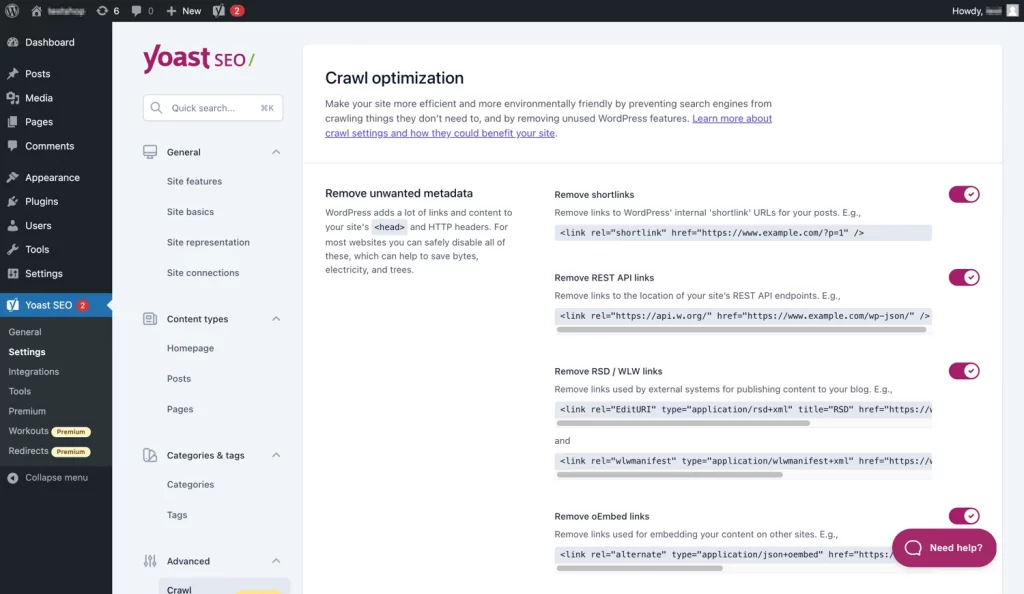
Many store owners struggle with writing SEO friendly titles and descriptions consistently across products. Yoast addresses this with its readability analysis and SEO checks, which guide users step by step while editing product pages.
| Version | Price per year | Key WooCommerce features | Best for |
| Free | $0 | Basic SEO titles, meta descriptions, XML sitemap | Small stores and beginners |
| WooCommerce SEO add-on | $149.00 | Product schema, breadcrumbs, better product indexing | Stores serious about SEO |
Technical note: Yoast adds real time content analysis in the editor, which can slightly increase admin load. On large WooCommerce stores, it is best used with proper caching and a clean plugin stack.
3. Omnisend
Best for: WooCommerce stores that want automated email and SMS marketing to drive repeat purchases and recover abandoned carts.
Omnisend is an email and SMS marketing platform for WooCommerce. It connects directly with WooCommerce to track customer actions such as product views, cart abandonment, and completed orders.
Many stores collect customer emails but struggle to turn them into repeat sales. Omnisend solves this with ready-to-use automation workflows, including welcome emails, abandoned cart reminders, and post purchase follow ups that work with minimal setup.
| Version | Price | Key WooCommerce features | Best for |
| Free | $0 | Email campaigns, basic automation, limited sends | Small or new stores |
| Standard | From $11.20 per month | Email automation, segmentation, reporting | Growing stores |
| Pro | From $41.30 per month | Email and SMS automation, advanced analytics | Scaling stores |
Technical note: Omnisend processes emails and automation off site, so it has minimal impact on WooCommerce site performance.
4. OptinMonster
Best for: WooCommerce stores that want to increase conversions using targeted popups and on site campaigns.
OptinMonster is a conversion optimization plugin used to turn visitors into subscribers and customers. For WooCommerce, it connects browsing behavior with campaigns such as exit intent popups, cart abandonment offers, and discount banners.
Many WooCommerce stores struggle with high bounce rates and abandoned carts. OptinMonster addresses this by allowing precise targeting based on user actions, page context, and cart status.
| Version | Price | Key WooCommerce features | Best for |
| Free | $0 | Basic popups and campaigns | Testing conversion ideas |
| Paid plans | From $7 per month | Exit intent, cart targeting, A B testing | Stores focused on growth |
Technical note: OptinMonster loads campaigns from its own platform, so it has minimal impact on WooCommerce site performance when implemented correctly.
5. AffiliateWP
Best for: WooCommerce stores that want to run a self hosted affiliate program with full control over tracking, commissions, and payouts.
If you want full control over your affiliate program, AffiliateWP is one of the strongest options available for WooCommerce. It is a premium affiliate management plugin built specifically for WordPress, with deep integration into WooCommerce orders and customer data.
Running affiliates often becomes messy when tracking links, commissions, and payouts across external tools. AffiliateWP keeps everything inside WordPress, making it easier to manage referrals, set commission rules, and pay affiliates accurately.
| Version | Price per year | Key WooCommerce features | Best for |
| Free add on | $0 | Affiliate redirect for WooCommerce accounts | Existing AffiliateWP users |
| Personal | $149 | Unlimited affiliates, commission tracking | Small affiliate programs |
| Plus | $199 | Advanced tracking, integrations | Growing stores |
| Pro | $299 | Advanced affiliate growth tools | High volume programs |
Pricing is based on AffiliateWP’s official pricing at the time of writing.
Technical note: AffiliateWP stores referral and commission data in the WordPress database. If your store processes a high number of orders, using object caching and database optimization will help maintain performance.
Best WooCommerce Performance & Speed Optimization Plugins
6. LiteSpeed Cache
Best for: WooCommerce stores that want maximum performance gains and are running on LiteSpeed hosting or plan to use QUIC.cloud.
If site speed is a priority, LiteSpeed Cache is one of the most powerful optimization plugins available for WooCommerce. Unlike most cache plugins, LiteSpeed Cache includes server-level caching, page optimization, image optimization, and CDN integration in one tool.
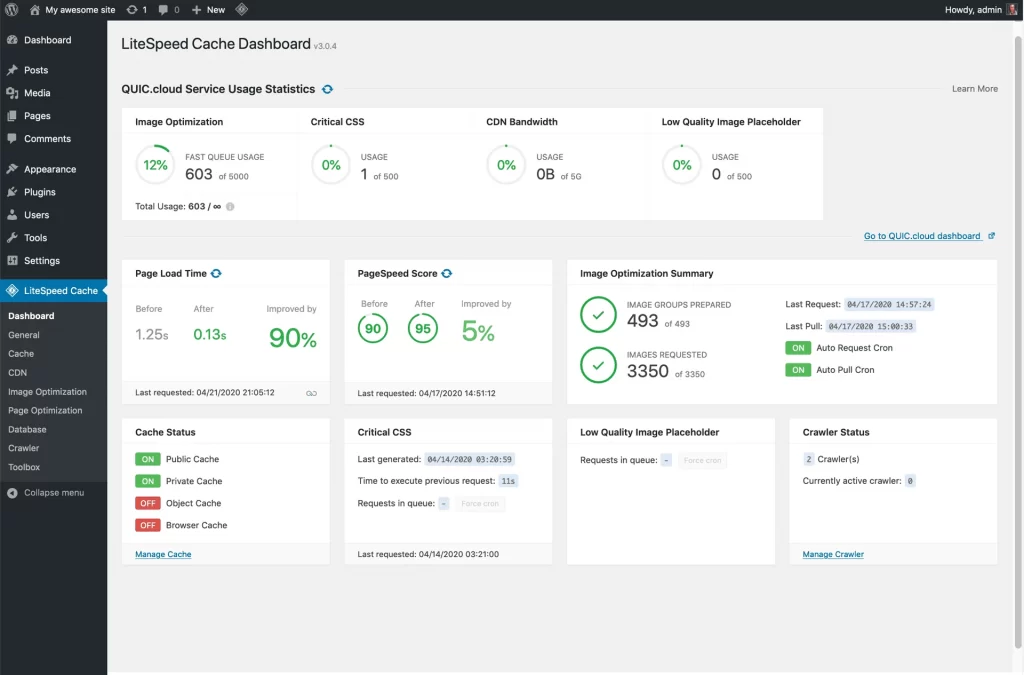
Many WooCommerce stores struggle with slow product pages and heavy checkout loads. LiteSpeed Cache solves this by handling caching and optimization at the server level, which is more efficient than PHP based caching alone.
| Version | Price | Key WooCommerce features | Best for |
| Plugin | Free | Page cache, object cache, CSS and JS optimization | All WooCommerce stores |
| QUIC.cloud services | Usage based | CDN, image optimization, Critical CSS | High traffic or global stores |
The LiteSpeed Cache plugin itself is always free. Some online services provided through QUIC.cloud may require payment after free usage limits are reached.
To use LiteSpeed exclusive cache features, your store must run on one of the following:
- LiteSpeed Web Server Enterprise with LSCache module
- OpenLiteSpeed
- LiteSpeed WebADC
- QUIC.cloud CDN
If your site runs on another web server such as Nginx or Apache, you can still use many general optimization features, but server level caching will not be available.
Technical note: LiteSpeed Cache can deliver major speed improvements, but incorrect configuration may cause cart or checkout caching issues. Always exclude dynamic WooCommerce pages and test carefully after setup.
7. WP Rocket
Best for: WooCommerce stores that want fast performance improvements without needing LiteSpeed hosting or complex server setup.
WP Rocket is a premium caching and performance plugin for WordPress that works smoothly with WooCommerce. It activates caching and core optimizations automatically and runs on most hosting environments, including Apache, Nginx, and managed WordPress hosts.
By combining page caching, file optimization, lazy loading, and database cleanup, WP Rocket helps reduce slow product pages and script load issues, while safely excluding WooCommerce cart and checkout pages by default.
| License | Price per year | Sites | Best for |
| Single | $59 | 1 site | Single WooCommerce store |
| Plus | $119 | 3 sites | Multiple stores |
| Infinite | $299 | Unlimited | Agencies and developers |
Technical note: WP Rocket automatically excludes WooCommerce cart, checkout, and account pages from caching. This reduces the risk of checkout issues, but advanced options such as JavaScript delay and CSS optimization should still be tested carefully on live stores.
8. Smush Image Optimization
Best for: WooCommerce stores with many product images that want faster pages without manually resizing or compressing files.
Smush is an image optimization plugin developed by WPMU DEV. This plugin automatically compresses images on upload and allows bulk optimization of existing media, which helps product and category pages load faster.
If your store feels slow mainly because of large product images, Smush is often the easiest place to start. It reduces image file size without changing how images look to customers.
| Version | Price | Key WooCommerce features | Best for |
| Free | $0 | Lossless compression, bulk optimize up to 50 images at once | Small to medium stores |
| Smush Pro (Basic) | $30 per year | Unlimited bulk optimization, CDN, lazy loading | Image heavy stores |
| Smush Pro (Standard) | $60 per year | Higher CDN limits, advanced optimization | Growing stores |
| Smush Pro (Plus) | $100 per year | Increased limits and performance tools | Large catalogs |
| Smush Pro (Premium) | $1000 per year | Enterprise usage limits | High volume sites |
Technical note: Smush works at the image level and does not cache pages or affect WooCommerce checkout logic. For best results, it should be combined with a page caching plugin such as LiteSpeed Cache or WP Rocket.
Best WooCommerce Product Search Plugins
9. SearchWP
Best for: WooCommerce stores with large or complex catalogs where customers rely heavily on search to find products.
SearchWP is a dedicated WordPress search plugin built to replace the default WooCommerce search. It adds instant, AJAX-powered search results that update as customers type, improving product discovery and usability.
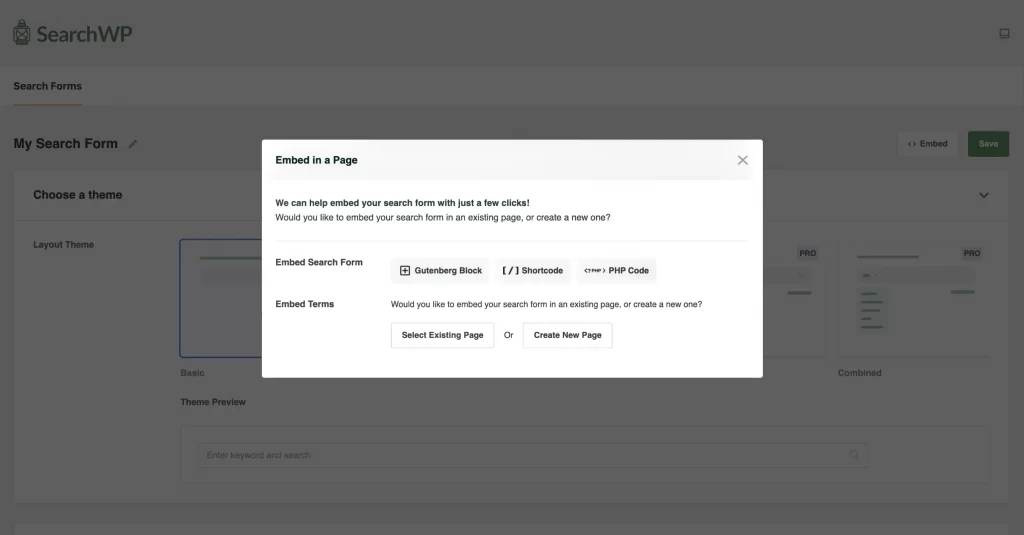
For stores where default WooCommerce search misses products, SKUs, or attributes, SearchWP provides deeper indexing and more relevant results, especially when paired with its core plugin.
| Version | Price | Key WooCommerce features | Best for |
| Live Ajax Search | Free | Instant AJAX search UI | Improving search experience |
| Standard | $99 per year | Custom search engines, product indexing | Small to mid-size stores |
| Pro | $199 per year | Advanced weighting, eCommerce data support | Large catalogs |
| All Access | $399 per year | WPFilters, unlimited queries, priority support | Agencies and complex stores |
Technical note: SearchWP builds a custom search index inside the WordPress database. For WooCommerce stores with many products, enabling object caching or database optimization is recommended to maintain fast search performance.
10. FiboSearch (Ajax Search for WooCommerce)
Best for: WooCommerce stores with medium to large product catalogs that want instant, visual search results to improve product discovery and conversions.
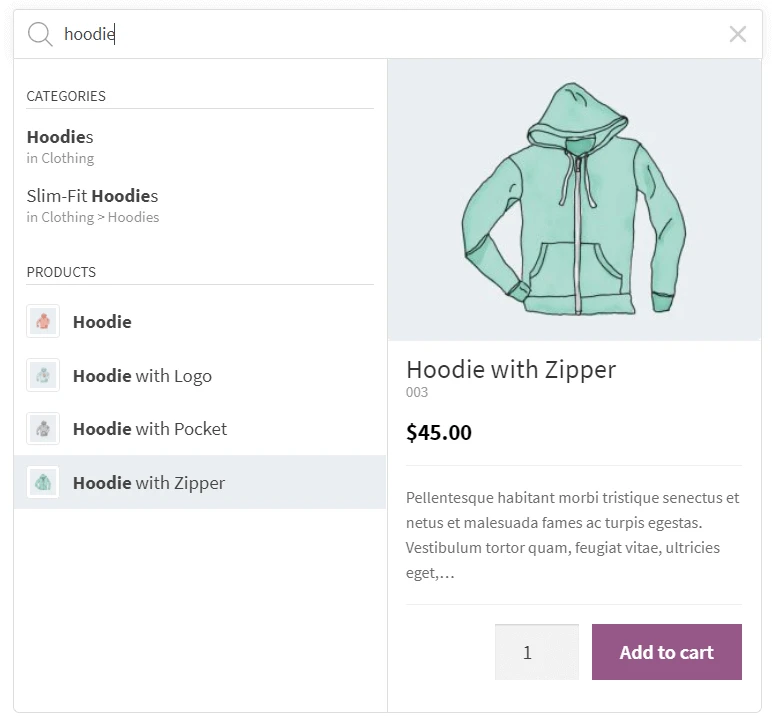
FiboSearch is a dedicated WooCommerce product search plugin designed to replace the default search with fast, AJAX-powered suggestions. For stores where customers rely on search to find products quickly, FiboSearch improves usability by displaying products, prices, images, and categories in real time as users type.
| Version | Price | Key WooCommerce features | Best for |
| Free | Free | AJAX live search, product title, SKU, category and tag search | Small stores improving basic search |
| Personal | $59 per year | Indexed search engine, faster results, attribute search | Medium stores |
| Entrepreneur | $99 per year | Synonyms, fuzzy search, brand and taxonomy search | Large catalogs |
| Agency | $249 per year | Priority support, multi-site licensing (25 sites) | Agencies and enterprise stores |
Technical note: The Pro versions use an indexed search engine instead of default database queries. For stores with large catalogs, this significantly improves search speed and reduces database load compared to native WooCommerce search.
11. WooCommerce Product Search
Best for: WooCommerce stores that want an official, tightly integrated search solution built and maintained by the WooCommerce team.
WooCommerce Product Search is a premium extension that replaces the default WooCommerce search with a faster, more accurate search engine. It adds live search results, advanced filtering, and relevance-based ranking to help customers find products more easily.
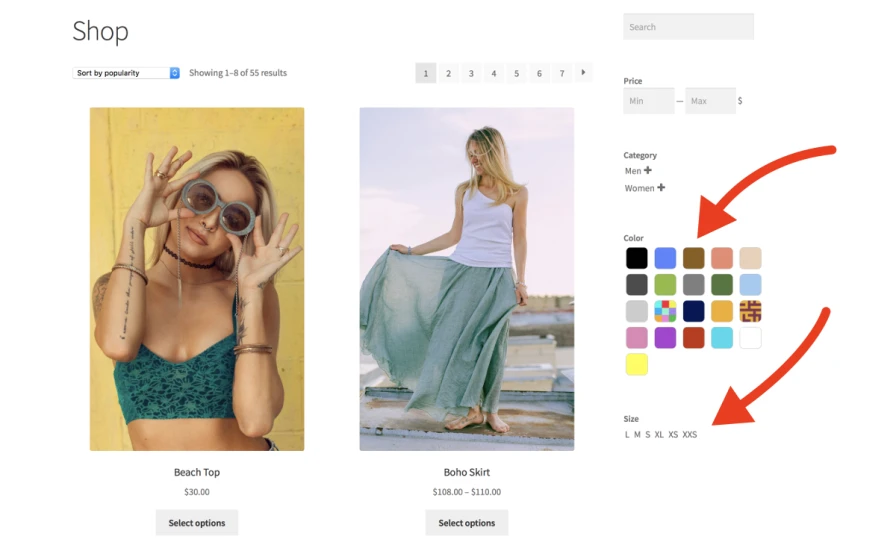
For stores that prefer native WooCommerce extensions over third-party plugins, this plugin offers deep compatibility with core WooCommerce features, themes, and updates.
| Version | Price | Key WooCommerce features | Best for |
| Product Search | $59 per year | Live AJAX search, relevance ranking, SKU search, product filters | Small to mid-size stores |
| Product Search + Filters | $79 per year | Advanced filters, layered navigation, search widgets | Stores with complex catalogs |
Technical note: WooCommerce Product Search builds a dedicated product index in the database and updates it automatically when products change. On stores with large inventories, enabling object caching improves search performance and reduces query load.
Store Management & Merchandising Plugins for WooCommerce
12. WooCommerce Subscriptions
Best for: WooCommerce stores that sell products or services on a recurring basis, such as memberships, subscription boxes, or SaaS-style offerings.
WooCommerce Subscriptions is the official extension for adding recurring billing to WooCommerce. It allows store owners to charge customers weekly, monthly, or yearly, and manage renewals, upgrades, downgrades, and cancellations directly inside WooCommerce.
For businesses focused on predictable, recurring revenue, this plugin provides deep integration with WooCommerce core, payment gateways, and order management.
| Version | Price | Key WooCommerce features | Best for |
| 1-year plan | $279 per year | Recurring payments, subscription management, and manual renewals | Small to mid-size stores |
| 2-year plan | $446.40 every 2 years | Same features, 20% savings vs annual billing | Growing subscription businesses |
Technical note: WooCommerce Subscriptions relies on scheduled background actions for renewals and payments. For stores with many active subscriptions, using a reliable cron setup and compatible payment gateways helps ensure renewals run smoothly.
13. Advanced Coupons
Best for: WooCommerce stores that want more flexible and strategic discount rules than what core WooCommerce coupons allow.
Advanced Coupons is a WooCommerce coupon plugin that extends native coupon features with cart conditions, auto-applied discounts, and advanced promotion logic. For stores running frequent promotions, bundles, or targeted discounts, Advanced Coupons helps control when and how discounts are applied without custom code.
| Version | Price | Key WooCommerce features | Best for |
| Free | Free | Basic coupon rules, auto-apply coupons, URL coupons | Small stores running simple promotions |
| Growth | $59.50 per year | Cart conditions, scheduled coupons, store credit | Growing stores |
| Advanced | $119.50 per year | Buy X Get Y, loyalty rewards, advanced discount logic | Promotion-heavy stores |
| Enterprise | $249.50 per year | All features, priority support, multi-site use | Large stores and agencies |
Technical note: Advanced Coupons hooks directly into WooCommerce’s cart and checkout logic. On stores with many active coupon rules, keeping conditions well organized helps avoid unnecessary cart recalculations during checkout.
14. YITH WooCommerce Wishlist
Best for: WooCommerce stores that want to increase engagement, repeat visits, and conversions by letting customers save products for later.
Have you ever added a product to a wishlist and returned days later to purchase it? That is exactly what YITH WooCommerce Wishlist helps you do for your customers.
This plugin lets shoppers save products they like, create wishlists, and share them with friends or family. For many stores, especially fashion, lifestyle, and gift shops, wishlists help turn browsing into future sales.
| Version | Price | Key WooCommerce features | Best for |
| Free | Free | Basic wishlist, Add to Wishlist button | Small stores or basic wishlist needs |
| Premium | €99.99 / year | Multiple wishlists, sharing, email notifications, analytics | Conversion-focused stores |
Technical note: YITH WooCommerce Wishlist stores wishlist data in the WordPress database. For stores with high traffic or many logged-in users, enabling object caching is recommended to keep wishlist actions fast and scalable.
15. Booster for WooCommerce
Best for: Store owners who want many WooCommerce features in one plugin instead of installing many separate plugins.
Booster for WooCommerce is an all-in-one toolkit that adds pricing, checkout, payment, product, and sales features to your store. The free version already includes many useful modules, while Booster Elite unlocks the full set of advanced tools for stores that want deeper customization and higher revenue control.
If you ever felt your store needed small improvements in many areas, pricing rules, checkout tweaks, or product options, this plugin is built exactly for that situation.
| Version | Price | Key WooCommerce features | Best for |
| Free | $0 | Core pricing tools, checkout fields, basic product and shop enhancements | Small stores and beginners |
| Elite Personal | $11.99 per month | All 110+ modules, advanced pricing, abandoned cart, variation swatches | Single store owners |
| Elite Developer | $19.99 per month | All modules, use on 5 sites, updates and support | Freelancers and developers |
| Elite Agency | $39.99 per month | All modules, use on 50 sites, priority support | Agencies and large teams |
Technical note: Because Booster includes many modules, you should only enable the features you actually need. This keeps your WooCommerce store fast and easy to manage, even as it grows.
If you like to build your store step by step and want full control without coding, Booster for WooCommerce is one of the most flexible plugin choices available.
Checkout & Conversion Optimization WooCommerce Plugins
16. FunnelKit – Funnel Builder for WooCommerce Checkout
Best for: WooCommerce stores that want to increase conversions by optimizing checkout, upsells, and post purchase flows.
FunnelKit is a conversion-focused WooCommerce plugin designed to improve how customers move through checkout. It replaces the default WooCommerce checkout with a faster, cleaner experience and adds built-in tools for order bumps, one-click upsells, and thank you page optimization.
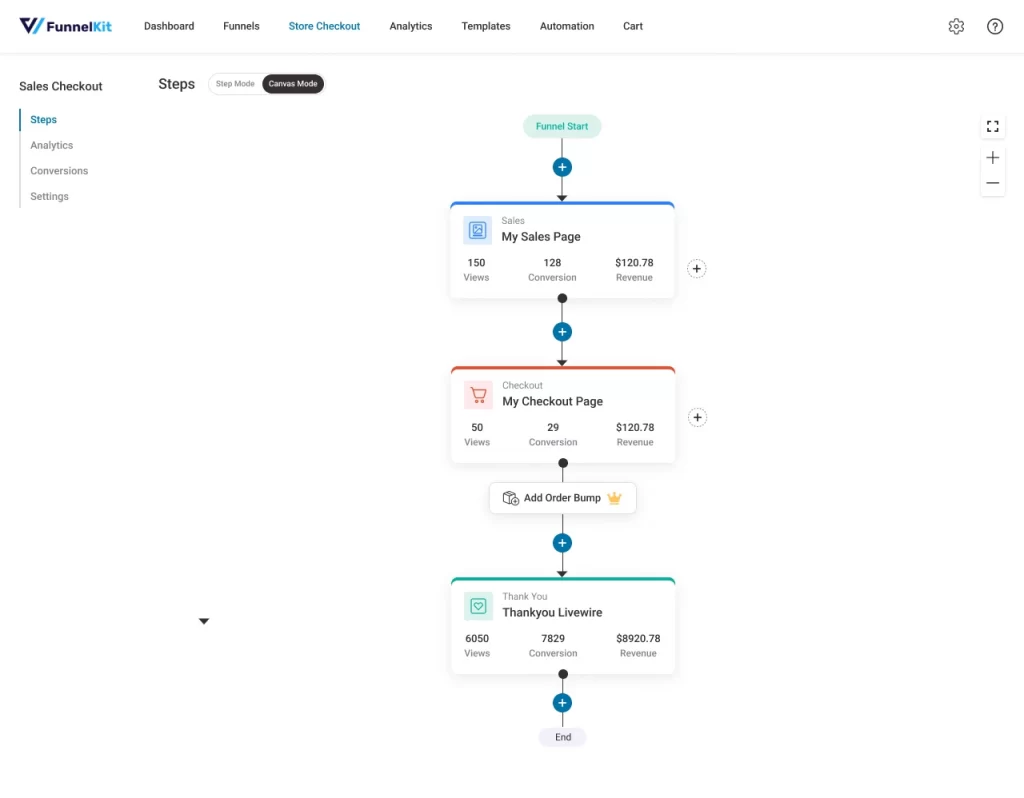
If you feel customers reach checkout but do not complete purchases, FunnelKit helps fix that problem by simplifying steps and offering relevant add-ons at the right moment.
| Version | Price | Key WooCommerce features | Best for |
| Basic | $99 per year | Optimized checkout, custom fields, checkout templates | Small stores are improving checkout |
| Plus | $179 per year | Order bumps, thank you page builder | Growing stores increasing AOV |
| Professional | $249 per year | One click upsells, downsells, advanced funnels | High volume stores |
| Elite | $399 per year | All features, advanced automation, priority support | Brands scaling aggressively |
Technical note: FunnelKit adds logic around checkout and post-purchase flows. For stores with high traffic, enabling page caching exclusions for checkout and using a reliable hosting setup helps maintain fast performance.
If checkout is where you lose money today, this is one plugin worth testing first.
17. CartFlows
Best for: WooCommerce stores that want a simpler checkout and higher conversion rates without complex setup.
CartFlows helps you guide customers step by step through checkout using optimized sales funnels. Instead of sending shoppers to a default WooCommerce checkout, you can control the flow and remove distractions. This makes it easier for customers to complete their purchase.
CartFlows is widely used by store owners who want to improve checkout speed, reduce cart abandonment, and increase average order value. If your checkout feels confusing or too long, CartFlows is designed to fix that.
| Version | Price | Key WooCommerce features | Best for |
| Free | Free | Custom checkout pages, basic funnel builder | Testing funnel based checkout |
| Plus | $189 per year | Checkout optimization, order bumps, templates | Small to medium stores |
| Pro | $299 per year | One click upsells, downsells, advanced funnels | Growing stores |
| Woo Toolkit | $449 per year | Full toolkit bundle, premium features | High volume stores |
Technical note: CartFlows works on top of WooCommerce checkout. For best performance, use it with a lightweight theme and a caching plugin. Page builder support includes Elementor and Gutenberg, so setup is visual and beginner friendly.
Let’s ask yourself: Are customers dropping off at checkout? If yes, CartFlows gives you more control to guide them smoothly to the final payment step.
Best WooCommerce Plugins for Analytics & Insights
18. MonsterInsights
Best for: WooCommerce store owners who want to see sales, traffic, and customer behavior inside WordPress without touching Google Analytics directly.
MonsterInsights is a WordPress plugin that connects your WooCommerce store to Google Analytics and shows the data in a simple dashboard. You do not need to read complex reports. You see clear numbers like revenue, conversion rate, top products, and traffic sources right in your admin area.

MonsterInsights also supports GA4 by default, so you do not need extra setup. If you ever ask questions like “Where do my buyers come from?” or “Which product sells best?”, MonsterInsights helps you answer them fast.
| Version | Price | Key WooCommerce features | Best for |
| Free | $0 | Basic Google Analytics connection, page views | Small stores starting with analytics |
| Plus | $99.50 per year | Enhanced reports, publisher stats | Content driven stores |
| Pro | $199.50 per year | WooCommerce tracking, conversion rate, revenue, top products | Most WooCommerce stores |
| Elite | $299.50 per year | Advanced reports, client management, multisite support | Agencies and large stores |
Technical note: MonsterInsights does not replace Google Analytics. It reads data from Google Analytics and shows it in a friendly way. For accurate WooCommerce reports, enable Enhanced eCommerce tracking and make sure your checkout pages are not blocked by caching or consent plugins.
19. Google Analytics for WooCommerce
Best for: Store owners who want official, no-cost analytics from WooCommerce and simple eCommerce tracking in Google Analytics.
Google Analytics for WooCommerce is the official extension by Woo. It connects your store directly to Google Analytics and helps you understand how visitors become customers. There is no complex setup and no third-party dashboard. Your data goes straight to Google Analytics.
This plugin focuses on core eCommerce tracking, not advanced reports inside WordPress. If you are comfortable opening Google Analytics to read data, this plugin does the job cleanly.
| Version | Price | Key WooCommerce features | Best for |
| Core plugin | $0 | Product views, add to cart, checkout flow, transactions | Stores that want official GA tracking |
| With GA Pro | Paid add on | Advanced funnels and deeper eCommerce data | Stores needing more detailed insights |
What to keep in mind: This plugin does not show reports inside WordPress. You must open Google Analytics to see your data. A free Google Analytics account is required. GA4 is supported.
Best WooCommerce Payment Gateway Plugins
20. WooPayments
Best for: WooCommerce store owners who want built in payments, simple setup, and everything managed inside WordPress.
WooPayments is the official payment solution by Woo. It lets you accept cards, Apple Pay, Google Pay, and local payment methods without installing a third party gateway plugin. You manage payments, refunds, disputes, and payouts directly from your WooCommerce dashboard.
There is no monthly fee to use WooPayments. You only pay transaction fees, and the exact rate depends on your country and the payment method. Woo shows the exact fees during setup, so there are no hidden costs.
| Version | Price | Key WooCommerce features | Best for |
| Core plugin | $0 | Card payments, Apple Pay, Google Pay, refunds, payouts | Small to mid size stores |
| With add ons | Transaction based | Subscriptions, deposits, multi currency | Growing stores |
Note: WooPayments is not available in every country. Transaction fees vary by region and payment method, so always check the pricing shown in your WooCommerce admin before going live.
21. Stripe Payments for WooCommerce
Best for: Store owners who want a global payment gateway, fast checkout, and support for many countries and currencies.
Stripe Payments for WooCommerce lets you accept card payments and popular wallets like Apple Pay and Google Pay using Stripe, one of the most trusted payment platforms in the world. Setup is simple, and the checkout experience is smooth on both desktop and mobile.

The plugin itself is free to install. There is no monthly fee. You pay Stripe transaction fees, and the exact rate depends on your country and the payment method you enable. Stripe clearly shows the fees inside your Stripe dashboard.
| Version | Price | Key WooCommerce features | Best for |
| Core plugin | $0 | Card payments, Apple Pay, Google Pay, refunds | Most WooCommerce stores |
| With Stripe features | Transaction based | Subscriptions, saved cards, international payments | Global and growing stores |
Note: Stripe is not available in every country, and transaction fees vary by region. Always check the exact Stripe fees during setup so you know your real costs.
22. PayPal Payments for WooCommerce
Best for: WooCommerce stores that want a trusted, global payment method and an easy checkout experience for international customers.
PayPal Payments for WooCommerce is the official PayPal plugin built for WooCommerce. It lets customers pay using PayPal balance, debit cards, credit cards, Pay Later options, and local payment methods in supported countries. The checkout stays fast and familiar, which helps customers feel safe when paying.
Because this is an official WooCommerce extension, setup is simple, and updates stay compatible with WooCommerce core. Many customers already have PayPal accounts, so they can complete checkout without entering card details again.
| Version | Price | Key WooCommerce features | Best for |
| Core plugin | Free | PayPal checkout, card payments, Pay Later, Venmo in supported regions | Most WooCommerce stores |
| PayPal fees | Transaction based | Buyer protection, fraud detection, secure processing | Stores selling internationally |
Technical note: This plugin uses PayPal hosted payment processing. Sensitive payment data is handled by PayPal, which helps reduce security risks and compliance workload for store owners.
Best Security Plugins for WooCommerce
23. Wordfence
Best for: WooCommerce stores that want strong security protection against hacking, malware, and brute force attacks without complex setup.
Wordfence is one of the most popular security plugins for WordPress and WooCommerce. It protects your store using a firewall, malware scanner, and login security features that run automatically in the background.
Wordfence helps block malicious traffic, scans your site for infected files, and protects admin and customer login pages from unauthorized access. Alerts are sent when security issues are detected, so store owners can act quickly.
| Version | Price | Key WooCommerce features | Best for |
| Free plugin | Free | Firewall, malware scanning, login protection | Small to medium WooCommerce stores |
| Wordfence Premium | $149 per year per site | Real time firewall rules, malware signatures, country blocking | Stores handling sensitive customer data |
Technical note: Wordfence runs security checks at the WordPress level and does not handle payment data directly. This helps protect your store from attacks while keeping payment processing handled safely by your existing payment gateways.
24. Sucuri
Best for: WooCommerce stores that want strong security protection against malware, hacks, and unauthorized access, especially stores handling customer accounts and payments.
Sucuri Security is a well known WordPress security plugin focused on protecting websites from attacks, malware, and file changes. For WooCommerce stores, this means better protection for customer data, login pages, and checkout processes.
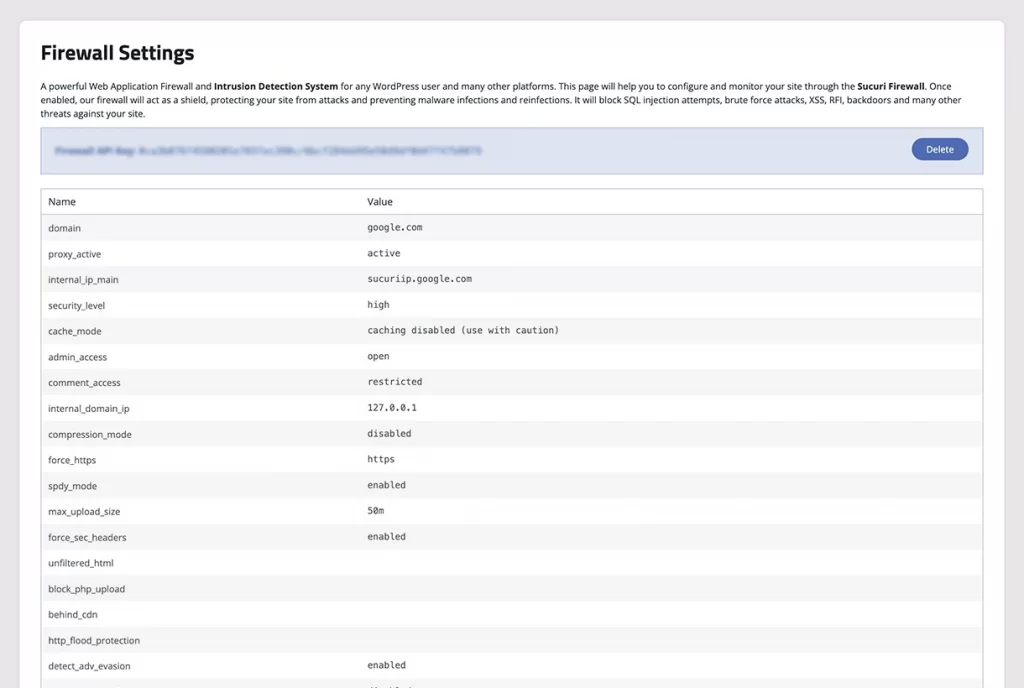
Sucuri helps you monitor your site in real time. It scans for malware, checks file integrity, tracks security events, and alerts you if something suspicious happens. Even if you are not technical, the plugin explains issues clearly and guides you on what to fix.
| Version | Price | Key WooCommerce features | Best for |
| Core plugin | Free | Malware scanning, file integrity monitoring, security alerts | Small to mid size WooCommerce stores |
| Sucuri Firewall | From $229 per year | Website firewall, DDoS protection, faster page delivery | Stores needing advanced protection |
Technical note: The free plugin focuses on monitoring and detection inside WordPress. For full protection, including blocking attacks before they reach your site, Sucuri Firewall works at the server and DNS level, which reduces risk and improves site stability for WooCommerce stores.
How to Choose the Right WooCommerce Plugins (Avoid Plugin Bloat)
A good plugin should support your business goals, work smoothly with your theme, and keep your store fast and stable. Now let’s look at how to choose plugins the right way, even if you are not technical.
1. Start with your store goal
Ask yourself what you want to improve today. More sales. Faster loading. Better checkout. Safer payments. If you cannot explain the reason in one short sentence, do not install the plugin.
2. One job, one plugin
Do not install two or three plugins that do the same thing. For example, if one plugin already creates discounts, do not add another just for coupons. More plugins mean more problems later.
3. Always test with your theme and Elementor
Before using a plugin on your live store, test it first. Check product pages, cart, and checkout. If you use Elementor, make sure buttons, layouts, and forms still work normally.
4. Speed matters more than extra features
A simple, fast plugin is better than a powerful but heavy one. Slow pages make customers leave. If a plugin makes your site slower, it is not helping your business.
5. If it does not help sales or customers, remove it
After testing, ask one last question. Does this plugin help customers buy more easily? If the answer is no, you do not need it.
Need help choosing or setting up the right plugins?
At LitOS, we help WooCommerce stores plan, integrate, and optimize plugins the right way – focusing on performance, compatibility, and long-term growth, not plugin overload.
Talk to LitOSBest WooCommerce Plugins: FAQs
What are the essential plugins for WooCommerce?
Every WooCommerce store needs a few basic plugins to run properly. At minimum, you should have one plugin for payments, one for security, and one for performance or speed. Many stores also add an SEO plugin and an analytics plugin to understand visitors and sales.
Do WooCommerce plugins slow down a site?
Yes, plugins can slow down your site if you install too many or use poorly built ones. Each plugin adds extra work for your website. This is why it is better to use fewer plugins that do their job well, instead of many plugins with overlapping features.
Are free WooCommerce plugins enough?
For many small or new stores, free plugins are enough to get started. Official WooCommerce plugins and popular WordPress plugins often offer strong free versions. Paid plugins usually become useful later, when you need advanced features, better support, or more control over your store.
How many plugins should a WooCommerce store use?
There is no perfect number, but most healthy WooCommerce stores use between 15 and 30 plugins. The number matters less than what the plugins do. A store with 20 well-chosen plugins can be faster and safer than a store with 40 unnecessary ones.
Which WooCommerce plugins work best with Elementor?
Plugins that follow WooCommerce standards usually work well with Elementor. Official WooCommerce plugins and popular tools like checkout, search, and marketing plugins are generally compatible.
Final Recommendations by Store Type
The best WooCommerce plugins depend on how your store works and what you want to improve. Below are quick, practical recommendations to help you choose faster.
- New or small stores: Start with the basics only. One payment plugin, one security plugin, and one speed plugin are enough.
- Stores with many products: Focus on search and performance. A strong product search plugin and a caching plugin help customers find items quickly.
- Conversion focused stores: If traffic is not the problem, improve checkout and promotions. Use checkout optimization and coupon or funnel plugins.
- Subscription based stores: Choose plugins built for recurring payments and make sure your payment gateway supports renewals.
- Elementor based stores: Use plugins that work well with WooCommerce layouts and test product and checkout pages after each install.
Let’s start small and add only what your store truly needs.

