
Shopify Related Products: How to Enable, Customize & Optimize Product Recommendations
Shopify related products help merchants increase conversions by showing relevant, similar, or complementary items directly on product pages.
In this guide, you’ll learn:
- How Shopify automatically generates related and complementary product recommendations
- How to show related products on Shopify product pages using your theme
- How to customize recommendation logic with the Search & Discovery app
- When Shopify’s native features are enough and when apps or custom logic make more sense
This guide covers the practical steps and best practices for setting up and optimizing Shopify related products at any stage.
What Are Shopify Related Products?
Shopify related products are automated product recommendations shown on product pages to encourage customers to explore similar or complementary items. These recommendations are designed to support cross-selling and upselling by surfacing products that are most likely to be relevant to what the customer is currently viewing.
By default, Shopify generates related products automatically using multiple data signals. The recommendation logic runs in the background and updates over time as your store’s catalog and customer behavior change.
How Shopify generates related products by default
Shopify uses a combination of the following methods to determine which products to recommend:
- Purchase history: Products that are frequently bought together by past customers
- Product description similarity: Items with similar product descriptions and attributes (available for English storefronts)
- Related collections: Products that belong to the same or closely related collections, used as a fallback when limited data is available
This automated approach allows Shopify to generate recommendations for every product without requiring manual setup, even for large catalogs.
Limitations of Shopify’s native related products and when to use an app instead
Shopify’s built-in related products are designed to be simple, fast, and easy to maintain. For many stores, the native system is more than enough to surface relevant recommendations without additional setup or cost. However, because the logic is largely automated and standardized, it may not suit every merchandising strategy.
If your store requires more control over recommendation logic, placement, or promotional rules, third-party related products apps can help extend what Shopify offers out of the box.
The comparison below highlights when Shopify’s native features are sufficient and when using an app becomes a better option:
| Feature | Shopify built-in | Third-party apps |
| Cost | Free | Free plans available; paid plans from $10-40+/month |
| Setup difficulty | Easy – just enable in theme | Moderate – requires app installation & configuration |
| Recommendation logic | Fixed AI (purchase history, descriptions, collections) | Customizable rules, AI, manual control, quiz-based |
| Placement options | Product pages only | Product pages, cart, checkout, thank you page, pop-ups, homepage |
| Manual curation | Up to 10 complementary + 10 related per product | Unlimited manual selections |
| Bundle creation | No | Yes – fixed bundles, mix-and-match, BOGO |
| Discounts & offers | No | Yes – volume discounts, percentage off, free shipping |
| One-click upsells | No | Yes |
| Post-purchase offers | No | Yes |
| Analytics | Basic (through Shopify Analytics) | Advanced – conversion tracking, A/B testing, ROI metrics |
| Multi-language support | Limited (English descriptions only) | Yes (many apps support 10+ languages) |
| Learning curve | Minimal | Moderate to high |
| Best for | New stores, simple catalogs, budget-conscious | Revenue optimization, complex products, advanced strategies |
How to Show Related Products on Shopify Product Pages
To display related products on your Shopify product pages, your theme must support Shopify’s product recommendation sections. Most modern Online Store 2.0 themes already include this functionality by default.
Before making any changes, make sure your active theme is compatible with product recommendation sections.
Step 1: Check if the theme supports product recommendations
Open your Shopify admin and go to Online Store → Themes. If your theme uses Online Store 2.0 templates, it will support dynamic sections on product pages, including Related products and Complementary products.
If you can add sections to a product template, your theme is compatible.
Step 2: Open the theme editor
From Online Store → Themes, click Edit theme on your active theme.
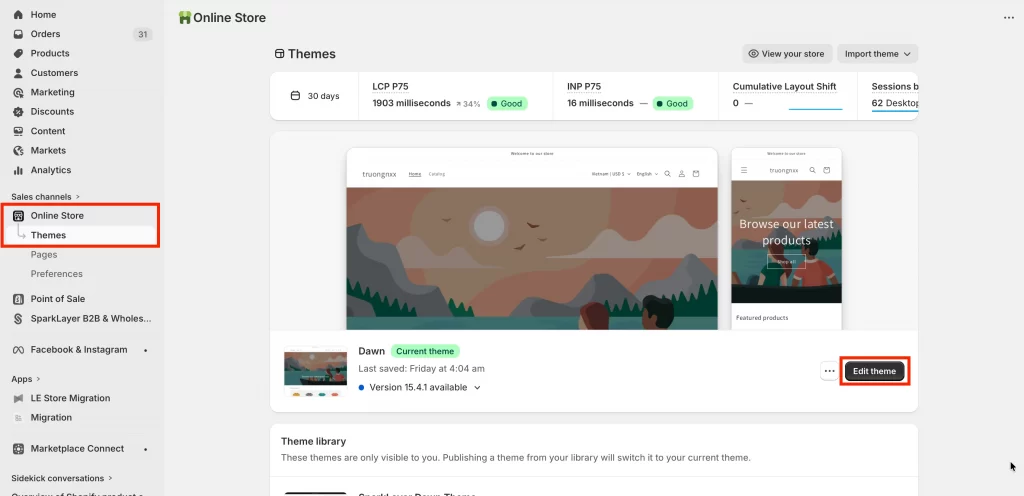
In the theme editor, use the page selector at the top to navigate to a Product page template.
Step 3: Add the related products section
Within the product page template:
- Click Add section
- Select Related products or Complementary products
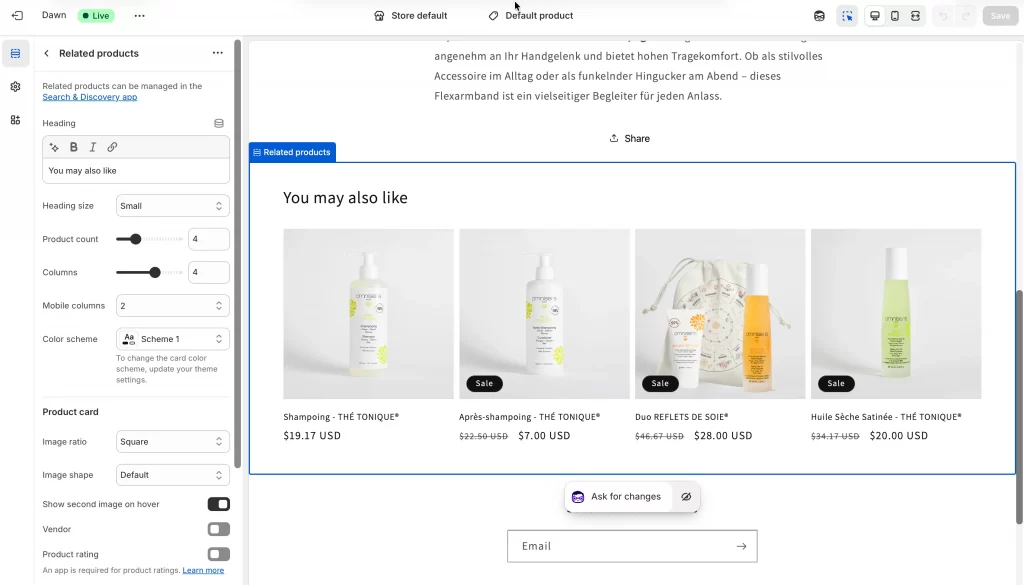
- Place the section where you want it to appear on the product page
Most merchants place this section below the product details or near the product description for better visibility.
Step 4: Configure display settings
After adding the section, adjust the available settings in the sidebar, such as:
- Number of products to display
- Section heading text (for example, “You may also like” or “Pairs well with”)
- Layout and spacing options (depending on your theme)
Save your changes, then preview the product page to confirm that related products are displaying correctly.
How to Customize Shopify Related Products Algorithm
While Shopify provides multiple ways to control which products appear as recommendations, the recommendation algorithm itself can’t be customized directly. Shopify automatically determines relevance based on purchase history, product descriptions (English storefronts only), and related collections, and returns up to 10 recommended products per item, ranked by relevance.
Because this logic runs automatically in the background, customization focuses on influencing which products appear, through manual selections, combining custom and automatic results, or disabling recommendations, rather than changing the algorithm itself.
Method 1: Use automatic recommendations only
This is Shopify’s default, fully automated approach.
Shopify generates recommendations using purchase history, product description similarity (English storefronts only), and related collections. Recommendations update automatically as customer behavior and sales data change.
Steps to use automatic recommendations only:
- Go to Online Store → Themes → Edit theme
- Open a Product page template
- Add the Related products or Complementary products section
- Adjust display settings (heading, number of products, layout)
- Save changes
This method is best for new stores building sales history, large catalogs where manual curation isn’t practical, and merchants who prefer a hands-off setup.
That said, it has some limitations. Results improve as sales data accumulates, control over exact pairings is limited, and recommendations can feel generic at the early stages.
Method 2: Add manual product recommendations
This method lets you hand-pick exactly which products appear as recommendations.
Steps to add manual product recommendations:
- Go to Apps → Search & Discovery
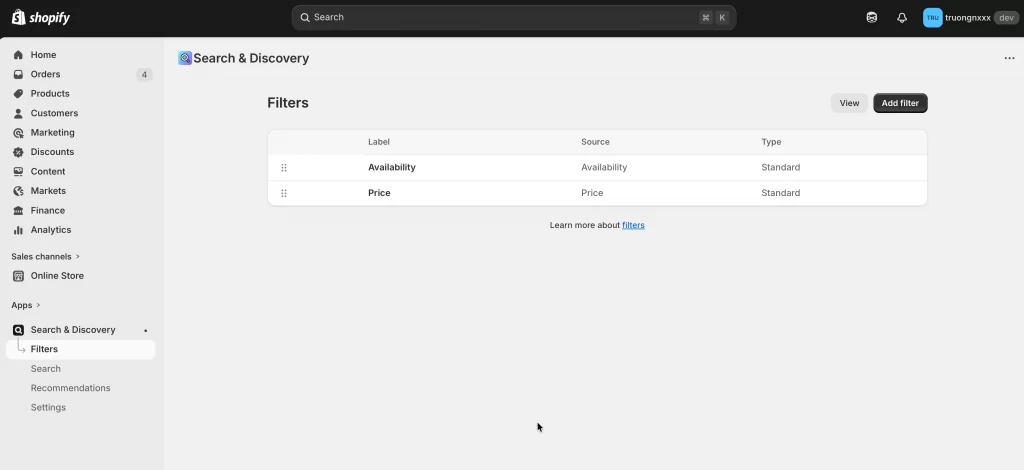
- Open Recommendations
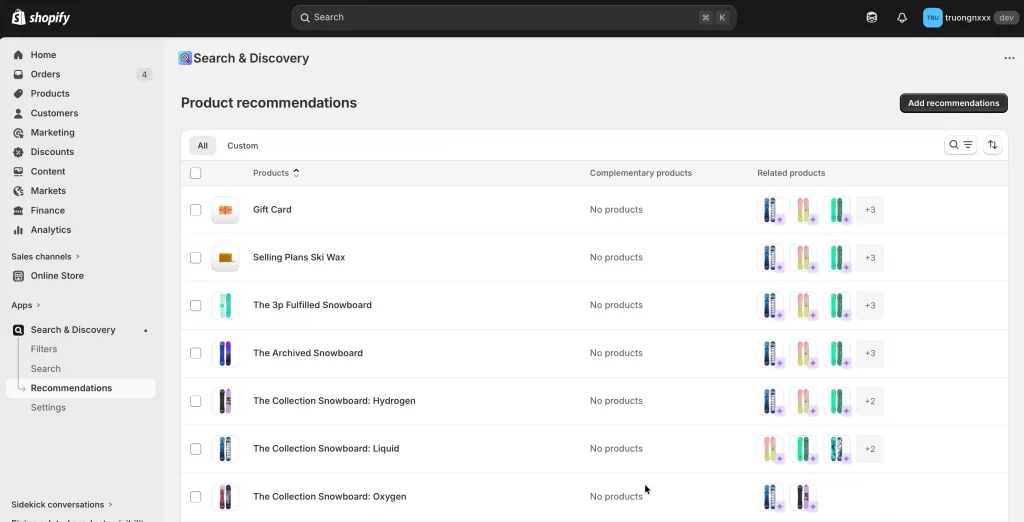
- Click Add recommendations
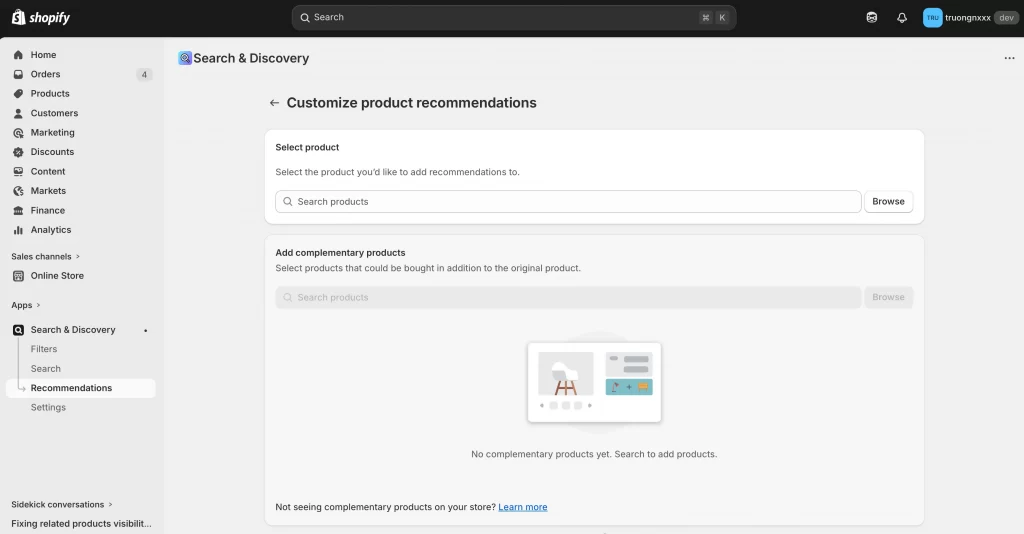
- Select the product you want to customize
- Choose up to 10 complementary products
- Choose up to 10 related products
- Select Show only custom recommendations
- Save
This method is best for curated product pairings (outfits, accessories, gift sets), new products without sales history, and premium or brand-driven stores needing precise control.
However, it requires ongoing maintenance, does not adapt to customer behavior, and can be time-consuming at scale.
Method 3: Combine manual and automatic recommendations
This is Shopify’s recommended best practice, balancing control and automation.
Your manual selections appear first. Then, Shopify fills the remaining slots with automatic recommendations. If manual picks sell out or are unpublished, automatic ones replace them.
Steps to combine manual and automatic recommendations:
- Go to Apps → Search & Discovery
- Open Product recommendations
- Click Add recommendations
- Select the product
- Add up to 10 complementary and 10 related products
- Select Show both custom and automatically generated recommendations
- Save
This method works best for most Shopify merchants. It allows you to highlight strategic products while keeping recommendations flexible and ensures recommendations continue to display even when products change.
Tip: Manually curate hero products and bestsellers, and let automation handle the rest of the catalog.
Method 4: Disable recommendations for specific products
This method hides recommendations where they don’t make sense.
Steps to disable recommendations for specific products:
- Go to Apps → Search & Discovery
- Open Product recommendations
- Select the product
- Hide auto-generated recommendations or show only custom recommendations with none selected
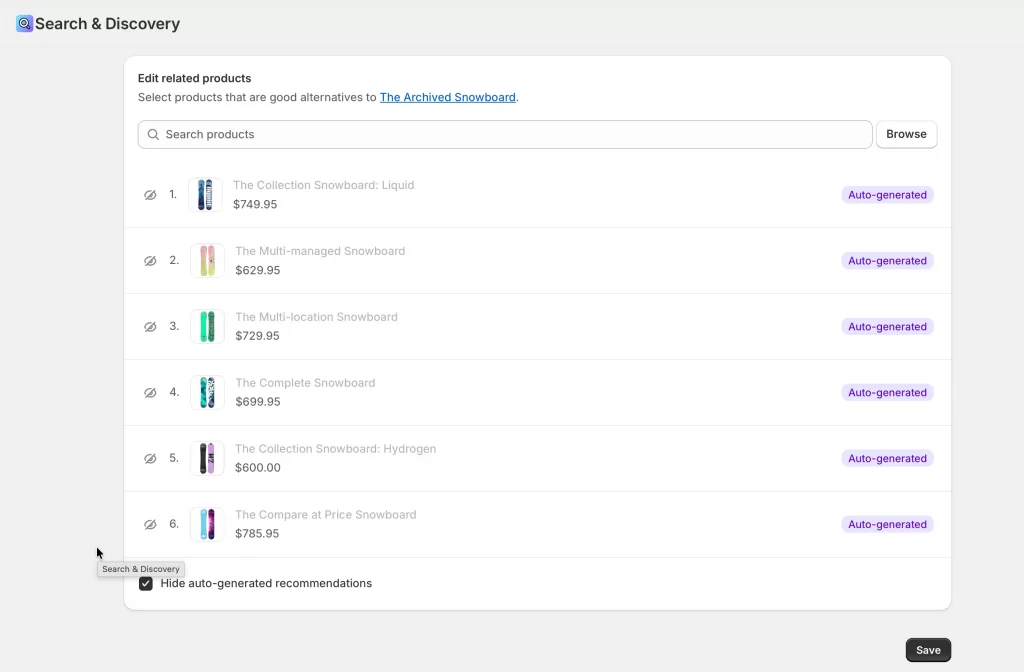
- Save
Alternatively, you can remove the Related products or Complementary products section from specific product templates in the theme editor.
This approach is best for gift cards, one-off or standalone products, clearance or final-sale items, and landing-page-focused products.
Note: This must be configured on a per-product basis.
Best Shopify Related Products Apps (With Free Plans)
If Shopify’s built-in related products don’t provide enough flexibility, several third-party apps can extend recommendation logic without immediate cost. The options below offer free plans or free tiers suitable for testing and small catalogs.
| Product Recommendations • ES | Frequently Bought Together FT | RevenueHunt: Recommender Quiz | |
| Summary | Pre/post-purchase upsells everywhere | AI bundles & cross-sells | Interactive quiz recommendations |
| Pricing | Free forever plan; Basic $9.99/mo (20-day trial) | Free plan; Premium $1 first month then from $15/mo | Free up to 100 responses/mo; Paid from $39/mo (15-day trial) |
| Unique features | One-click upsells, thank you page offers, unlimited upsells | AI analyzes order history, volume discounts, “complete the look” bundles | Quiz builder with AI, lead capture, CRM sync, customer segmentation |
| Integrations | PageFly, GemPages, Cart/Product/Thank You Page Upsell | OpenAI, EComposer, PageFly, GemPages | Klaviyo, Omnisend, Meta Pixel, Zapier, Google Analytics |
| Languages | English | English | 12 languages including English, Spanish, French, German, Portuguese |
| Support | Email, phone, Zoom/chat | Email, support portal | Email, live chat, video calls (higher plans) |
Common features: All three are Built for Shopify certified, offer free plans to get started, and provide customization options to match your brand. They focus on increasing average order value through smart product suggestions.
1. Product Recommendations • ES
Pricing: Free plan available | Paid plans start at $9.99/month for higher usage limits and advanced features.
Product Recommendations is a Shopify-built app designed to extend native product recommendations with additional upsell and cross-sell placements across the customer journey.
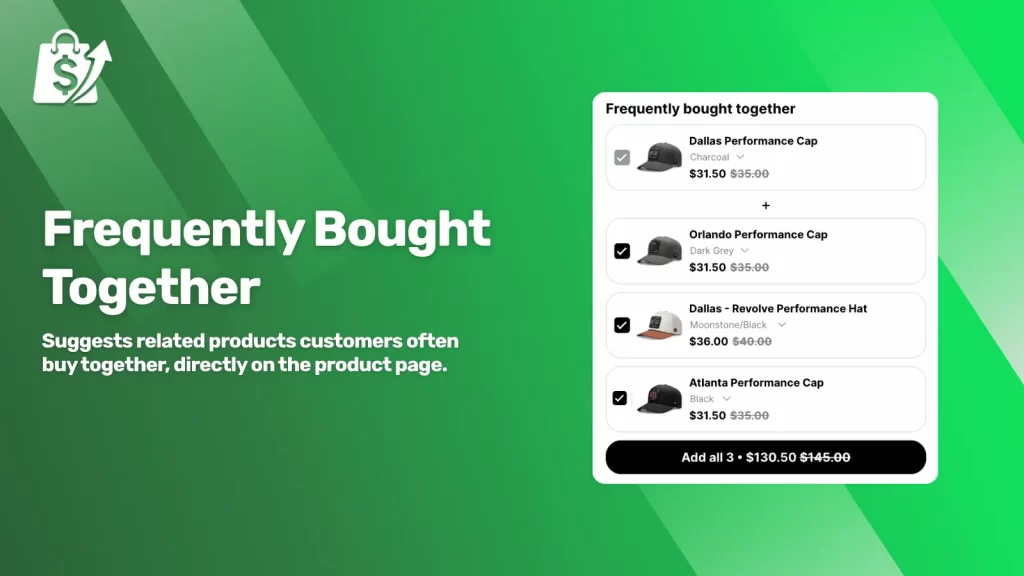
Key features:
- AI-powered product recommendations and upsells
- Frequently bought together suggestions
- Upsell placements on product pages, cart, and thank-you pages
- Optional incentives such as free shipping bars and discount-based upsells
- Built for Shopify, with native checkout compatibility
Limitations
- Less suitable for highly curated or editorial product pairings
- Advanced customization and scaling require a paid plan
- Recommendation logic is primarily automation-driven rather than rule-based
Product Recommendations works well as a lightweight upgrade to Shopify’s built-in recommendations, especially for merchants who want broader upsell coverage without managing complex merchandising logic.
2. Frequently Bought Together FT
Pricing: Free plan available (limited bundle setup) | Paid plans start from $1/month after the first month, with expanded bundle and upsell features.
Frequently Bought Together FT focuses on bundle-style recommendations that group products commonly purchased together, helping merchants increase average order value through one-click upsells.
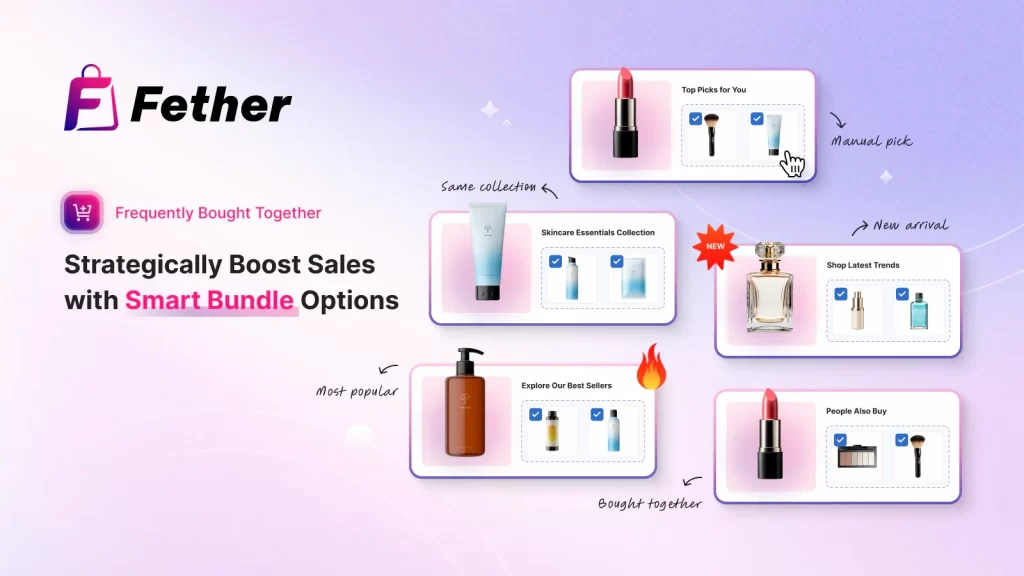
Key features
- “Frequently bought together” product bundles
- AI-driven bundle suggestions based on order history
- Product bundles with mix-and-match support
- Volume discounts and bundle-based offers
- Upsell widgets on product pages and other key locations
Limitations
- Primarily optimized for bundle and “buy together” use cases
- Less suitable for editorial or manually curated recommendations
- Advanced customization requires upgrading from the free plan
Frequently Bought Together FT is a strong option for merchants who want bundle-driven upsells and automated “buy together” recommendations, especially for catalogs where products naturally pair with each other.
3. RevenueHunt: Recommender Quiz
Pricing: Free plan available (limited quiz responses per month) | Paid plans start at $39/month, with higher limits, advanced logic, and premium support.
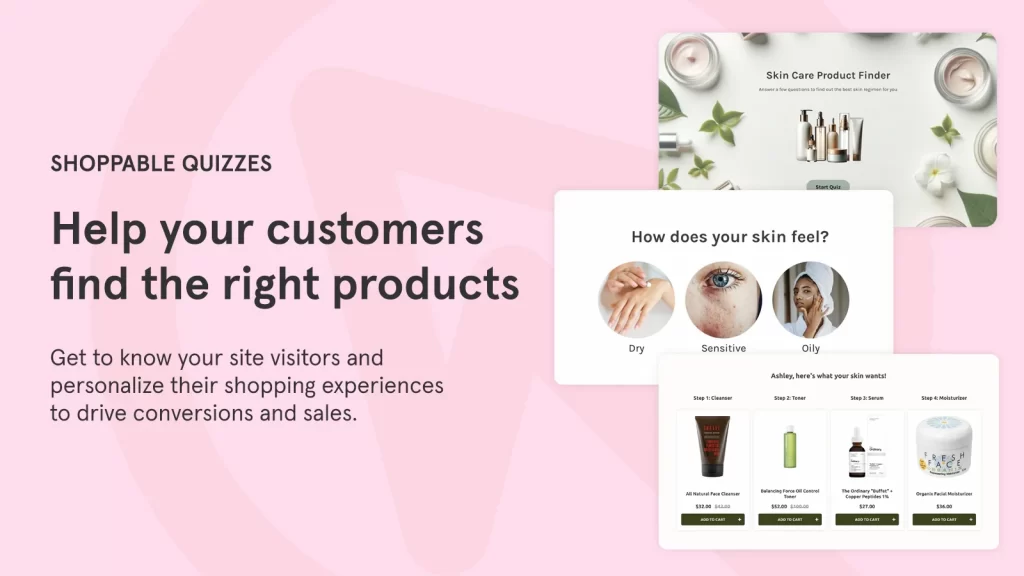
RevenueHunt: Recommender Quiz uses interactive quizzes to generate personalized product recommendations, guiding customers to the right products based on their answers rather than past purchase data alone.
Key features
- Quiz-based product recommendations
- Conditional logic to tailor results based on customer responses
- Product matching driven by customer preferences and use cases
- Integrations with Shopify Flow, Klaviyo, analytics tools, and marketing platforms
- Support for multilingual and international storefronts
Limitations
- Requires more setup time compared to automated recommendation apps
- Less effective for simple catalogs or impulse-driven purchases
- Higher cost compared to basic related products apps
RevenueHunt is best viewed as a personalization and product discovery tool rather than a traditional related products app. It excels when customers need guidance to choose the right product, but may be unnecessary for stores with straightforward catalogs.
How to Fix Shopify Related Products Not Showing
If related products aren’t appearing on your Shopify product pages, it’s usually caused by a configuration or data issue rather than a system error. The sections below cover the most common causes and how to fix each one.
Cause 1: Section not added to product template
For related products to appear, your theme must include a product recommendations section and that section must be added to your product page template.
Make sure you are using a theme that supports product recommendation sections, then add the section through the theme editor.
How to fix it
- Go to Online Store → Themes → Customize
- Open a Product page template
- Click Add section
- Add Related products or Complementary products
- Save and preview the page
Cause 2: No sales or purchase data yet
Shopify’s automatic recommendations rely heavily on purchase history to suggest products commonly bought together. If a product has little or no sales data, Shopify may not be able to generate strong recommendations.
In these cases, Shopify falls back to other signals such as product description similarity (English storefronts only) or related collections.
How to fix it
- Manually add custom recommendations in the Search & Discovery app
- Combine manual and automatic recommendations so suggestions appear while your store builds sales history
Cause 3: Recommended products out of stock
Products won’t display as recommendations if they don’t meet Shopify’s eligibility requirements. To appear as related products, items must:
- Be active and published to the Online Store
- Have a price greater than $0
- Not be sold out (unless continue selling when out of stock is enabled)
- Not be hidden or unlisted
- Not be gift cards
For complementary products, inventory must be greater than 0 for the product to display.
How to fix it
- Check product status, pricing, and inventory levels
- Ensure products are published to the Online Store sales channel
Cause 4: Recommendations disabled in Search & Discovery
Product recommendations can be customized or overridden in the Search & Discovery app. If recommendations are disabled or set to show only unavailable custom picks, nothing will appear on the product page.
How to fix it
- Go to Apps → Search & Discovery → Product recommendations
- Review the product’s recommendation settings
- Add up to 10 related and 10 complementary products if needed
- Set recommendations to show both custom and automatically generated results
Best practice: Allow both custom and automatic recommendations to display together. This ensures recommendations stay visible and continue adapting to customer behavior, even when manual selections are sold out.
FAQs: Shopify Related Products
Why aren’t my product recommendations showing?
Product recommendations won’t display if they don’t meet Shopify’s requirements. Recommended products must be active, published to the Online Store, priced above $0, not gift cards, not unlisted, and not currently in the visitor’s cart. Related products must be in stock unless continue selling when out of stock is enabled, while complementary products require inventory above 0. Your theme must also include and enable a product recommendations section.
What’s the difference between complementary products and related products?
Complementary products are add-on items commonly purchased alongside a product, such as accessories or upgrades. Related products are similar or alternative items that help customers discover comparable products they may want instead.
How do I add or customize product recommendations on Shopify?
Go to Apps → Search & Discovery → Product recommendations, click Add recommendations, select a product, then choose up to 10 complementary and 10 related products. You can show only custom recommendations or combine them with Shopify’s automatic suggestions.
How does Shopify decide which products to recommend?
Shopify uses purchase history, product description similarity (English storefronts only), and related collections to generate recommendations. Purchase-based recommendations require sales data, and the system updates regularly as customer behavior changes.
How do I add the product recommendations section to my theme?
Open Online Store → Themes → Customize, navigate to a product page template, and add the Related products or Complementary products section. Available settings and layout depend on your theme.
Final Verdict
Shopify related products are a powerful, built-in way to increase cross-selling and upselling without adding complexity to your store. For most merchants, Shopify’s native product recommendations, managed through the Search & Discovery app, are more than enough to display relevant, related, and complementary products on product pages.
If you need greater control over placement, bundles, or promotional logic, third-party apps can extend these capabilities. For advanced catalogs or highly customized merchandising strategies, combining Shopify’s automation with selective manual curation delivers the best balance between control and scalability.
The right setup depends on your catalog size, sales data, and business goals but in many cases, starting with Shopify’s native features is the most efficient and sustainable approach.
Ready to optimize your Shopify product recommendations?
At LitOS, we help Shopify merchants design and customize product recommendation strategies that actually convert, from native Search & Discovery setups to advanced custom logic for complex catalogs. Whether you need better upsells, smarter cross-sells, or a scalable custom solution, we’ll help you get it right.
Contact Us
