
Shopify vs Shopify Plus: What Are The 10 Differences?
Have you ever decided to compare Shopify plans? In that case, you’ve probably noticed how quickly the conversation jumps from a few hundred dollars a month to a price tag that starts in the thousands. That gap naturally raises an important question: What actually changes between Shopify vs Shopify Plus, and does it really justify the upgrade?
The confusion usually comes from the fact that both plans share the same core platform. That’s why, in this article, we will break down the 10 concrete differences between Shopify and Shopify Plus, focusing on:
- Pricing
- Targeted users
- Checkout customization
- Integrations
- Reporting
- Scalability
- Account management
- Expansion stores
- POS
- Support
By the end, you’ll have a clear understanding of their distinctions and which option actually fits your business stage, rather than choosing based on price alone. Let’s get started!
Shopify vs Shopify Plus: Break Down The 10 Differences
The key difference between Shopify and Shopify Plus is scale and control. Shopify provides a powerful platform, but Plus removes limitations with tools for massive growth and deep backend customization, justifying its significantly higher cost.
| Features | Standard Shopify | Shopify Plus |
| Pricing | $39 / $105 / $399 per month. Fixed fees. | Custom pricing from ~$2,300 a month. Lower, negotiable fees. |
| Target users | Small & mid-size businesses. Single store. | Enterprise & high-volume brands. Multi-store. |
| Checkout | Branding only. No logic or field changes. | Full checkout logic, fields, validation, pricing rules. |
| API & integrations | App-based. Low API limits. | ~10× API limits. ERP / CRM / WMS integrations. |
| Reporting | Prebuilt reports only. Aggregated data. | ShopifyQL. Custom queries & dashboards. |
| Scalability | 10 inventory locations. 15 staff max. | 200 locations. Unlimited staff. |
| User management | Store-level users only. Hard caps. | Centralized org-level users. Unlimited. |
| Expansion stores | Not supported. Separate subscriptions. | 1 main & 9 expansion stores included. |
| POS | POS Lite. POS Pro costs: $89/location. | POS Pro included (up to 200 locations). |
| Support | 24/7 chat. Shared queue. | Priority support & Merchant Success Manager. |
The sections below will break down each criterion in more detail:
1. Pricing
- Standard Shopify uses fixed, transparent pricing tiers ranging from $39 to $399 per month, with standard transaction fees that decrease as you move up plans.
- Shopify Plus follows a custom, enterprise pricing model starting around $2,300 per month under a 3-year contract, with negotiable, lower transaction fees.
Shopify’s pricing
First, let’s discuss the pricing!
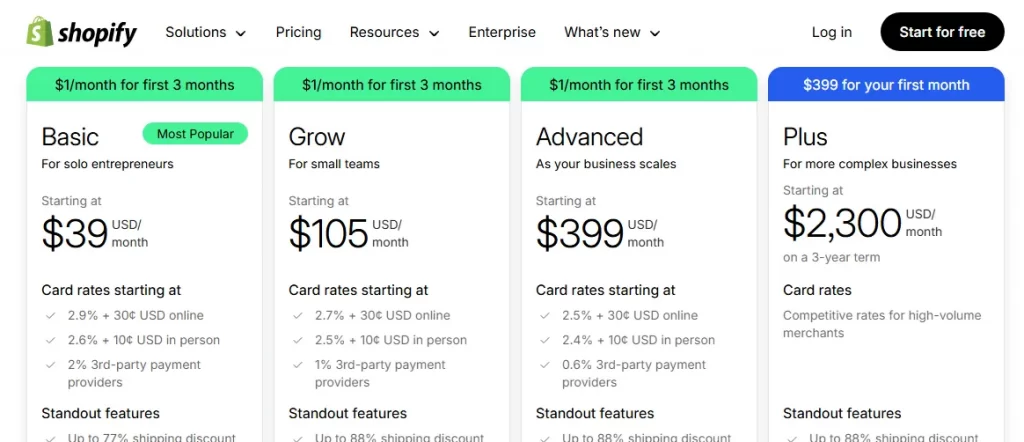
Standard Shopify offers fixed subscription pricing with three main tiered plans based on business size and needs. These are publicly listed and predictable:
- Basic Shopify: $39/month
- Grow (mid-tier): $105/month
- Advanced Shopify: $399/month
In addition, when using Shopify Payments, each plan charges a percentage and a fixed fee per order. Higher plans have slightly lower transaction fees:
- Basic: ~2.9% + 30¢
- Shopify: ~2.7% + 30¢
- Advanced: ~2.5% + 30¢
If you do not use Shopify Payments, Shopify adds additional fees on top of the third-party processor fees, up to 2%.
Shopify Plus Pricing
Shopify Plus pricing is fundamentally different from standard Shopify. It starts at approximately $2,300 per month on a multi-year term (usually a 3-year contract).
In addition, for some high-volume or complex use cases, Shopify Plus may include a revenue-based variable platform fee, calculated as a percentage of gross merchandise volume (GMV). This type of pricing varies by contract and business model and slides based on your sales levels.
And the great news is that with Shopify Plus, you typically get lower Shopify Payments rates than on standard plans. All these rates can be negotiated with Shopify based on your sales volume and region.
2. Targeted users
- Shopify targets small to mid-sized merchants who want an easy, low-maintenance ecommerce platform to start and grow a single online store.
- Shopify Plus targets high-volume and enterprise merchants who need advanced control, multi-store management, and infrastructure designed for complex, large-scale eCommerce operations.
Shopify’s targeted users
It’s quite clear that Shopify’s standard plans are targeted at individual sellers, startups, and small-to-mid-sized businesses that want to launch and grow an online store without needing enterprise-level control or complexity.
These types of users usually value predictable costs and an all-in-one platform that does not require a dedicated technical team. Their operations are often handled by a small team where one person may manage products, marketing, and fulfillment at the same time. In addition, they rely heavily on apps rather than custom development and are comfortable working within Shopify’s built-in workflows.
In terms of scale, standard Shopify users are commonly in the early to growth stage, often generating from their first sales up to the low seven figures annually. Hence, their business models are typically straightforward: a single storefront, one main brand, limited regional complexity, and standard checkout flows.
Shopify Plus’ targeted users
On the other hand, Shopify Plus is targeted at high-growth, large, and enterprise-level businesses whose operational needs go beyond what standard Shopify plans are designed to support. At this point, these users are not just selling more; they are operating at a level of complexity where scale, coordination, and customization become critical.
Typical Shopify Plus users include established DTC brands, global ecommerce companies, omnichannel retailers, and fast-scaling businesses that generate high six-figure to multi-million-dollar annual revenue. Many Plus merchants already have internal teams (such as developers, marketers, and operations managers) or work with agencies to manage custom workflows and large-scale campaigns.
In addition, these businesses often manage multiple storefronts, multiple regions, multiple brands, or both B2C and B2B sales models at the same time. They run frequent promotions, high-traffic product launches, or seasonal sales events where performance and checkout flexibility directly impact revenue. Hence, the standard Shopify structure becomes restrictive for them, meaning the additional control offered by Plus is necessary rather than optional.
3. Checkout customization
- Shopify checkout customization is limited to surface-level branding. Merchants cannot alter checkout structure, fields, validation rules, or payment logic.
- Shopify Plus enables deep structural and logic-level changes, allowing full control over checkout layout, custom fields, conditional validation, pricing and discount logic, advanced integrations, etc.
Shopify’s checkout customization
On Basic, Grow, and Advanced plans, checkout customization is intentionally restricted and focused mainly on branding consistency.
Specifically, merchants can adjust visual elements such as logo placement, colors, fonts, and button styling through Shopify’s Checkout Branding settings or Theme Editor. Still, keep in mind that the underlying checkout structure remains fixed. The checkout flow always follows Shopify’s predefined sequence (Information, Shipping, then Payment), and this order cannot be changed.
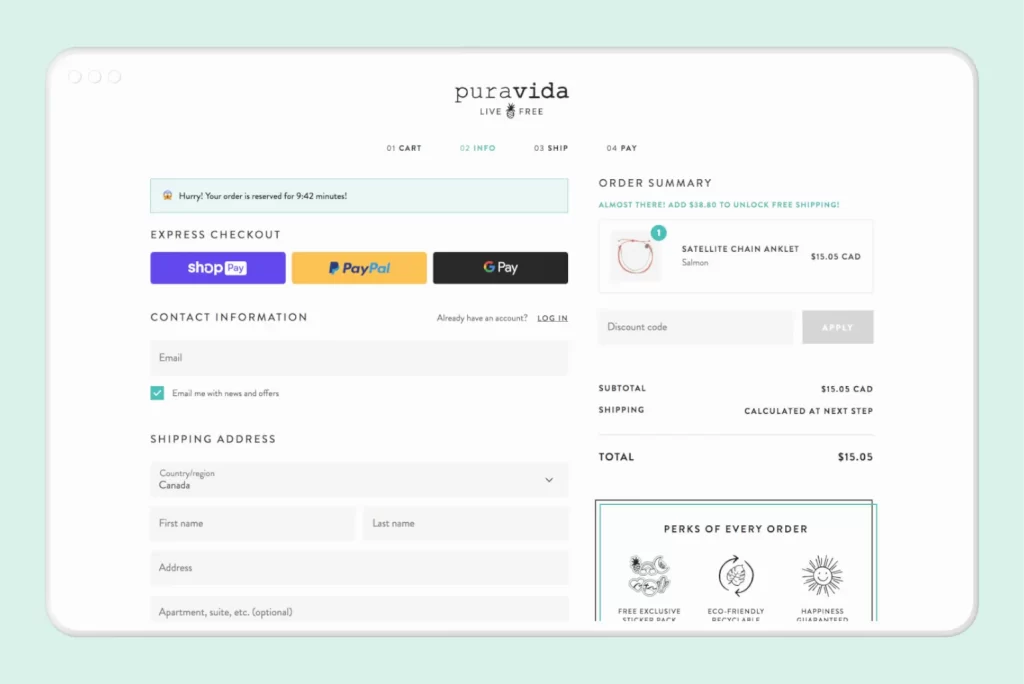
Also, from a layout and data perspective, standard Shopify does not allow merchants to add, remove, or rearrange checkout fields.
Simply put, core fields such as email, shipping address, billing address, and payment inputs are all locked. And though merchants can install eligible checkout apps, those apps operate only within Shopify’s approved extension points. That means they cannot introduce conditional logic, validate customer input in custom ways, or alter how shipping rates, taxes, or payments are calculated.
Not to mention, payment customization is arguably one of the most restricted areas on standard Shopify. Credit card fields are fully locked, particularly in the US and Canada, and merchants cannot modify their layout, validation rules, or data handling. Only non-credit-card payment methods (such as certain local gateways or manual payments) allow minimal configuration, and even then, logic-level changes are not supported.
Shopify Plus’ checkout customization
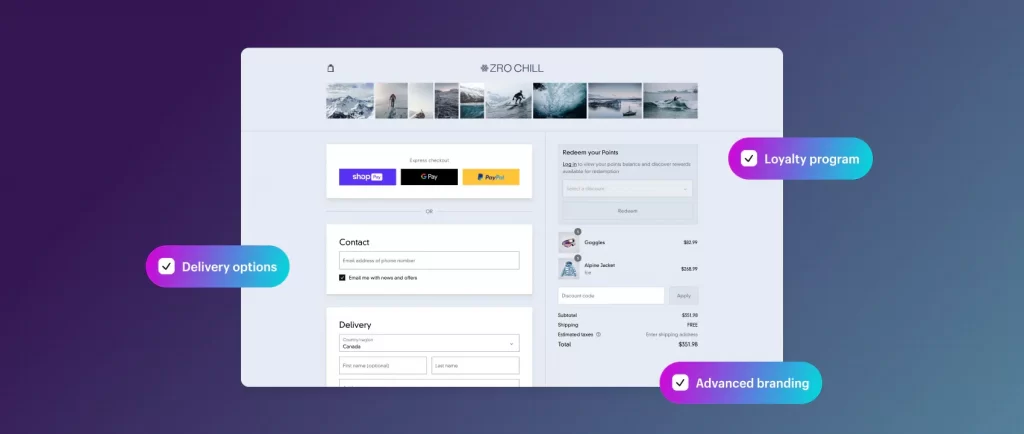
Meanwhile, Shopify Plus removes many of the structural and logical limitations imposed on standard plans and is built for deep, enterprise-grade checkout control.
Plus merchants gain access to Shopify’s checkout extensibility stack, which includes legacy tools like checkout.liquid (still supported for existing Plus stores) and modern, forward-compatible tools such as Checkout UI Extensions and Shopify Functions.
And that’s not all. With Shopify Plus, merchants can modify the layout and behavior of checkout pages across the Information, Shipping, and Payment steps. This process might include:
- Adding custom fields (for example: gift messages, delivery instructions, VAT, or tax IDs)
- Creating conditional fields that appear only for certain customers or products
- Enforcing custom validation rules before checkout completion
Logic-level customization is another key differentiator: Shopify Plus allows merchants to implement custom pricing logic, shipping rules, discounts, and promotions using Shopify Scripts (deprecated but still available) and the newer, more scalable Shopify Functions framework.
Payment customization is also significantly more flexible: Shopify Plus supports advanced payment workflows, including greater control over how payment methods are presented and processed. Even better, in the US and Canada, Plus merchants can implement custom logic around credit card handling through approved extensions and APIs, which enable tailored payment experiences that align with enterprise requirements.
4. Integrations
- Shopify integrations support plug-and-play integrations with common tools and services, but with lower API limits and limited flexibility.
- Shopify Plus integrations offer significantly higher API limits, exclusive advanced tools, and the ability to integrate Shopify tightly with ERPs, CRMs, WMSs, and custom systems.
Shopify integrations
On Standard plans, integrations are primarily app-driven and modular, designed to cover the most common eCommerce use cases without requiring custom infrastructure.
Merchants gain full access to the Shopify App Store, which includes 13,000+ third-party apps for marketing automation, email, loyalty, inventory syncing, accounting, shipping, and analytics. For many businesses, these apps are sufficient to extend Shopify beyond its core features!
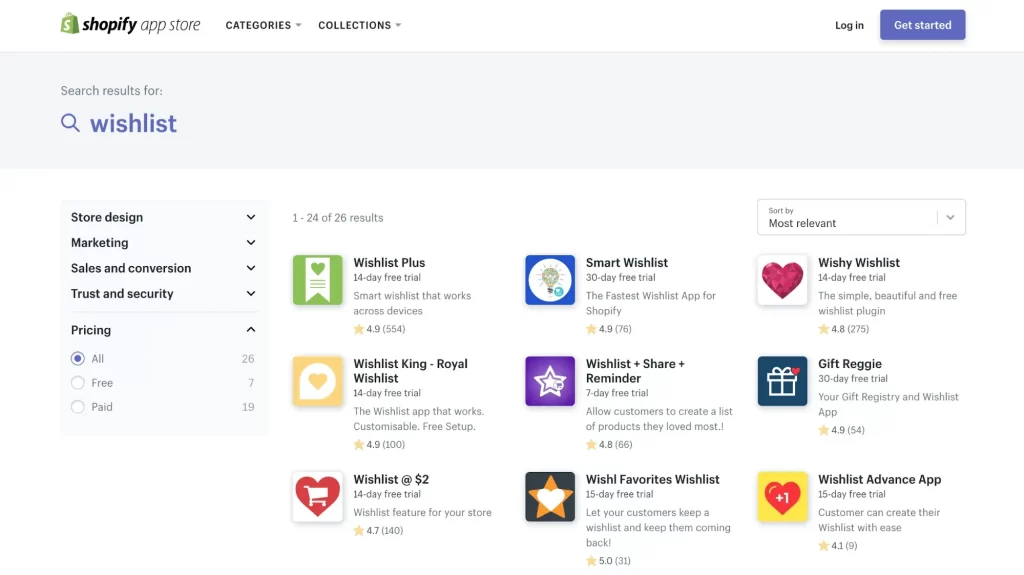
Likewise, built-in integrations are another defining aspect of standard Shopify. Merchants can natively connect to social commerce channels (such as Facebook, Instagram, TikTok), payment gateways, shipping carriers, and basic marketplace connectors without custom development.
In addition, from a technical perspective, standard Shopify plans do provide access to Shopify’s core APIs (REST and GraphQL), which allow integrations with external tools such as CRMs, basic ERPs, fulfillment services, and reporting platforms.
Nevertheless, keep in mind that API rate limits are relatively low, which restricts how frequently data can be read or written. Hence, complex logic (such as conditional syncing, multi-entity inventory rules, or tightly coupled ERP workflows) often requires workarounds or multiple apps layered together,
Shopify Plus integrations
On the contrary, Shopify Plus is designed for integration-heavy environments, where Shopify must operate as part of a broader commerce ecosystem rather than as a standalone platform.
Specifically, Plus merchants still have access to the full App Store, plus a whole set of advanced tools to help merchants connect deeply to external systems:
- Significantly higher API limits (often cited as up to 10x standard limits), which enable near real-time data exchange with ERPs, CRMs, WMSs, PIMs, loyalty engines, and custom internal systems.
- Launchpad for orchestrating flash sales and large campaigns
- Script Editor and Shopify Functions for logic-driven pricing and discounts)
- ShopifyQL Notebooks to help query large datasets directly within Shopify for advanced analysis)
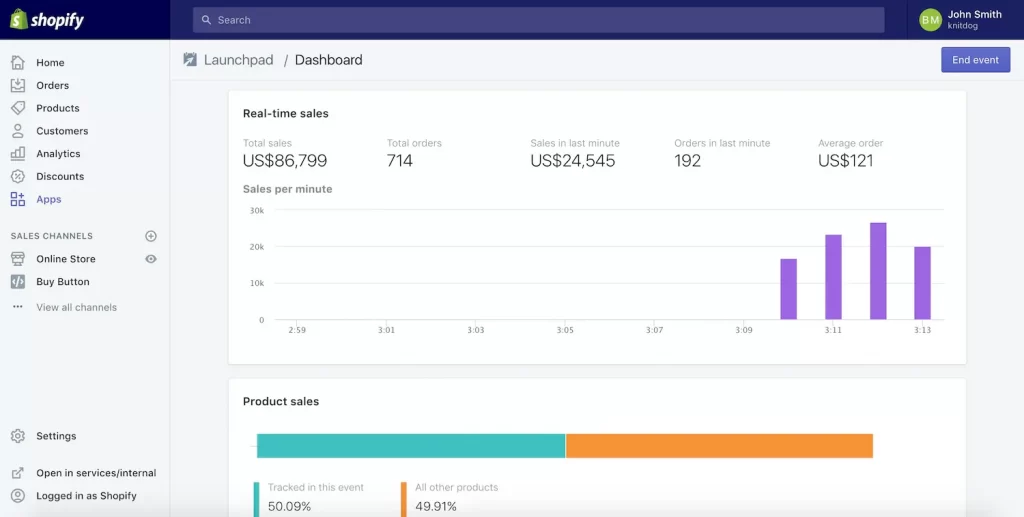
And that’s not all; integration depth also extends into checkout and backend workflows. Shopify Plus allows integrations to interact directly with checkout logic (via extensibility tools and APIs), enabling scenarios such as ERP-driven pricing, customer-specific discounts, contract-based B2B checkout flows, or region-specific payment logic.
Even better, Plus allows merchants to create and manage multiple expansion stores under a single organization, making it even easier to integrate Shopify with global systems that handle multiple brands, regions, or customer segments. Integrations can be shared, centralized, or even customized per store, which is extremely beneficial for international or omnichannel operations.
5. Reporting
- Shopify reporting analytics rely on predefined dashboards and aggregated reports, offering enough visibility for trend tracking and basic optimization.
- Shopify Plus analytics provide advanced data access and analytical depth through tools like ShopifyQL Notebooks, customizable dashboards, and higher API limits.
Shopify reporting & analytics
With the standard subscription plans, merchants get access to Shopify’s standard analytics dashboard, which includes predefined reports covering:
- Sales performance
- Product performance,
- Customer behavior
- Marketing attribution
- Finance
- Real-time Live View.
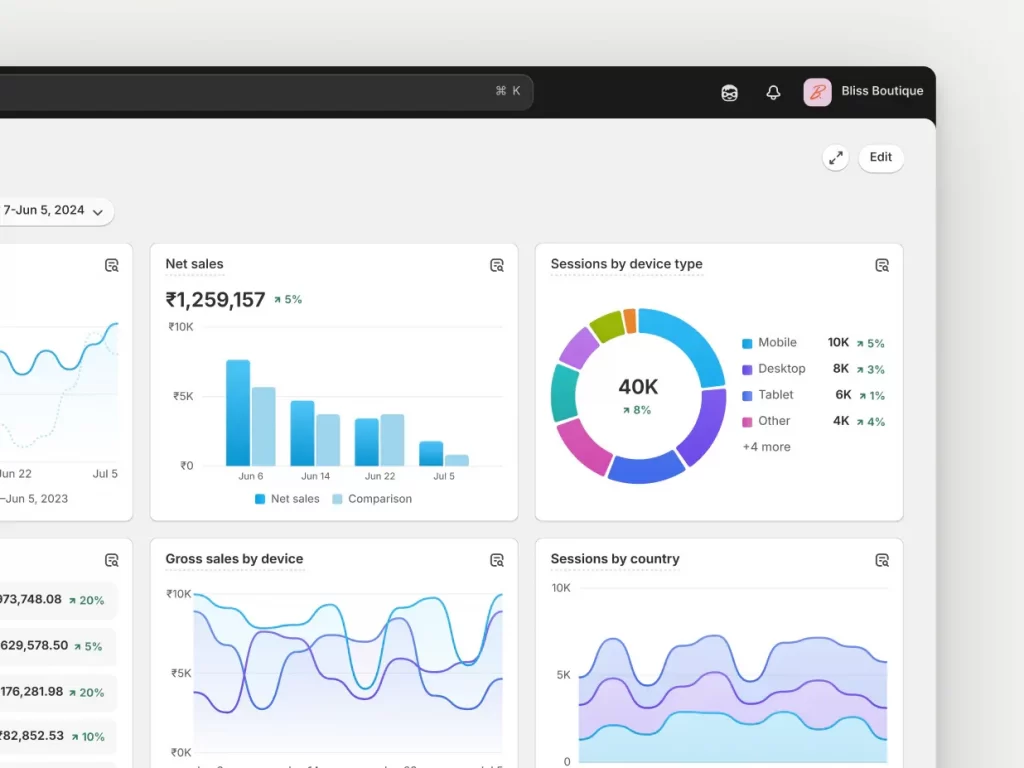
All these reports are easy to use and require no technical knowledge, which makes them suitable for day-to-day monitoring and basic decision-making.
On another note, the data available in standard Shopify reports is mostly aggregated and pre-structured. Merchants can filter by date ranges, channels, or products, but they cannot freely query raw data or create highly customized metrics. Customer insights, for example, are limited to high-level indicators such as returning vs new customers, average order value, and basic cohort behavior, without deep behavioral segmentation.
Also, keep in mind that while merchants can export reports or slightly adjust columns (depending on plan), they cannot build fully custom dashboards or define complex KPIs directly inside Shopify. As a result, merchants often rely on third-party analytics apps or external tools such as Google Analytics, Mixpanel, or customer analytics platforms to gain deeper insights.
Shopify Plus reporting & analytics
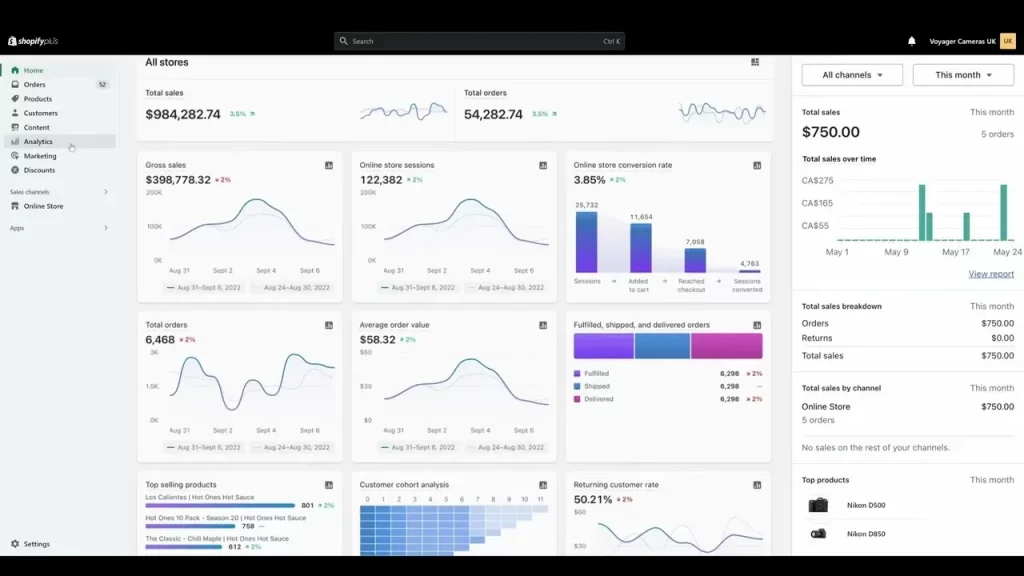
On the other hand, Shopify Plus gives merchants significantly more access to advanced data exploration tools and higher data accessibility.
As mentioned briefly earlier, a major differentiator is ShopifyQL Notebooks, which allows Plus merchants to query Shopify data directly using ShopifyQL, Shopify’s query language. Hence, it’s possible to carry out more complex analysis, such as:
- Custom cohorts
- Multi-dimensional sales breakdowns
- Inventory aging analysis
- Customer behavior trends across time
- Performance comparisons
In addition, Shopify Plus also provides more granular access to underlying data, paving the way for a thorough investigation into customer journeys, purchasing patterns, discount usage, and inventory movement at a detailed level.
Better yet, Plus merchants can build dashboards that focus on their most critical metrics, whether those are operational KPIs, growth indicators, or financial performance signals. Combined with higher API limits, Shopify Plus even allows analytics data to be written to or pulled into external BI platforms such as Looker, Tableau, Power BI, or enterprise data warehouses, further enabling centralized reporting across the entire organization.
6. Scalability
- Shopify scalability supports traffic growth and basic international expansion on a single store, with clearly defined operational limits (10 inventory locations, up to 15 staff accounts).
- Shopify Plus scalability is built for high-volume and high-complexity operations, expanding key limits to 200 inventory locations, unlimited staff accounts, and more advanced coordination tools.
Shopify scalability
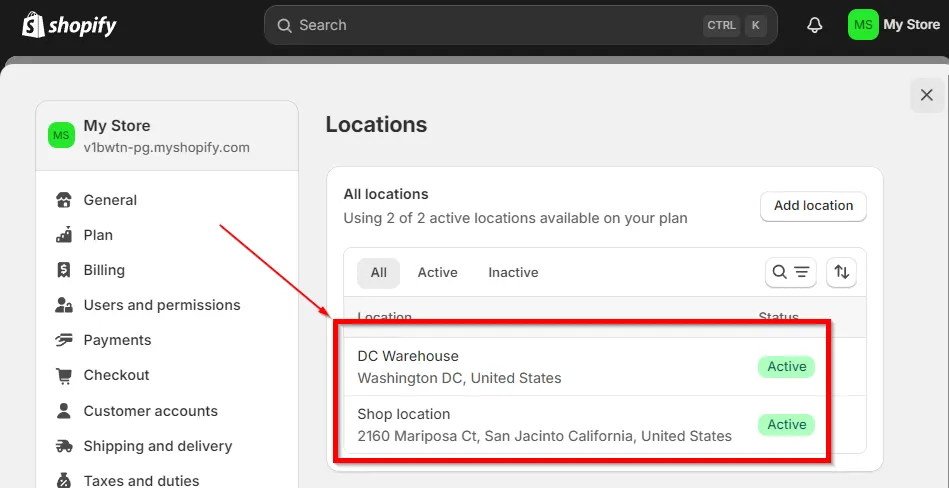
From an inventory and fulfillment perspective, standard Shopify supports a maximum of 10 inventory locations per store. These locations include internal warehouses, physical retail stores, and third-party logistics providers (3PLs). Once a business exceeds this limit, inventory must be merged or handled outside Shopify.
How about international expansion? At the moment, Shopify Markets on standard plans supports up to 50 Markets. However, all Markets operate within a single-store architecture, meaning pricing logic, product structure, automation rules, and inventory logic are shared across regions.
Organizationally, standard plans also impose staff account limits (15 staff accounts on Advanced Shopify), which can restrict collaboration across larger teams. And since API rate limits are also low, standard Shopify is suitable for moderate data volumes but less effective for high-frequency or real-time system synchronization.
Shopify Plus scalability
As said earlier, Shopify Plus is engineered specifically for high-volume, high-complexity scaling. That explains the significantly higher operational limits and built-in tools to support growth across traffic, teams, regions, and systems.
Specifically, for inventory and fulfillment, Shopify Plus supports up to 200 inventory locations per store, a clearly defined limit that enables large brands to operate across multiple warehouses, retail locations, and 3PL partners without workarounds. This advantage is a critical difference for omnichannel and distributed fulfillment models.
At the traffic and checkout level, Shopify Plus supports extreme concurrency and peak events. Shopify has publicly stated that Plus can handle thousands of checkouts per minute during major events such as Black Friday or global product drops, aided by priority processing compared to standard plans.
Furthermore, in global scaling, Shopify Plus supports the same Markets framework but is designed to work alongside multiple expansion stores under a single organization. Though Shopify itself does not publish a hard numerical cap for expansion stores in public docs, Plus merchants commonly operate multiple regional or brand stores with shared integrations, centralized reporting, and separate operational logic.
And the best part: from an organizational and systems standpoint, Shopify Plus provides unlimited staff accounts and significantly higher API rate limits, all coupled with enterprise-level support. As a result, Shopify Plus stores can easily function as a scalable commerce layer integrated with ERPs, WMSs, CRMs, and internal platforms.
7. Account management
- On Shopify, Staff accounts are strictly capped per store (Basic: 1, Shopify: 5, Advanced: 15), with store-level permissions and no centralized user management.
- Shopify Plus offers unlimited staff accounts, more granular role permissions, and centralized user management across multiple stores, enabling scalable control over admin and staff access.
Shopify’s account management
On standard Shopify plans, account management is built for small teams and comes with hard limits on the number of staff accounts per store. Each plan allows the following number of staff (admin) accounts:
- Basic: 1 staff account
- Grow: 5 staff accounts
- Advanced: 15 staff accounts
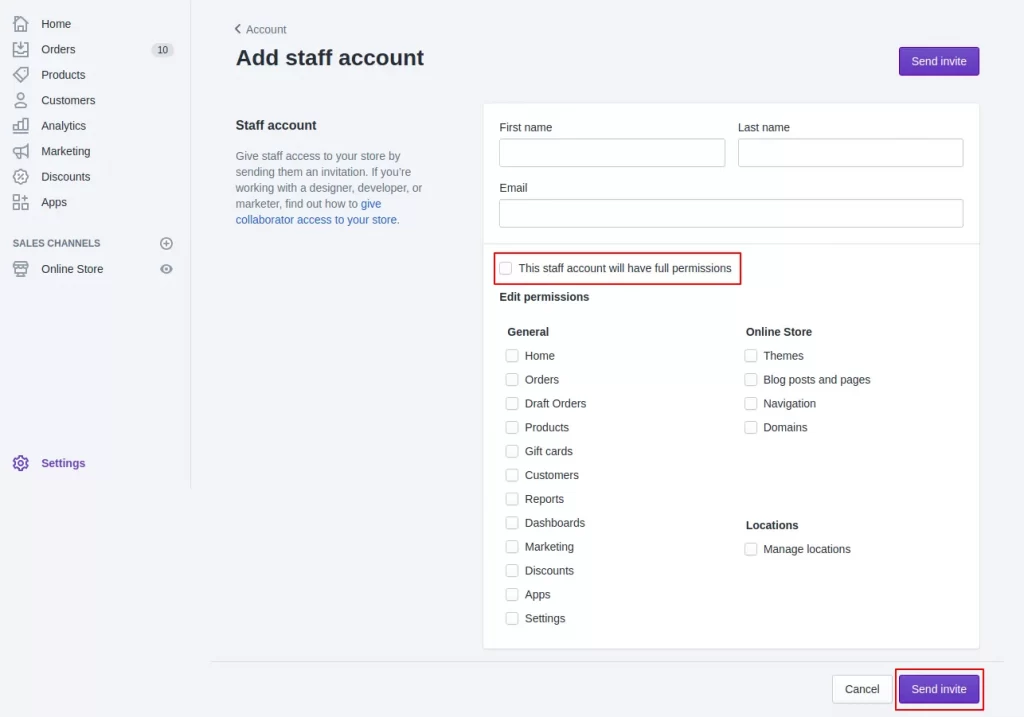
These limits apply per store and do not include the store owner account. However, they do include all admin and staff users, such as marketing, customer support, operations, and developers. Once the limit is reached, you cannot add more users unless you remove existing ones or upgrade your plan.
Also, keep in mind that account management on standard plans is also store-specific. If you run multiple Shopify stores, staff accounts must be created, assigned, and maintained separately for each store. There is no centralized way to manage users across multiple stores, which increases administrative effort and the risk of inconsistent access control.
Shopify Plus’s account management
On the contrary, the account management capabilities on Shopify Plus clearly reflect that it’s designed for large teams and complex organizations.
As discussed above, Shopify Plus supports unlimited staff accounts, which basically removes all constraints on team size.
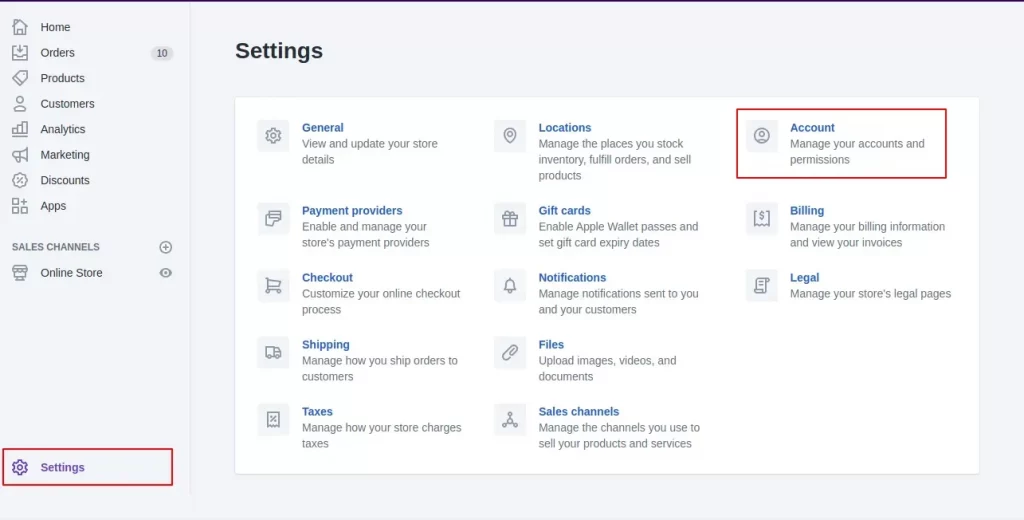
You can freely add internal employees, external agencies, or temporary collaborators without worrying about hitting a user cap or restructuring access. Even better, permissions on Shopify Plus are more granular and scalable, allowing clearer separation of responsibilities across teams such as merchandising, finance, customer support, development, and analytics.
And most importantly, Shopify Plus enables centralized staff management across multiple stores under the same organization. Instead of managing users store by store, you can control staff access more consistently across regional or brand-specific storefronts. Needless to say, this feature can significantly reduce unnecessary operational friction for multi-store businesses.
8. Expansion stores
- Shopify does not support expansion stores. Each additional storefront requires a separate Shopify subscription with its own admin, billing, staff setup, and configuration.
- Shopify Plus includes 1 main store plus up to 9 expansion stores under a single Plus organization. Each expansion store is fully independent (domain, catalog, pricing, checkout), while staff access and administration are centrally managed.
Shopify expansion stores
For standard Shopify, there is, unfortunately, no concept of “expansion stores” as a built-in or managed feature.
Simply put, each Shopify store is treated as a completely separate entity. If a business wants to operate multiple storefronts (for example, separate stores for different countries, brands, or customer segments), it must purchase and manage individual Shopify subscriptions for each store.
These stores have independent admin panels, separate billing, separate staff management, and no shared organizational layer. There is no native way to group multiple stores under one umbrella account, meaning all operational tasks (such as staff access setup, store configuration, and maintenance) must be repeated store by store.
Sure, Shopify does offer tools like Shopify Markets to localize a single store across multiple countries. Nevertheless, this still operates on one backend store. It does not provide separate storefronts with independent catalogs, pricing, checkout logic, or legal configurations.
Shopify Plus expansion stores
Meanwhile, Shopify Plus introduces Expansion Stores as a core part of its enterprise offering.
Under a single Shopify Plus contract, merchants receive 1 primary store plus up to 9 additional expansion stores, all managed within the same Shopify organization. These expansion stores are fully standalone Shopify stores, not sub-sites or localized versions of a single store.
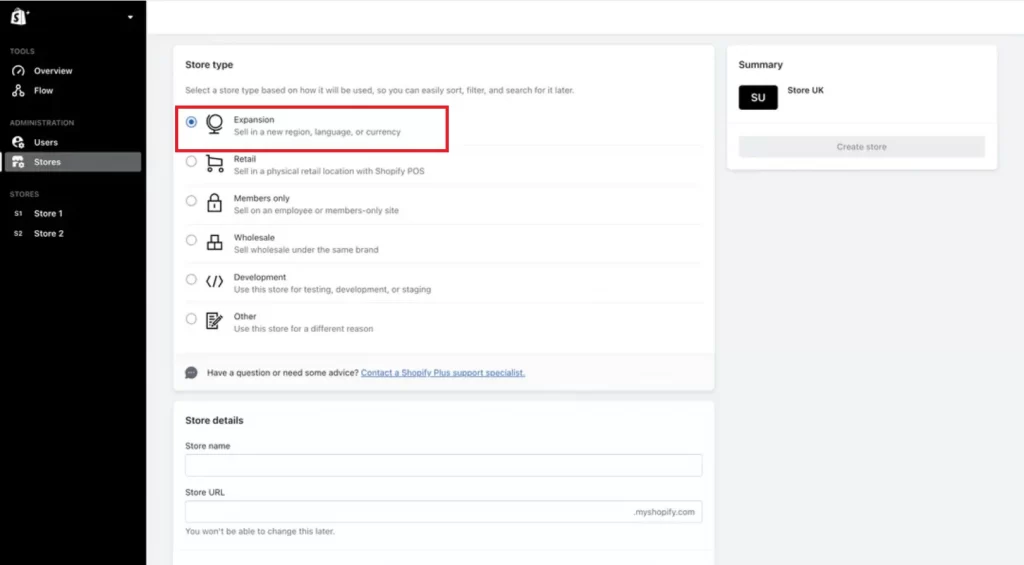
Each expansion store can have its own domain, theme, product catalog, pricing structure, checkout setup, payment methods, and apps. And the best part: Shopify Plus allows merchants to manage staff access, permissions, and high-level administration across all expansion stores from one organization layer, instead of handling each store in isolation. Billing is also consolidated under the Plus contract to reduce administrative complexity.
9. POS
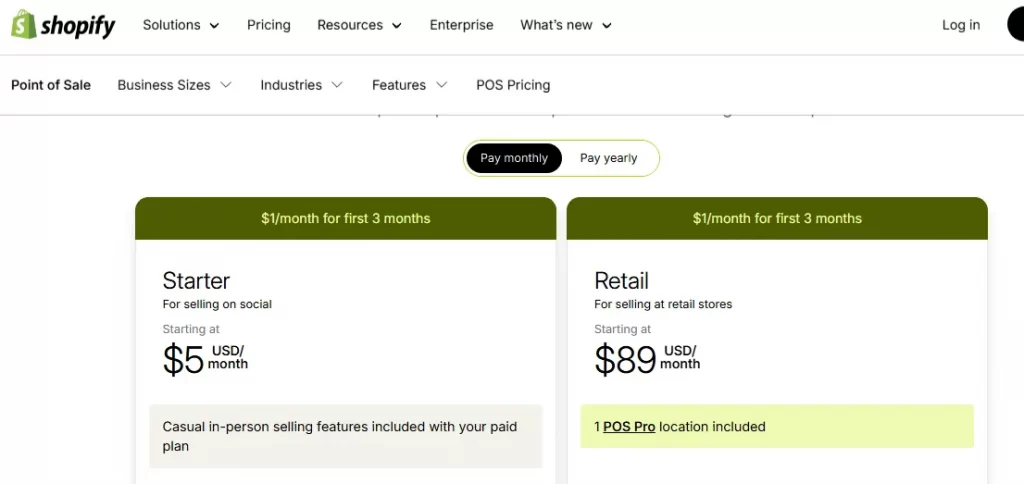
- Shopify comes with POS Lite only. To access POS Pro, (POS Pro), merchants must pay $89/month per retail location.
- Shopify Plus includes POS Pro for the first 20 retail locations by default. If Shopify Payments is used with at least one in-store transaction per month, POS Pro fees are waived for up to 200 locations.
Shopify POS
All Shopify plans (Basic, Grow, and Advanced) include the basic Shopify POS system, which allows you to sell in person using the Shopify POS app on iPad, iPhone, Android, or web.
The standard POS features offered include:
- Accepting in-store payments and managing sales at physical locations.
- Inventory synchronization between online and offline, so stock levels stay unified.
- Basic customer profiles and order history.
- Working with Shopify hardware (such as card readers, receipt printers, scanners).
Nevertheless, standard Shopify only comes with the free POS Lite functionality by default; there is no enterprise-grade POS included on those plans.
Hence, to access advanced retail features, merchants on regular Shopify plans must pay an additional subscription for Shopify POS Pro, typically $89 per month per store location (or discounted with annual billing). Without POS Pro, Shopify’s POS system remains functional for basic sales only.
Shopify Plus POS
Unlike standard Shopify plans, Shopify Plus includes POS Pro as part of the enterprise package. Every Shopify Plus plan automatically includes POS Pro for the first 20 retail locations, with no additional subscription fee.
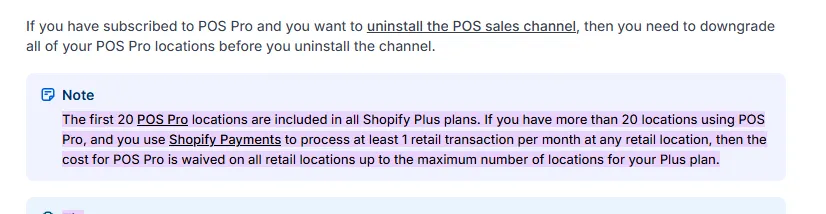
And that’s not all. If your business operates more than 20 locations, Shopify Plus can continue to waive POS Pro fees across ALL retail locations, provided you use Shopify Payments and process at least one in-store transaction per month at any retail location.
In practice, this means Shopify Plus merchants can deploy full POS Pro functionality at scale (up to 200 POS locations) without paying the standard $89 per-location monthly fee. Needless to say, that is a significant advantage for large, multi-location retail operations!
With POS Pro included, Shopify Plus retailers get:
- Unlimited POS locations (up to the included threshold)
- Advanced inventory and omnichannel tools across all retail locations.
- Detailed sales and staff-level analytics across stores.
- Better staff role/permission control in the POS itself.
10. Support
- Shopify provides 24/7 live chat through a shared support queue, with no dedicated account manager or priority escalation.
- Shopify Plus offers priority 24/7 support (live chat and phone), delivering more personalized, proactive, and strategic support tailored to high-volume businesses.
Shopify’s support
Currently, all standard Shopify plans include 24/7 live chat.
You can contact support any time through Shopify’s help center after logging into your store. Support agents assist with general platform issues, troubleshooting, and feature questions.
However, since these are standard plans, no dedicated or personalized account manager is assigned. Your support interactions are mostly handled through the general support queue shared by all Shopify merchants. In short, the Shopify team focuses mainly on answering problems rather than partnering with you on growth.
Shopify Plus support
On the contrary, Shopify Plus includes much more advanced support services designed for enterprise-level stores with high traffic.
Specifically, Plus merchants are typically assigned a Merchant Success Manager (MSM) (or similar dedicated contact). This person helps not just with technical issues but with planning campaigns, setting up integrations, and improving workflows.
In addition, there is also priority 24/7 support: Shopify Plus calls are escalated ahead of standard plan tickets, which results in faster response times for critical issues. On certain occasions, there might also be phone support lines reserved for higher-tier plans if needed.
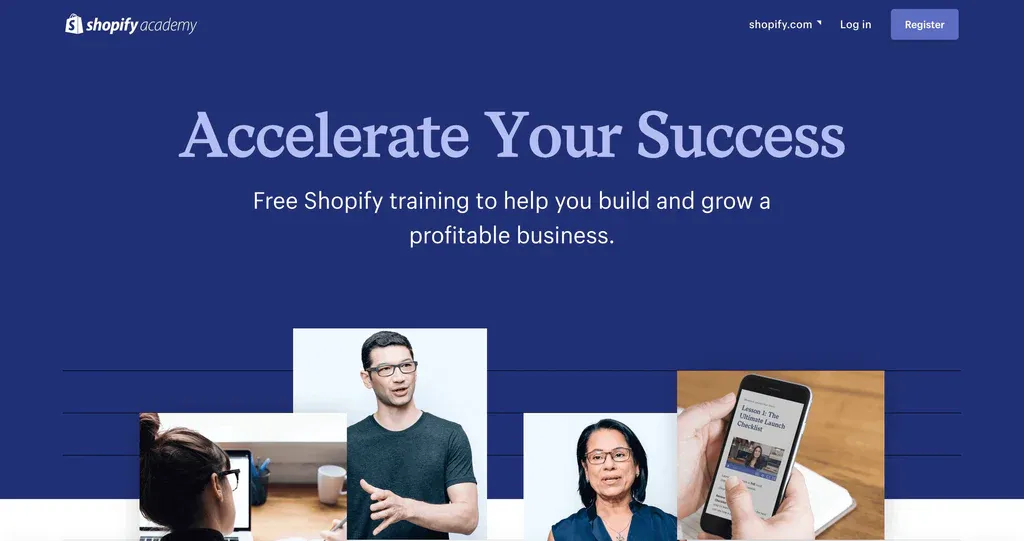
And that’s not all. Human support aside, Shopify Plus merchants even get access to exclusive educational resources like the Shopify Academy and specialized training content, which connects them with vetted experts and solution partners to help solve complex challenges.
Is Shopify Plus Worth It?
Yes, Shopify Plus is worth it for large, high-volume businesses needing advanced customization, global scaling, and enterprise-level support. Still, keep in mind that it might be too expensive and overkill for small to medium businesses, who should stick to standard Shopify plans.
Below are the five most significant benefits that explain why Shopify Plus is a smart investment for high-growth and enterprise businesses.
1. Checkout flexibility that directly protects and increases revenue
Checkout is the most sensitive part of any eCommerce funnel, and for complex businesses, a rigid checkout becomes a bottleneck very quickly.
On standard Shopify plans, merchants are locked into a fixed checkout structure with minimal logic control. Fortunately, Shopify Plus removes these constraints by allowing businesses to introduce custom fields, conditional logic, validation rules, and dynamic pricing or discount behavior directly into checkout.
Such a high level of control allows checkout to reflect real business rules instead of forcing the business to adapt to platform limitations. For example, Plus merchants can:
- Enforce VAT or tax ID validation
- Show or hide payment methods based on customer type
- Apply contract pricing
- Customize discount logic during high-volume campaigns.
2. A multi-store structure built for global and multi-brand growth
As businesses expand internationally or diversify into multiple brands, managing everything inside a single store becomes increasingly inefficient.
Shopify Plus solves this dilemma by supporting expansion stores under one organization, allowing each store to operate independently while remaining centrally managed. Each expansion store can have its own domain, product catalog, pricing strategy, checkout rules, and legal setup.
At the same time, to avoid the chaos that usually comes with multi-store setups, Shopify Plus also centralizes access, integrations, and administration. That way, global teams can move faster without duplicating work or losing oversight, which is critical for brands running regional storefronts, wholesale and DTC channels, or multiple brand identities.
3. Higher API limits and integration depth for system-driven operations
Once a business reaches a certain size, Shopify can no longer function in isolation. Inventory, pricing, fulfillment, finance, and customer data often live across multiple systems, such as ERPs, CRMs, WMSs, or internal tools.
The great news is that Shopify Plus is designed for these integration-heavy environments! With significantly higher API limits and access to advanced tools, Plus allows Shopify to act as a reliable commerce layer within a broader tech stack.
This advantage enables more accurate inventory synchronization, automated pricing updates, customer-specific rules, and faster data exchange across systems. As a result, it reduces manual work and lowers the risk of operational breakdowns as the business scales.
4. Scalability and performance during traffic spikes and peak events
Traffic spikes are no longer an exception for fast-growing brands — they are planned, repeated events. Flash sales, product drops, influencer campaigns, and seasonal peaks all place extreme pressure on checkout and infrastructure.
Fortunately, Shopify Plus merchants benefit from priority checkout processing and higher operational limits, which help ensure that traffic surges convert into completed orders rather than failed checkouts. This reliability is especially valuable for businesses where minutes of downtime or slow checkout performance can result in significant revenue loss. After all, performance is no longer just a technical concern at scale; it has now become a direct driver of both customer trust and brand reputation.
5. Enterprise-level support and reduced operational friction
Last but not least, as teams grow, internal coordination becomes just as important as customer-facing features. That’s why Shopify Plus supports unlimited staff accounts, granular permissions, and centralized user management across multiple stores, so you can scale teams without constantly restructuring access!
In addition, Shopify Plus merchants also receive priority support and access to a dedicated success or account manager. Rather than reacting only when a problem arises, this level of support helps businesses plan launches, optimize workflows, and address issues faster. For high-revenue stores, the ability to resolve issues quickly (or, better yet, avoid them altogether) often justifies the cost of Plus on its own.
How to Upgrade to Shopify Plus
To complete the upgrade from Standard to Plus, simply select Shopify Plus, confirm your billing setup, and then complete Shopify’s verification checks. If your store does not qualify for an automatic upgrade, Shopify will redirect you to speak with the Plus sales team instead.
The detailed steps are as follows:
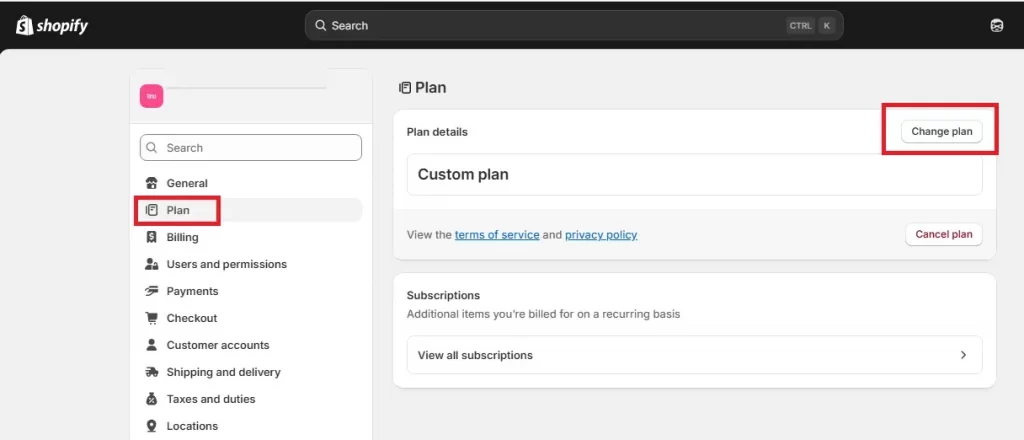
Step 1. Open your plan settings
First, log in to your Shopify admin, then open “Settings” and select “Plan.” Click “Change plan” to view all upgrade options available for your store.
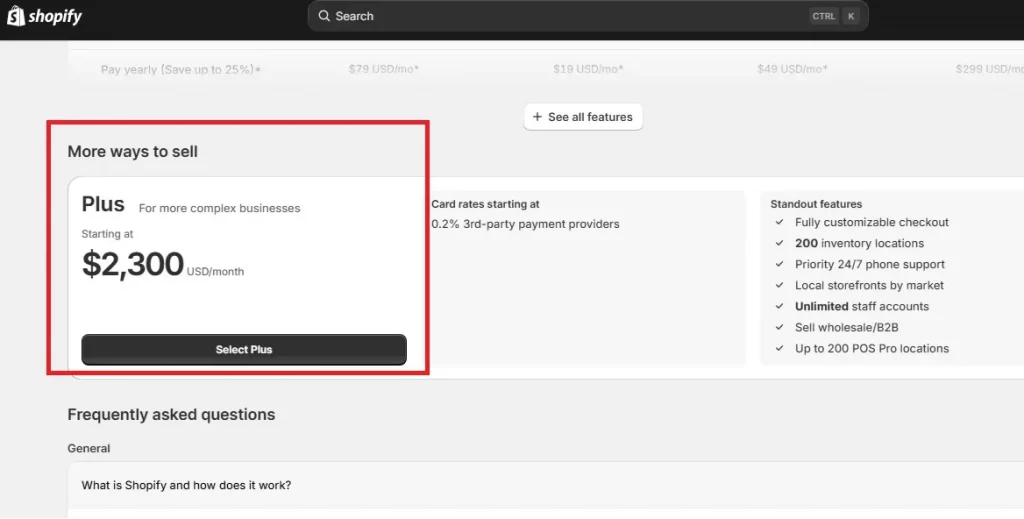
Step 2. Select Shopify Plus and confirm billing
On the plan selection screen, choose “Shopify Plus.” Shopify will then ask you to review the billing terms and select an available billing cycle (typically monthly or annual). Once you’ve reviewed the agreement, click “Subscribe” to confirm your choice and initiate the upgrade.
Step 3. Complete verification and finalize
After submitting the upgrade request, Shopify may prompt you to complete an identity verification step, which might include confirming account details or providing a government-issued photo ID (depending on your store and region).
Follow the on-screen instructions to complete verification. Once approved, your store is officially upgraded to Shopify Plus.
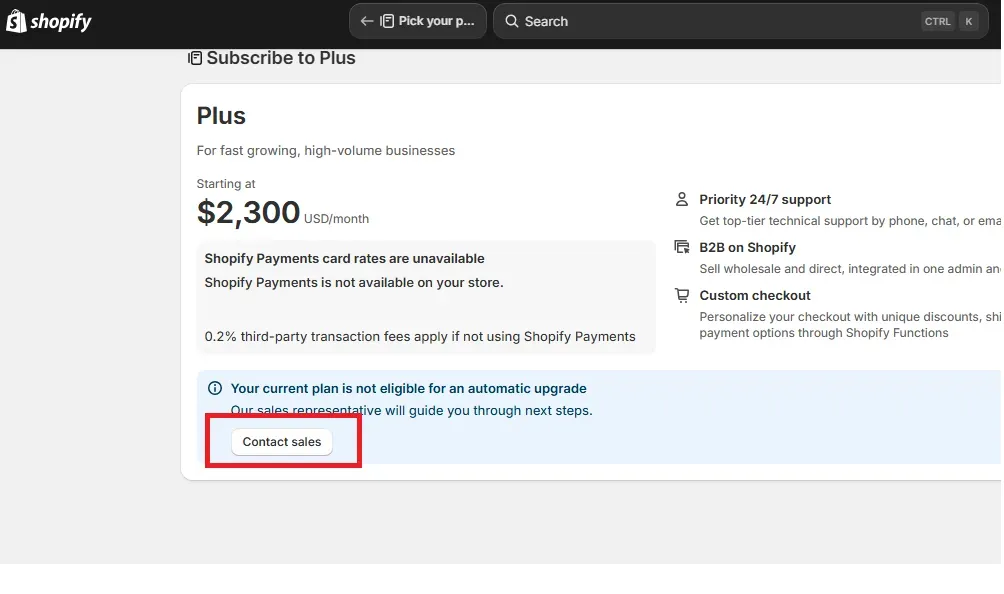
Important note:
Some high-volume or complex stores are not eligible for self-service upgrades. In these cases, Shopify will display a “Contact sales” option instead of allowing you to select Plus directly. You’ll need to speak with the Shopify Plus sales team to discuss pricing, contract terms, technical requirements, and more.
Shopify vs Shopify Plus: FAQs
What is the difference between Shopify Basic and Plus?
Shopify Basic is for small businesses starting online and offers core, basic eCommerce tools. On the other hand, Shopify Plus is an enterprise solution for high-growth, large-volume brands.
How much is Shopify Plus vs Shopify?
Shopify has tiered plans (Basic, Grow, Advanced) from around $39-$399/month. Meanwhile, Shopify Plus is an enterprise-level platform starting at $2,300/month under a 3-year contract.
What is the difference between Shopify Advanced and Shopify Plus?
Shopify Advanced is for growing mid-market businesses needing better reporting, lower fees, and basic automation. On the other hand, Shopify Plus targets large enterprises needing ultimate control, massive scale, deep customization (checkout, API), dedicated support, and advanced features like wholesale & multi-store management.
When should I upgrade to Shopify Plus?
You should upgrade to Shopify Plus when you're scaling to enterprise levels, hitting revenue of $1M+ annually (or $80k/month), need deep checkout/store customization, require advanced automation (Flow), handle high traffic during sales, or need robust B2B/international features.
Final Verdict: Which to Choose?
The choice between Shopify vs Shopify Plus is not about which platform is “better” in absolute terms. You need to consider where your business is in its growth lifecycle and what constraints are starting to slow you down.
Standard Shopify is usually the smarter choice if your business is still operating within a relatively simple structure (e.g., a single storefront, limited regional complexity, standard checkout flows, and a small team).
These plans offer predictable pricing, a mature app ecosystem, reliable performance, and enough flexibility for most small to mid-sized merchants to grow comfortably. In this stage, Shopify’s limitations are often not blockers; in fact, they can help keep operations focused and manageable without the overhead of enterprise tooling.
However, the equation changes once growth introduces structural friction. Consider upgrading to Shopify Plus when:
- Checkout restrictions start limiting how you price, discount, or validate orders.
- API limits slow down integrations with ERPs or fulfillment systems
- Team size outgrows staff caps
- Running multiple regions or brands inside a single store becomes operationally chaotic.
In short:
- Choose Shopify if you need speed to market, simplicity, and cost control while your operations remain relatively straightforward.
- Choose Shopify Plus if your growth is being held back by platform limits and you need enterprise-level control, scalability, and flexibility to support the next phase of your business.
Ready to scale beyond standard Shopify?
When your business starts hitting Shopify’s structural limits, the question is no longer whether to upgrade, but how to do it right. From smooth Plus upgrades to complex custom builds, we make sure your Shopify store is built to scale, not just to run.
Contact Us
