
Shopify Product Variants: Limits & Customization 2026
It’s common knowledge that even for the same product, Shopify customers rarely want the exact same thing. Some care most about color; others focus on size, material, or style. Hence, how you present Shopify product variants plays a critical role in whether customers feel motivated to buy from your store.
And yet, surprisingly, many merchants still don’t fully understand how product variants work on Shopify. That’s exactly why we’re here to help! In this guide, we’ll explain:
- What Shopify product variants are
- How to add and manage variants step by step
- Advanced customization features
- 5 best apps to extend Shopify’s variant system
Keep scrolling!
What Are Shopify Product Variants?
Shopify product variants are different versions of the same product, distinguished by options like size, color, or material (e.g., Small Red Shirt vs. Large Blue Shirt). In practice, they are what your customers actually select and buy when they choose options on a product page.
As you can see, there’s a big difference between product variants and product options:
Product options are the attributes, such as “Size” or “Color.”
Variants are specific combinations of those options, each with unique SKUs, prices, and inventory.
An example: If a T-shirt has two options: Color (Black, White) and Size (S, M), then “Black / S” or “White / M” are individual variants.
1. How many Shopify product variants can you create?
At the moment, Shopify allows up to 2,048 variants per product, and each product can have a maximum of three options. Basically, you can combine options like Size, Color, and Material, but you can’t add a fourth option without restructuring the product or using workarounds (such as splitting it into multiple products).
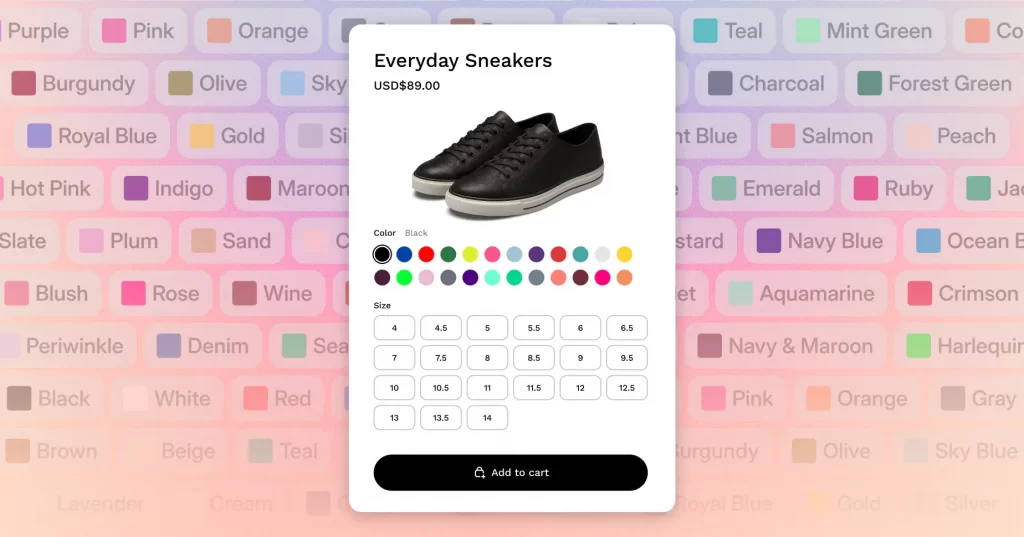
On the other hand, though the variant cap is technically high, most stores rarely approach it. In fact, the practical limitation usually comes from storefront usability, theme support, or app compatibility rather than Shopify’s core infrastructure itself.
2. What must you consider when adding over 100 variants?
Once a product exceeds 100 variants, technical and operational considerations start to matter more. Sure, Shopify does support large variant counts, but your store’s ecosystem needs to be ready for it as well:
- All variants of the same product can include up to 250 media items in total. Individual variants can be assigned one image or media item, but that media must already exist in the product’s main media library.
- By default, only the main product appears in collections and search results, even if it has hundreds of variants. If you want certain variants to appear as separate entries (e.g., different colors showing individually in collection grids), you’ll need to use combined listings.
- Some third-party themes are not designed to handle more than 100 variants. In these cases, the theme must be updated or replaced with one that explicitly supports higher variant counts.
- Likewise, certain app extensions, including custom ones, may not fully support products with large numbers of variants. To handle higher variant volumes reliably, those apps need to migrate to the GraphQL Admin API.
How to Add A Shopify Product Variant
To add variants to product Shopify, go to “Product”, scroll to the “Variants” section, click “+ Add options like size or color,” name your option (e.g., Size), add values (e.g., Small, Medium), and click “Save.”
Step 1. Open the product you want to add variants to
First, log in to your Shopify admin dashboard and navigate to Products. Make sure you already have the product created before moving on, since variants are added at the product level, not created independently.
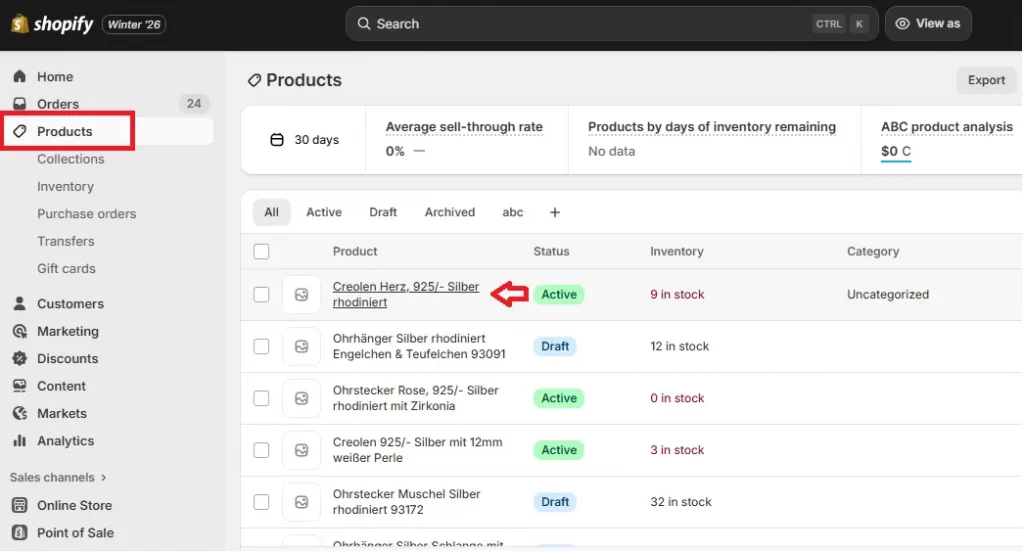
Next, click on the specific product you want to edit to the product detail page. Scroll down until you reach the Variants section.
Step 2. Add product options
Now, in the Variants section, click + Add options to start defining how your product can vary.
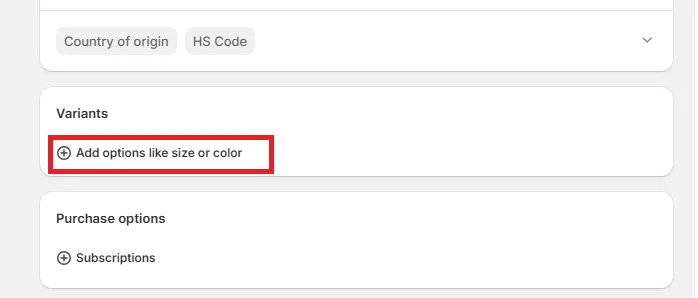
In the Option name field, enter the attribute you want customers to choose from, such as “Size,” “Color,” or “Material.” This option name will be visible on the product page, so it should be clear and customer-friendly.
Next, in the Option values field, enter each value for that option. For example, if the option is Size, you might add Small, Medium, and Large.
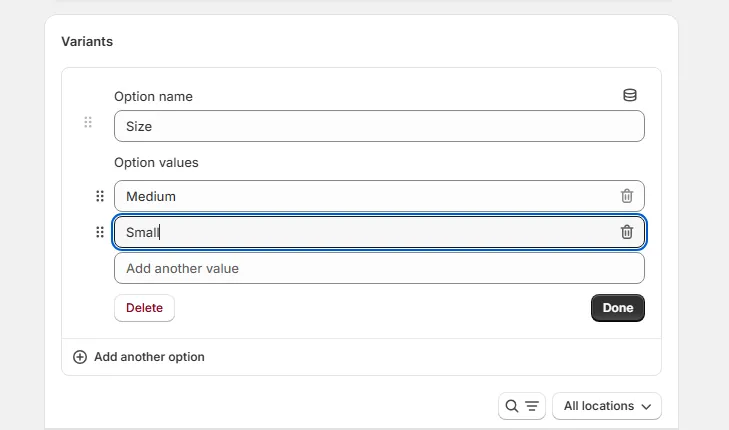
Step 3. Add more options to create variants
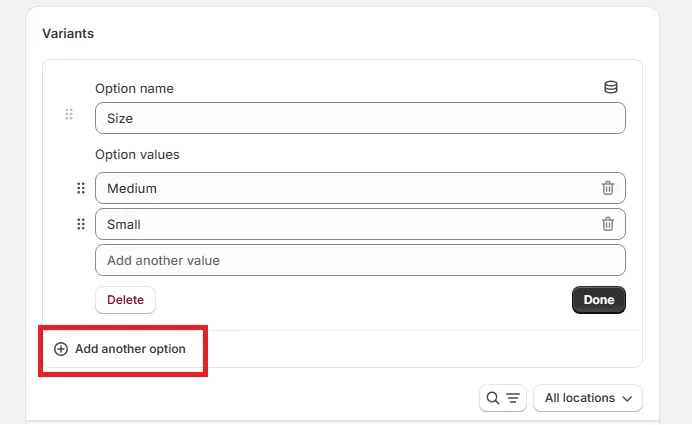
If your product varies by more than one attribute, you can add more options by clicking + Add another option. For instance, you might combine Size with Color, or Material with Style. Shopify allows up to 3 options per product, and all possible combinations of those options will automatically generate variants.
Step 4. Review and save your changes
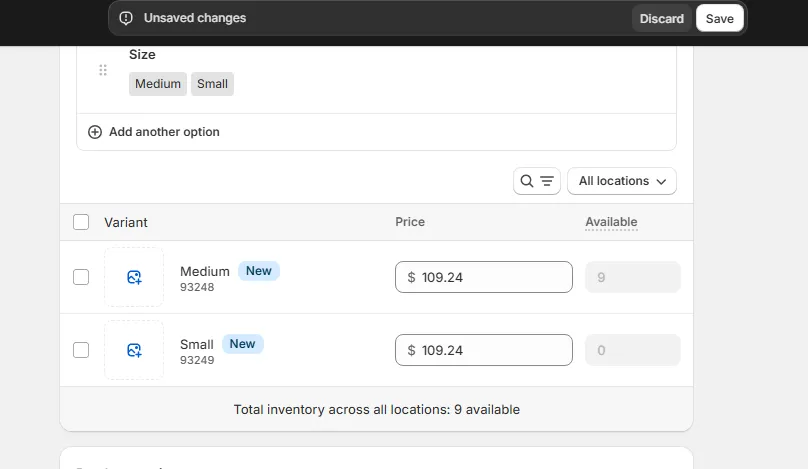
After you’ve finished adding options and values, click Done and review the generated variants list. At this stage, you can fine-tune each variant by adjusting prices, SKUs, inventory levels, weights, or assigned images if needed.
Once everything looks correct, click Save to apply your changes. Your product will now display variant selectors on the storefront, allowing customers to choose the exact version they want before adding it to the cart.
Advanced Customizations for Shopify Product Variants
After you add variants to multiple products Shopify, the platform allows you to connect variants to category metafields, expand existing options to generate new combinations, and duplicate variants in bulk to save time:
1. Connect, disconnect, and migrate category metafields
For starters, with category metafields, you can link variant options (such as color, size, or material) to structured data shared across your store.
Basically, when a variant option is connected to a category metafield, its values are no longer isolated to a single product. Instead, they become reusable entries that can be managed centrally.
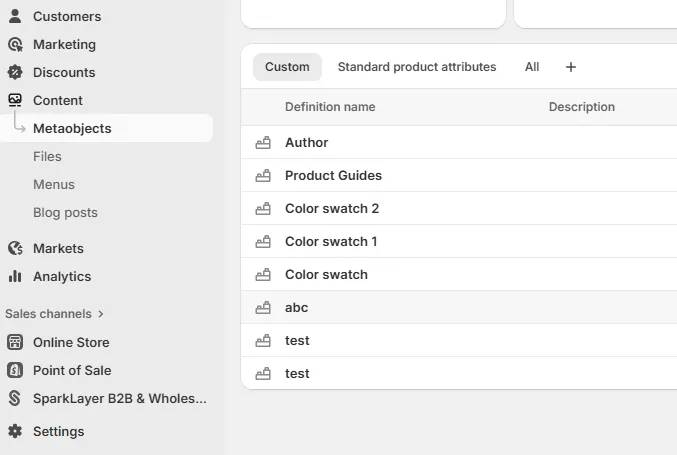
For example, if “Black” is used across dozens of products and you later want to rename it to “Graphite,” you only need to update the metafield once. That change will automatically reflect everywhere the metafield is connected, including all related variants. This feature eliminates repetitive edits and reduces the risk of mismatched labels across products.
Likewise, you can also disconnect a category metafield if a product needs more flexibility or unique values. When disconnected, the option is converted back into a regular variant option, allowing you to customize it independently.
In addition, for existing products, Shopify even lets you migrate standard variant options into category metafields. We recommend using this feature when expanding your catalog, because adding a new value (such as a new color) can instantly generate all valid variant combinations without manual duplication.
2. Add values to existing options
As your product range grows, you’ll often need to expand existing options rather than create entirely new variant structures. Fortunately, Shopify allows you to generate multiple new variants at once while keeping the original option framework intact.
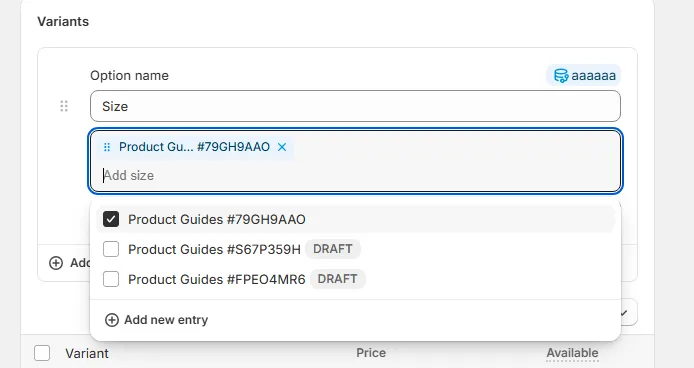
For instance, if a product already offers three sizes and two colors, adding a new color will automatically create all corresponding size combinations for that color. This approach is far more efficient than adding variants one by one; plus, it also helps ensure that inventory logic stays consistent across all combinations.
3. Duplicate product variants in bulk
Another standout capability is bulk duplication, which is designed to save time when new variants closely resemble existing ones.
Instead of manually re-entering prices, inventory rules, warehouse locations, and other settings, you can duplicate selected variants and adjust only the option value that makes them unique. We highly recommend this method for scenarios where one variant group shares the same logic.
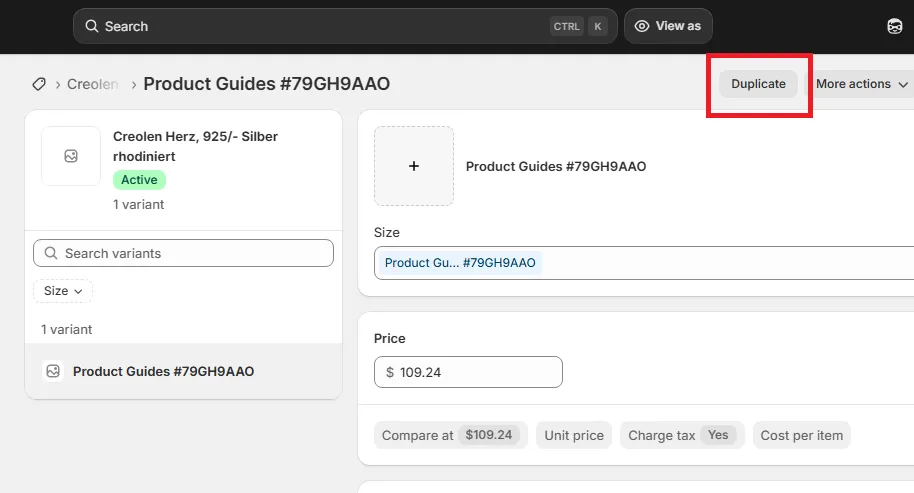
Let’s say a limited-edition color has higher pricing and is stocked in a different warehouse. In that case, duplicating those variants is the fastest way to introduce another limited-edition color with identical operational settings. Since Shopify intelligently avoids creating duplicate variants, only missing combinations are generated during bulk duplication.
Bonus: 5 Best Apps for Shopify Product Variants
Besides Shopify’s built-in variant tools, you can also rely on apps like Avis, APO, Globo, Easify Custom Product Options, and Color Swatch King to improve how variants are displayed across the storefront:
1. Globo Product Options, Variants
Rating: 4.9/5 (from 3,557 users)
Subscription plans (14-day free trial available):
• Free: $0
• Premium: $12.9/month
• Advanced: $24.9/month
Globo is often chosen by merchants who want to bypass Shopify’s 100-variant comfort zone. It lets you create unlimited option sets that behave like variants from the shopper’s perspective, giving you far more flexibility in how products are configured.
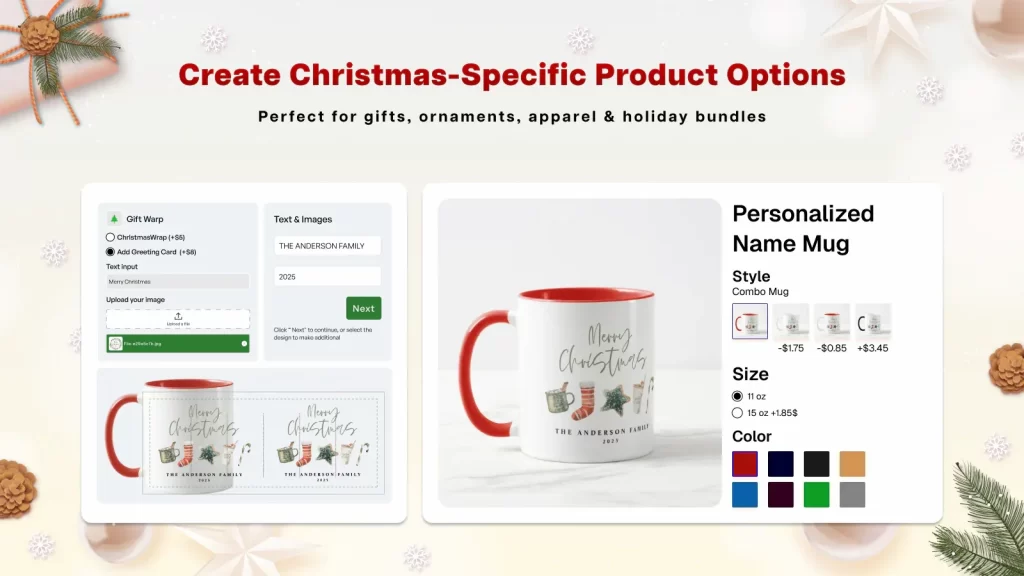
Better yet, the app supports a wide range of option types, including text inputs, file uploads, image and color swatches, dropdowns, and checkboxes. Not to mention, there’s also a live preview personalizer, which lets customers visualize their customized product before purchase.
And that’s not all. On the operational side, there are also powerful features like CSV import/export and automatic syncing of option data into orders, emails, and packing slips. Hence, Globo is very suitable for stores handling large volumes of personalized orders that require accurate fulfillment.
2. Color Swatch King: Variants
Rating: 4.9/5 (from 2,216 users)
Subscription plans (30-day free trial available)
• Free: $0
• Pay As You Grow (based on your Shopify plan): Starting from $5/month

Color Swatch King takes a UX-first approach by focusing on how variants are presented, rather than how they are created. The app replaces default dropdown selectors with visual elements such as color swatches, custom image swatches, and variant image swatches to make option selection faster and more intuitive.
Furthermore, the app is also recognized for its ability to display variant swatches directly on collection pages. Basically, customers can browse and compare colors or sizes without opening each product page, which significantly improves product discovery and reduces friction in visually driven catalogs.
Color Swatch King also enhances decision-making by supporting price labels, badges, and automatic hiding of out-of-stock variants. That’s why many merchants rely on this app in fashion, accessories, and home décor markets, where visual comparison usually plays a major role.
3. Easify Custom Product Options
Rating: 4.9/5 (from 1,991 users)
Subscription plans (14-day free trial available):
• Free: $0
• Pro Plan: $9.99/month
• Premium Plan: $19.99/month
Easify focuses on turning product options into conversion-driving tools. It supports a broad mix of basic and advanced option types, ranging from text fields and swatches to custom dimensions, date and time pickers, font selectors, and file uploads.
Merchants are also drawn to Easify’s strong emphasis on upselling and monetization. Options can be linked directly to price formulas or even specific products, encouraging customers to upgrade their purchase as they customize. We highly recommend this feature for engraving services, premium materials, rush orders, or bundled accessories.

4. Avis Product Options, Variants
Ratings: 5/5 (from 1,510 users)
Subscription plans (14-day free trial available)
• Free: $0
• Pro: $12/month
• Advanced: $24/month
• Premium: $59/month
Avis is best suited for stores that sell highly customizable or personalized products, such as print-on-demand items, gifts, or made-to-order designs.
Instead of being limited by Shopify’s native option structure, Avis lets you create unlimited option sets with more than 30 option types, including text fields, dropdowns, swatches, checkboxes, file uploads, and more. Basically, merchants are given full freedom to design complex customization flows without writing any code.

In addition, one of Avis’s most distinctive features is its live preview on product images. Customers can see their text, uploaded images, or design inputs rendered directly onto the product image in real time. The app even supports conditional logic and add-on pricing, allowing options to appear or disappear based on previous selections while automatically adjusting the product price.
5. APO Product Options, Variants
Rating: 4.7/5 (from 432 users)
Subscription plans (14-day free trial available)
• Free: $0 (only for development stores)
• Starter: $14.99/month
• Growth: $29.99/month
Lastly, another popular variant app is APO, which is designed for merchants who need maximum flexibility and scalability. The app removes practical limits on both product options and variant combinations, allowing you to create complex configurations where pricing, availability, and option visibility are all dynamically controlled.
In addition, you can link multiple options together so that choosing one value affects which other options are shown, hidden, or disabled. APO also supports dynamic pricing and add-on products, meaning you can increase prices based on option values or present other products as selectable options for upselling and bundling.
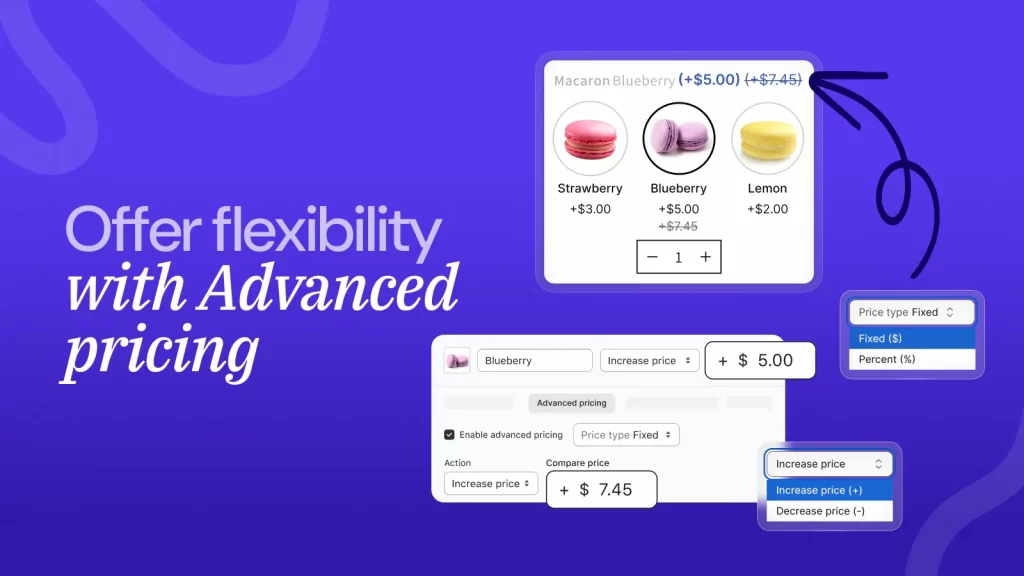
All in all, combined with other features like bulk editing tools, localization, and translation support, APO is a strong fit for growing stores that manage large catalogs and need fine-grained control over complex variant logic.
Shopify Product Variants: FAQs
What are product variants in Shopify?
In Shopify, product variants are different versions of the same product, distinguished by specific options like size, color, or material. You can manage unique details (price, SKU, stock) for each version, all within one product listing.
How many variants can a Shopify product have?
Shopify allows up to 2,048 variants per product, a significant increase from the previous 100-variant limit, and supports up to 3 options (like Size, Color, Material) for each product.
How do I know if a product has variants on Shopify?
You know a Shopify product has variants if you see an expandable "Variants" section on its product page in the admin, which shows different sizes, colors, etc., with unique settings for each.
What is an example of a product variant?
An example of a product variant is a T-shirt available in different colors (red, blue, black) and sizes (Small, Medium, Large), all under one main product listing.
Final Words
As you’ve seen throughout this guide, Shopify product variants offer a solid native system, along with many advanced features.
However, the more advanced your variant logic becomes, the more important technical planning and implementation are. And that’s where LitOS comes in!
Our team specializes in building and optimizing Shopify stores with complex product structures, from high-variant catalogs to fully customized option workflows. So, if your current variant setup feels limiting – or you’re planning to scale your catalog and want to get it right from the start – feel free to get in touch with us.
And now, let’s take your product variants further!
Once your catalog starts growing, the Shopify’s variant sy sstem can quickly become complex. At LitOS, we can help you plan, build, and scale advanced product variant structures that stay fast, manageable, and conversion-friendly.
Get in touch with LitOS
