
How to Set Up WooCommerce Free Shipping Properly (2026 Guide)
WooCommerce free shipping is one of the most effective ways to reduce checkout friction and increase average order value when it is set up correctly. Many store owners enable free shipping without fully understanding how WooCommerce handles shipping zones, conditions, and priorities, which often leads to broken rules, unexpected costs, or confusing checkout behavior.
In this guide, you will learn how to:
- Set up WooCommerce free shipping based on real store scenarios
- Control how free shipping behaves at checkout using advanced settings
- Decide when premium plugins are worth using
- Fix common WooCommerce free shipping issues safely
Before configuring any rules, it is important to understand what free shipping means in WooCommerce, why it works, and when it should be used.
Free Shipping in WooCommerce: What It Is, Why It Works, and When to Use It
Free shipping in WooCommerce is a shipping method that removes the delivery cost at checkout when specific conditions are met. It does not mean shipping has no cost. Instead, the shipping expense is absorbed by the store, built into product pricing, or offset by a minimum order requirement. Understanding this distinction helps avoid margin loss and pricing confusion later.
In WooCommerce, free shipping is always tied to shipping zones and rules. It only appears when the customer address matches a defined shipping zone and the cart meets the conditions you set. If those conditions are not met, free shipping will not be available, even if it is enabled in the store settings.
Why free shipping works for many WooCommerce stores
Free shipping reduces hesitation at checkout. Customers often abandon carts when unexpected shipping fees appear at the final step. Removing that friction makes the total cost feel clearer and easier to accept.
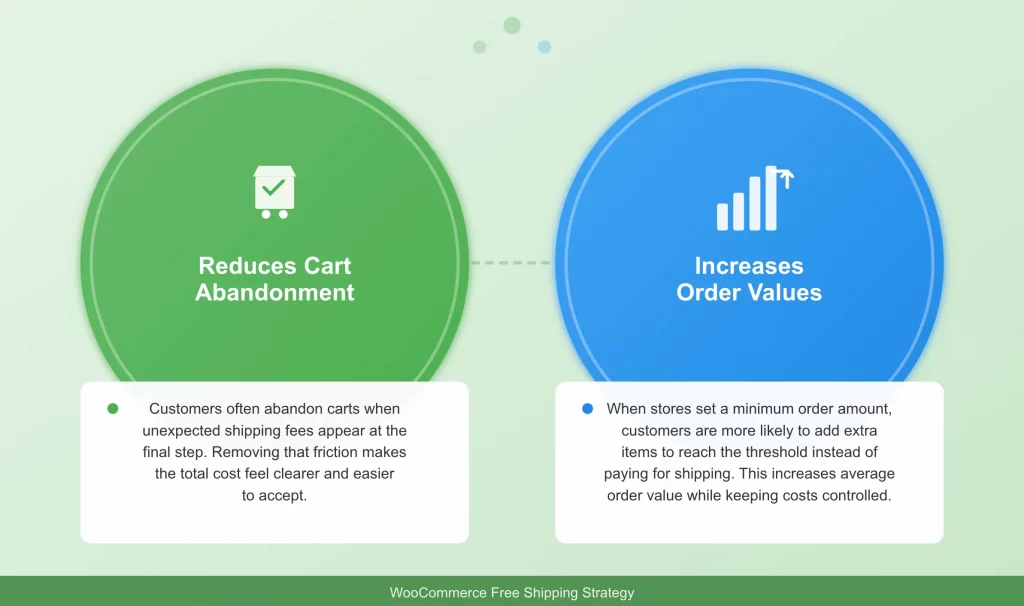
Free shipping also encourages higher order values. When stores set a minimum order amount, customers are more likely to add extra items to reach the threshold instead of paying for shipping. This behavior increases average order value while keeping shipping costs under control.
When free shipping makes sense
Free shipping works best for stores that sell physical products with predictable shipping costs. It is especially effective when the product margin allows shipping to be included without hurting profitability. Stores that want to increase order size or simplify the checkout experience often benefit the most from this approach.
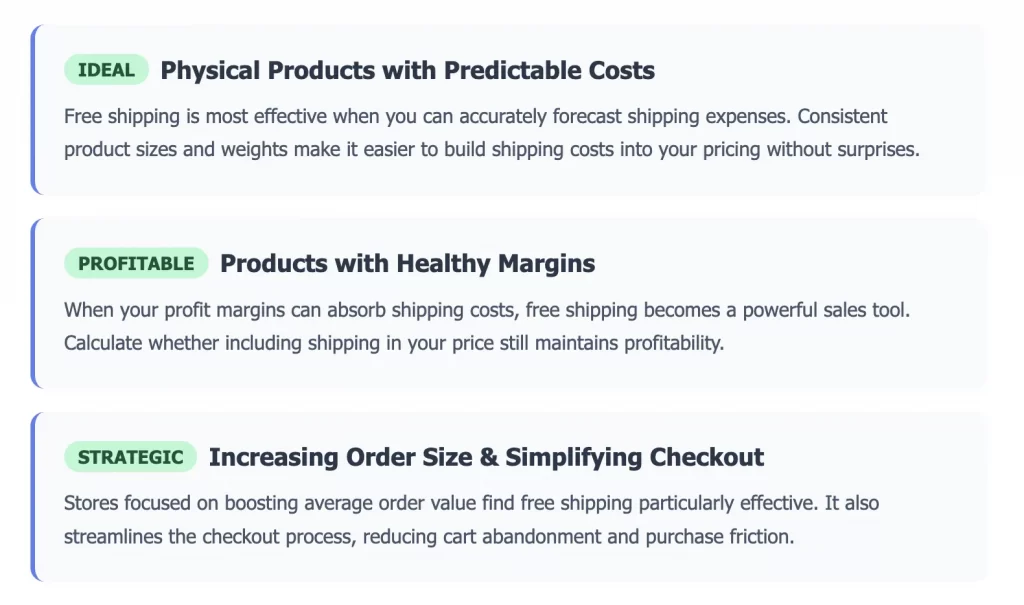
Free shipping is also useful for promotions, seasonal campaigns, and loyalty incentives. When used strategically, it can guide customer behavior without permanently reducing margins.
When free shipping may not be a good fit
Free shipping is not always the right choice for every WooCommerce store. Businesses with high or highly variable shipping costs can lose money if free shipping is applied too broadly. Stores selling heavy or oversized products may need stricter conditions or alternative shipping strategies.
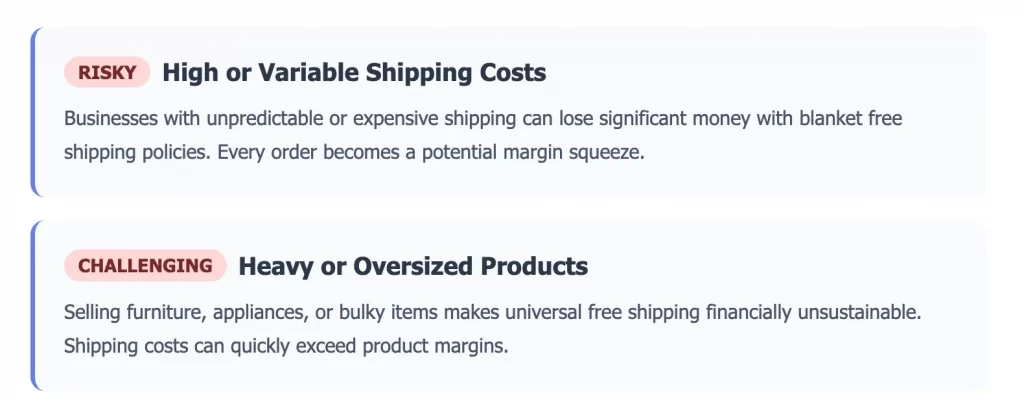
In these cases, free shipping should be limited by order value, location, or specific promotions rather than offered universally.
Before setting up any rules, it is important to evaluate your product margins, shipping costs, and customer buying patterns. This ensures free shipping supports growth instead of creating hidden costs.
How to Set Up Free Shipping in WooCommerce (By Case or Scenario)
WooCommerce handles free shipping through shipping zones and conditions. Instead of using one global setting, free shipping must be configured based on how and when you want it to apply. The cases below cover all native free shipping options available in WooCommerce and help you choose the setup that matches your business goals.
All free shipping setups in WooCommerce follow the same initial steps. You only need to add the Free Shipping method once per shipping zone. The cases below explain how to configure the conditions differently.
- Go to WooCommerce > Settings > Shipping > Shipping zones
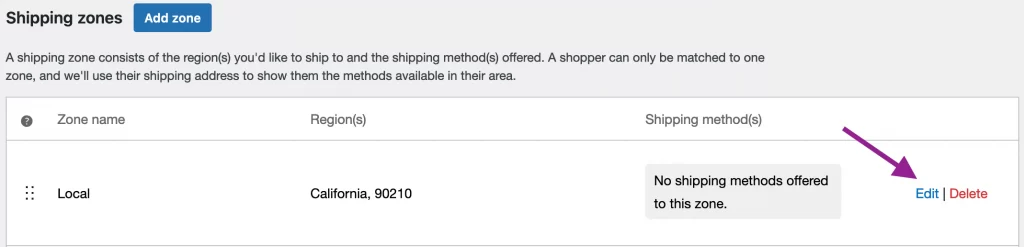
- Click Edit on the shipping zone where free shipping should apply
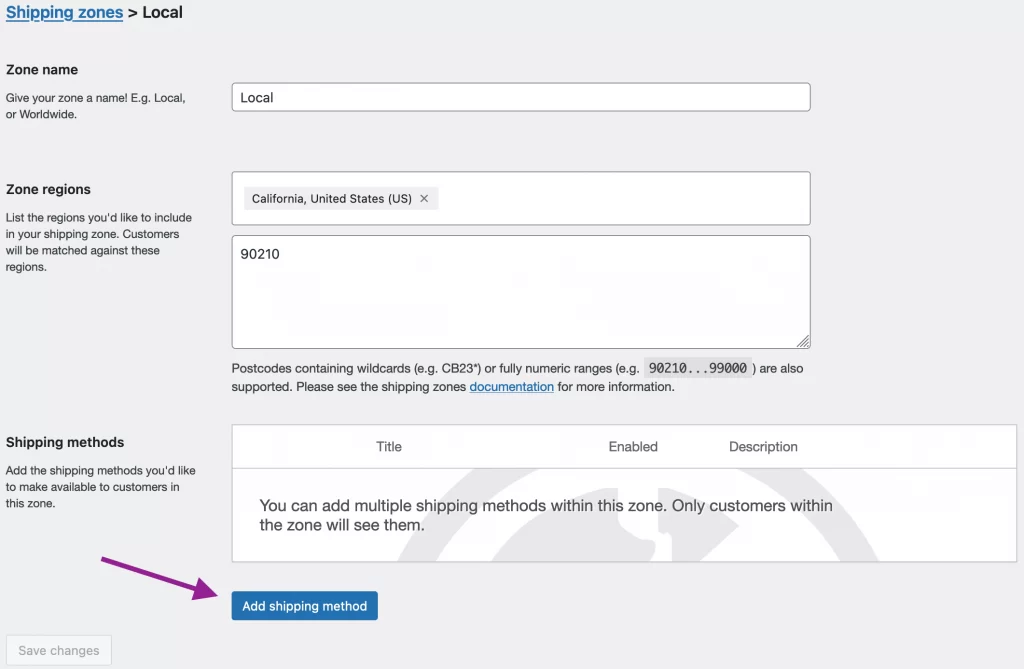
- Click Add shipping method
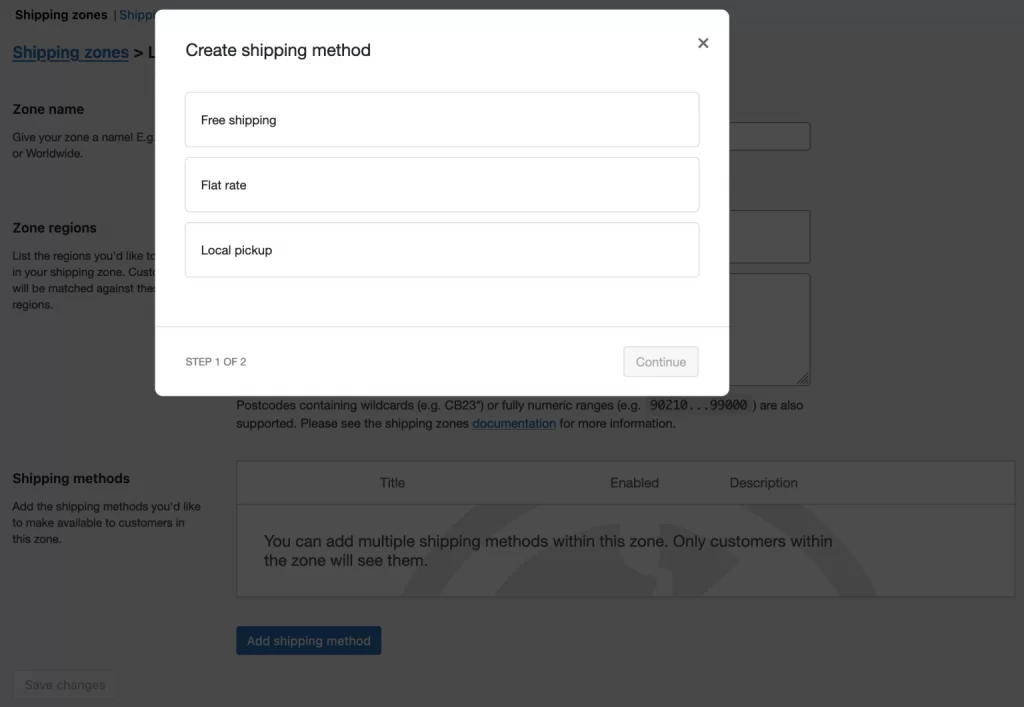
- Select Free shipping and click Continue
- Enter a method name that customers will see at cart and checkout then click Save changes
After completing these steps, you can configure how free shipping works by choosing the appropriate requirement for your store.
Case 1: Free shipping on all orders (no conditions)
After adding Free Shipping to your shipping zone, select No requirement as the free shipping condition. This makes free shipping available for every order within that shipping zone.
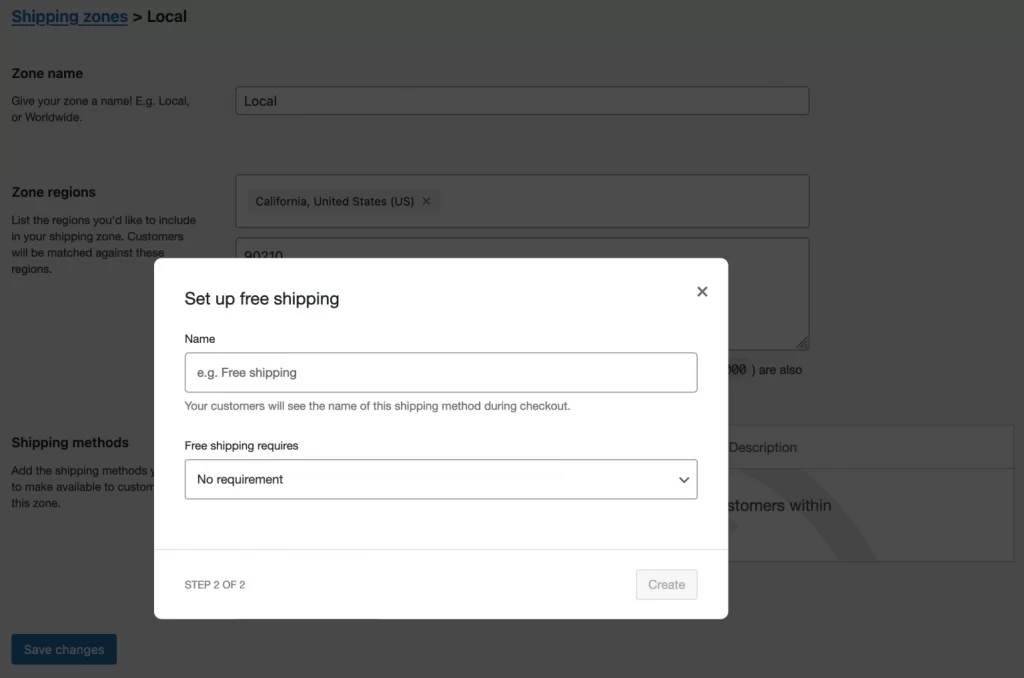
Free shipping appears automatically on the cart and checkout pages for all qualifying addresses. No minimum order value or coupon is required. This setup is suitable for stores that include shipping costs in product pricing, offer local delivery with minimal cost, or sell lightweight products that are inexpensive to ship.
Because the store covers the full shipping cost, this setup should only be used when margins allow it.
For customers in the shipping zone, they will enjoy:
- Free shipping always appears
- No cart value checks are applied
- Coupons do not affect eligibility
If other shipping methods exist in the same zone, they may still appear alongside free shipping. Controlling which methods are shown is covered later in the advanced settings section.
Case 2: Minimum WooCommerce free shipping over amount
After adding Free Shipping to your shipping zone, select a Minimum Order Amount field to enable WooCommerce free shipping over a set amount. Enter the cart total that customers must reach to qualify.
Free shipping only appears when the cart total meets or exceeds the defined amount. If the cart total is lower, free shipping does not appear and paid shipping options remain available.
This case works well for stores that:
- Want to increase average order value
- Have stable shipping costs
- Need better control over shipping expenses
It encourages customers to add more items instead of paying for shipping.
When using a minimum order amount, WooCommerce allows you to control how coupons affect eligibility. You may see an option labeled Apply minimum order rule before coupon discount:
- If this option is unchecked, WooCommerce checks the cart total after coupons are applied
- If this option is checked, WooCommerce checks the cart total before coupons are applied
Free shipping appears automatically once the cart reaches the required amount and disappears if the cart total falls below it. Other shipping methods may still be displayed, depending on the configuration of the shipping zone.
Case 3: Free shipping with a coupon code
After adding Free Shipping to your shipping zone, select A valid free shipping coupon as the free shipping requirement. Free shipping then becomes available only when a qualifying coupon is applied to the cart.
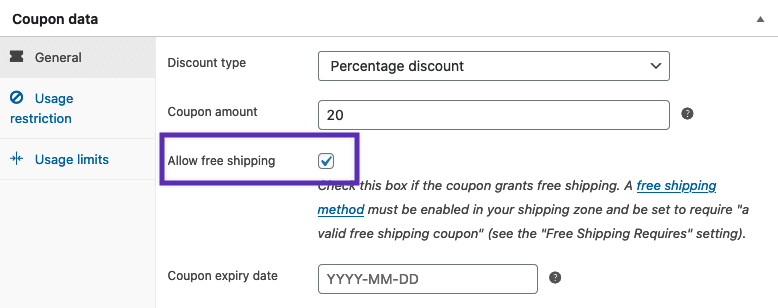
Free shipping does not appear automatically in this setup. Customers must enter the coupon code at the cart or checkout page for free shipping to apply.
This setup works well for stores that want to control free shipping through promotions rather than offering it continuously. It is commonly used for seasonal campaigns, email marketing offers, or loyalty rewards.
To use this case correctly, the coupon itself must allow free shipping. When creating or editing a coupon, make sure the option to allow free shipping is enabled. If that option is not selected, free shipping will not apply even if the coupon is valid.
For customers using a valid coupon:
- Free shipping appears after the coupon is applied
- No minimum order value is required unless set elsewhere
- Removing the coupon removes free shipping
If the coupon expires or does not meet usage conditions, free shipping will not appear. Other shipping methods may still be shown alongside free shipping, depending on how the shipping zone is configured.
Case 4: Free shipping when minimum order is met OR a coupon is applied
After adding Free Shipping to your shipping zone, select A minimum order amount OR a coupon as the free shipping requirement.
Free shipping becomes available when either condition is satisfied. Customers can qualify by reaching the minimum order amount or by applying a valid free shipping coupon.
This setup is designed for flexibility. It allows stores to keep a standard free shipping threshold while still running short term promotions without changing core shipping rules.
Typical use cases include promotional campaigns, email offers, or seasonal discounts where some customers qualify through spending while others qualify through a coupon.
If a minimum order amount is used, the option Apply minimum order rule before coupon discount controls how the cart total is evaluated when a coupon is applied. This setting should be chosen carefully to keep promotional behavior predictable.
Free shipping remains active as long as at least one condition continues to be met.
Case 5: Free shipping when minimum order is met AND a coupon is applied
After adding Free Shipping to your shipping zone, select A minimum order amount AND a coupon as the free shipping requirement.
Free shipping becomes available only when both conditions are met at the same time. Reaching the minimum order amount alone or applying a coupon alone does not trigger free shipping.
This setup is intended for strict cost control. It limits free shipping to specific campaigns while protecting margins, especially for stores with high delivery costs or international shipping zones.
The option Apply minimum order rule before coupon discount determines how the minimum order amount is evaluated when a coupon is applied. This setting helps prevent free shipping from being applied unintentionally during promotions.
Free shipping is removed immediately if either the cart total drops below the minimum or the coupon is removed.
WooCommerce Free Shipping Customizations (Advanced Settings)
By default, WooCommerce displays all shipping methods and WooCommerce shipping rates that match the customer address and cart contents. This means free shipping often appears alongside flat rate, local pickup, or other methods.
If you want to control how free shipping behaves at checkout, such as hiding other methods or detecting free shipping programmatically, additional customization is required. These changes can be implemented using custom code or supported plugins.
Before applying any code snippets, clear cached shipping data to avoid unexpected results.
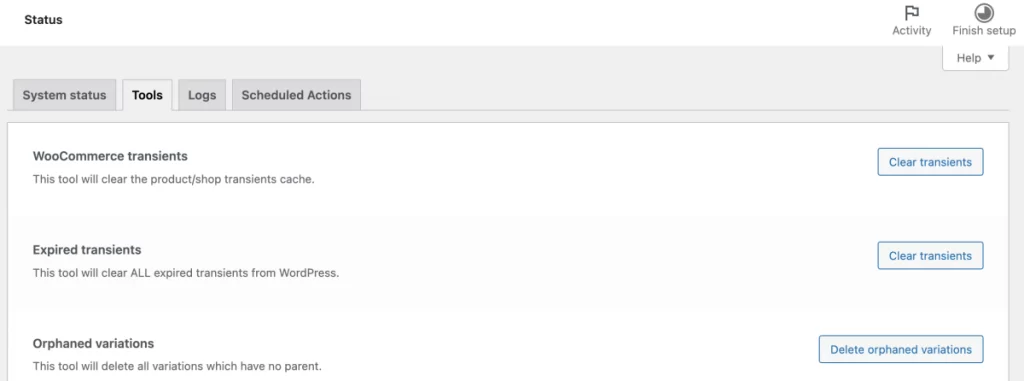
Go to WooCommerce Status Tools and clear WooCommerce transients.
Hide other shipping methods when free shipping is available
WooCommerce does not automatically hide paid shipping methods when free shipping is active. If you want customers to see only free shipping once it becomes available, custom code is required.
The following snippet hides all other shipping methods whenever free shipping is present for the customer.
/**

 * Hide other shipping rates when free shipping is available.

 *

 * @param array $rates Array of rates found for the package.

 * @return array

 */

function fsc_hide_shipping_rates_when_free_is_available( $rates ) {

foreach ( $rates as $rate_id => $rate ) {

if ( 'free_shipping' === $rate->method_id ) {

$rates = [ $rate_id => $rate ];

break;

}

}

return $rates;

}

add_filter( 'woocommerce_package_rates', 'fsc_hide_shipping_rates_when_free_is_available', 10, 1 );
After applying this code, customers will only see free shipping at checkout when it is available. Paid shipping options are hidden automatically.
Show only free shipping and local pickup
Some stores want to keep local pickup available while still hiding paid shipping methods when free shipping applies.
The following snippet hides all shipping methods except free shipping and local pickup when free shipping is available.
/**
 * Hide other shipping rates when free shipping is available, excluding local pickup.
 *
 * @param array $rates Array of rates found for the package.
 * @return array
 */
function fsc_hide_shipping_rates_when_free_is_available_excluding_local( $rates ) {
	$free_shipping = [];
	$local_pickup  = [];

	foreach ( $rates as $rate_id => $rate ) {
		if ( 'free_shipping' === $rate->method_id ) {
			$free_shipping[ $rate_id ] = $rate;
			continue;
		}
		if ( 'pickup_location' === $rate->method_id ) {
			$local_pickup[ $rate_id ] = $rate;
		}
	}

	if ( ! empty( $free_shipping ) ) {
		$rates = array_merge( $free_shipping, $local_pickup );
	}

	return $rates;
}
add_filter( 'woocommerce_package_rates', 'fsc_hide_shipping_rates_when_free_is_available_excluding_local', 10, 1 );
This setup keeps checkout options simple while still allowing customers to choose local pickup when appropriate.
Control free shipping availability programmatically
In some cases, stores need to detect or modify free shipping availability through custom logic. WooCommerce provides a filter that allows developers to check if free shipping is available during runtime.
WooCommerce applies the following filter internally.
return apply_filters( 'woocommerce_shipping_' . $this->id . '_is_available', $is_available );You can hook into this filter to check free shipping availability or add custom conditions. The example below logs the availability status.
/**

 * Log free shipping availability.

 *

 * @param bool $is_available True if free shipping is available.

 * @return bool

 */

function fsc_free_shipping_is_available( $is_available ) {

if ( $is_available ) {

error_log( 'Free shipping is available' );

} else {

error_log( 'Free shipping is not available' );

}

return $is_available;

}

add_filter( 'woocommerce_shipping_free_shipping_is_available', 'fsc_free_shipping_is_available', 10, 1 );
This approach is useful for debugging, custom rule enforcement, or advanced integrations that depend on shipping availability.
Code based customization works well for simple logic changes. For more advanced scenarios such as per product rules, shipping classes, split shipments, or complex geographic conditions, a dedicated premium shipping extension is usually safer and easier to maintain.
Those options are covered in the next section.
Premium WooCommerce Free Shipping Plugins for Advanced Rules
WooCommerce core free shipping works well for cart totals and coupons, but it has clear limits. It cannot natively handle product level rules, category based logic, customer specific conditions, or complex combinations across multiple factors.
A premium plugin becomes useful when a WooCommerce free shipping plugin is needed to handle rules beyond cart value. This includes cases such as offering free shipping only for certain product categories, restricting free shipping to wholesale customers, or applying different rules across regions and shipping classes.
The table below highlights commonly used premium plugins and the type of free shipping logic they support. Each plugin focuses on a specific problem rather than replacing WooCommerce core features.
| Plugin name | Best for | Free shipping capabilities | Key limitation |
| Advanced Free Shipping | Complex conditional logic | Rules by product, category, weight, quantity | Can become complex to manage |
| Conditional Shipping and Payments | Controlling method availability | Enable or hide free shipping by cart rules | Not focused only on free shipping |
| Flexible Shipping PRO | Rule based shipping rates | Combine free and paid shipping logic | Requires careful rule setup |
| Table Rate Shipping Pro | Complex shipping matrices | Integrate free shipping into rate tables | Higher setup complexity |
| WooCommerce Shipping Zones by Drawing | Geographic control | Free shipping by custom drawn zones | Limited use outside location rules |
| WooCommerce Wholesale Prices Premium | B2B and wholesale stores | Free shipping for specific user roles | Requires wholesale focused setup |
The best plugin depends on the type of control you need. Stores that rely heavily on product categories or cart logic often benefit from a rules based plugin. B2B or wholesale stores usually need customer role based control. Location driven businesses may prioritize geographic conditions.
Ready to apply this to your WooCommerce store?
At LitOS, we help WooCommerce brands design shipping strategies that actually work in real stores. From setting up free shipping rules to advanced custom logic and performance focused optimization, we support teams with clear guidance and hands on execution.
Contact UsWooCommerce Free Shipping Troubleshooting (Common Problems and Fixes)
Free shipping issues in WooCommerce usually come from configuration conflicts rather than bugs. Most problems can be fixed by checking shipping zones, cart conditions, or coupon settings. The sections below cover the most common issues store owners encounter and how to resolve them.
Free shipping does not appear in cart or checkout
This is the most common issue.
In most cases, free shipping does not appear because the customer address does not match any shipping zone that includes the Free Shipping method. If the address falls outside all configured zones, WooCommerce cannot apply free shipping.
Another common cause is cart conditions not being met. This includes minimum order amounts, coupon requirements, or rules affected by tax and discount settings.
To fix the issue:
- Confirm the customer address matches the correct shipping zone
- Check that Free Shipping is added to that zone
- Verify that cart totals meet the configured requirements
Testing with different addresses and cart values helps identify the exact cause.
Free shipping coupon code is not working
When a WooCommerce free shipping coupon is not working, the most common cause is that the coupon does not explicitly allow free shipping. A valid coupon without this option enabled will not trigger free shipping.
Coupon usage limits can also prevent free shipping from appearing. Expired coupons, usage restrictions, or minimum spend requirements on the coupon itself may block eligibility.
To fix the issue:
- Edit the coupon and confirm
- Check coupon usage limits and expiration dates
- Confirm the coupon applies to the current cart
After applying the coupon, refresh the cart or checkout page to confirm free shipping appears.
Free shipping disappears after applying a coupon
This issue often occurs when a minimum order amount is combined with coupon discounts. If the cart total drops below the required threshold after the coupon is applied, free shipping is removed.
WooCommerce provides a setting that controls how minimum order amounts are evaluated when coupons are used. This setting determines if eligibility is checked before or after discounts.
To fix the issue:
- Review the minimum order rule setting for free shipping
- Decide if eligibility should be based on the cart total before discounts
- Test the cart with and without coupons
Choosing the correct option prevents the unexpected removal of free shipping during promotions.
Free shipping conflicts with other shipping methods
By default, WooCommerce displays all shipping methods that match the cart and customer address. This can result in free shipping appearing alongside flat rate or local pickup options.
While this is expected behavior, it can confuse customers if paid options appear when free shipping is available.
To resolve this:
- Review the shipping methods assigned to the zone
- Decide which methods should be visible together
- Use advanced settings or custom code to hide unwanted methods
Examples of hiding other shipping methods are covered earlier in the advanced settings section.
Changes do not take effect immediately
Shipping changes may not appear right away due to cached data. WooCommerce stores shipping calculations in transients, which can delay updates.
To fix this:
- Clear WooCommerce transients in the system tools
- Clear any page or object caching used by the site
- Refresh the cart and checkout pages
After clearing cached data, test the setup again to confirm the changes are applied.
Best Practices for WooCommerce Free Shipping in 2026
Free shipping works best when it is planned as part of a broader pricing and checkout strategy. The practices below help ensure free shipping supports growth without creating hidden costs or customer confusion.
Set a free shipping threshold that protects your margins
The minimum order amount should be based on real shipping costs and average product margins, not competitor behavior alone. A threshold that is too low may increase conversions but quietly reduce profitability.
You should review average order value and shipping expenses before setting the number. The goal is to encourage larger carts while keeping delivery costs sustainable.
Make free shipping rules clear before checkout
Customers should understand how free shipping works before reaching the checkout page, often through clear cart messaging or a WooCommerce free shipping bar. Let’s clear messaging on product pages and the cart helps reduce frustration and abandoned carts.
Simple phrases explaining minimum order requirements or coupon based eligibility are often enough to guide customer behavior without adding friction.
Avoid conflicting shipping methods and promotions
Running promotions alongside free shipping requires careful coordination. Coupons, discounts, and shipping rules can interact in ways that remove free shipping unexpectedly.
You can review active coupons and shipping methods regularly to ensure they do not contradict free shipping rules. Keeping the setup simple reduces errors and improves checkout consistency.
Use free shipping to increase average order value, not just conversions
Free shipping should encourage customers to add more items to their cart rather than simply remove a shipping fee. Setting thresholds slightly above the current average order value helps guide this behavior.
Monitoring cart data over time shows if free shipping is driving larger orders or only reducing revenue through absorbed shipping costs.
WooCommerce Free Shipping: FAQs
How do I set up free shipping in WooCommerce?
Free shipping is set up by adding the Free Shipping method to a shipping zone in WooCommerce. After adding it, you choose the condition that customers must meet, such as no requirement, a minimum order amount, a coupon, or a combination of both. Free shipping only applies to customers whose address matches the shipping zone.
How do I remove shipping charges in WooCommerce?
Shipping charges can be removed by enabling free shipping for a shipping zone or by setting the free shipping condition to no requirement. This makes free shipping available for all qualifying orders in that zone. If other shipping methods are still visible, advanced settings or custom code may be needed to hide them.
What is the difference between standard shipping and free shipping?
Standard shipping applies a delivery fee based on the shipping method you configure, such as flat rate or calculated rates. Free shipping removes that delivery fee when specific conditions are met. The cost of delivery still exists but is absorbed by the store instead of being charged to the customer.
Can I combine free shipping with flat rate in WooCommerce?
Yes, free shipping and flat rate can exist in the same shipping zone. WooCommerce will display both options if their conditions are met. If you want customers to see only free shipping when it is available, additional customization is required using code or a plugin.
Does WooCommerce free shipping work for international orders?
Free shipping can be offered for international orders by creating a shipping zone that includes international locations and adding the Free Shipping method to that zone. The same conditions apply, such as minimum order amounts or coupons, but shipping costs and margins should be reviewed carefully for international deliveries.
Key Takeaways
Free shipping in WooCommerce works best when it is tied to clear shipping zones and well defined conditions. Choosing the right free shipping case helps control costs while supporting higher order values.
WooCommerce includes native options for minimum order amounts, coupon based rules, and combined conditions that cover most store needs. Advanced customization and plugins should only be used when core settings are not sufficient. Regular testing of cart and checkout behavior helps prevent free shipping issues after promotions or pricing changes.

